
dbegpdaninkikfcfodenceojbpdgdoaa
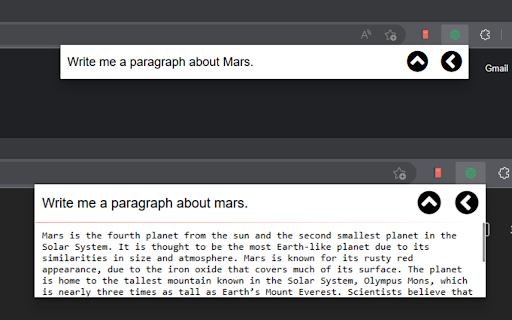
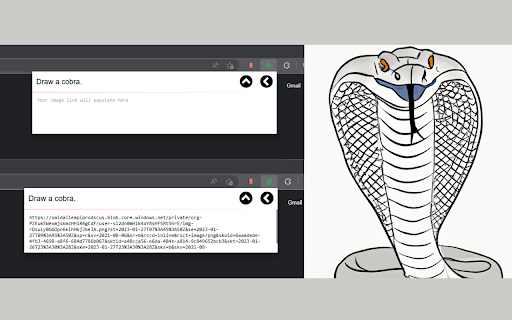
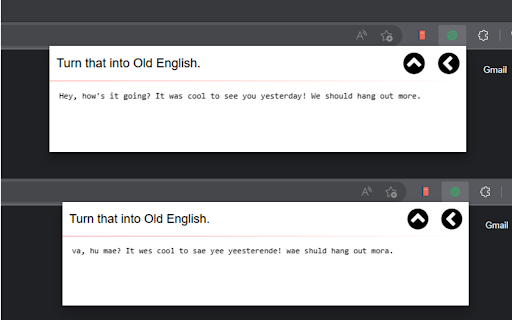
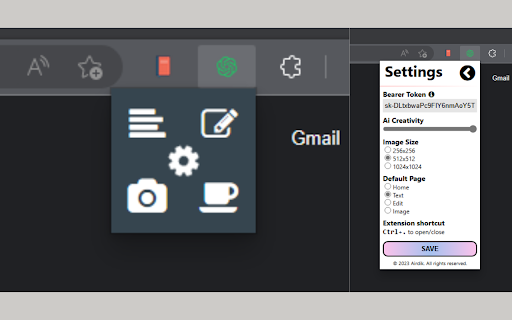
Create text completions/edits, and generate images easily with a prompt. Easily access OpenAi's text and image models from this extension. You can access Completion, Edit, and Image models with a simple click, or a keyboard shortcut of "Ctrl + Shift + Space" Answer all of you questions and kill your curiosity with this modern and dynamic design that allows you to generate text with ChatGPT and generate images from Dall-E.

NoteGPT: YouTube Summary, Chat with AI Assistant, ChatGPT DeepSeek Claude
Summarize YouTube videos and turn transcripts into notes with AI. Generate captions, then translate, copy, or download subtitles. NoteGPT Extension is your all-in-one AI tool for YouTube summary, YouTube transcript, and content creation. Instantly extract, summarize, and translate video content—even without subtitles. Whether you want to summarize YouTube videos or generate accurate YouTube transcripts, NoteGPT Extension helps you learn faster and work smarter by turning videos into clear notes, mind maps, slides, and podcasts. Key Features ✅ Instant YouTube Summary & Transcript Get precise AI YouTube summary and transcripts in seconds—even for videos without captions. ✅ Transcribe Long Videos — Even Without Subtitles (Up to 2 Hours) Easily transcribe and summarize YouTube videos with or without captions. For videos without subtitles, we support up to 2 hours in length. Just one click to get your full transcript and download it instantly. ✅ Free Subtitle Download Easily download subtitles in multiple formats (TXT, SRT) for all your YouTube videos—free and fast. ✅ Translate YouTube Transcripts into 40+ Languages Break language barriers with AI-powered translation of transcripts and summaries, perfect for global learners. ✅ AI Chat to Explore Video Content Interact with your videos by asking questions, clarifying concepts, or diving deeper into topics using AI chat. ✅ Turn Notes into Mind Maps, Slides & Podcasts Convert AI-generated notes into visual mind maps, ready-to-use presentations, or narrated podcasts with one click. ✅ Dark Mode & Browser Sync Choose light, dark, or follow your browser’s theme for a seamless user experience. ✅ Prompt Library for Smarter AI Summary GenerationUse our built-in prompt library to get better AI summaries and explanations. Whether you're using NoteGPT as a YouTube video summarizer or exploring other content, these smart prompts help you get high-quality results—without typing prompts yourself. ✅ Custom Settings for YouTube Summary and AI OutputEasily customize your YouTube summary with options to set length, tone, or format. Whether you want a brief AI overview or a full in-depth YouTube video summary, NoteGPT adapts to your workflow and learning style. How to Use ● Install NoteGPT Extension from the Chrome Web Store ● Open any YouTube video ● Click the NoteGPT Extension icon or summary panel on the right ● Choose to: ○ Transcript ○ Summary ○ AI Chat ○ AI Mind Map ○ AI Podcast ○ AI Presentation ● One-click download or translation of video transcripts. ● View or manage all your notes in the NoteGPT workspace (opens in a new tab) FAQs Q1: What is NoteGPT Extension? A: NoteGPT Extension is an AI-powered Chrome extension that helps you summarize, transcribe, and repurpose YouTube videos, webpages, and PDFs. It turns long-form content into structured notes, mind maps, slides, or podcasts — all in one click. Q: Is NoteGPT Extension free to use? A: Yes! You get 15 free quotas per month with permanent storage. Upgrade anytime for unlimited use. Q: Can I summarize videos without subtitles? A: Yes. Even videos without captions are supported (up to 120 minutes). This requires 1 quota per 10 minutes. Q2: How long of a video can NoteGPT Extension summarize or transcribe? A: There’s no length limit for videos with subtitles — NoteGPT Extension can summarize and transcribe them regardless of duration. For videos without subtitles, the maximum supported length is 2 hours. Q5: What else can I use NoteGPT Extension for? A: Beyond YouTube, you can summarize webpages and PDF documents, translate transcripts into any languages, and generate visual mind maps, podcasts, and slide decks from your content. Contact Us Have questions, feedback, or need support? We’d love to hear from you. Join our user group on Discord: https://discord.com/invite/wzNfuks8Qk Or email us at support@notegpt.io 🐦 Twitter/X: @NoteGPT_AINote Learn more: https://notegpt.io/

Image to Prompt Generator
Let Image to Prompt Generator describe your image with AI! Turn any image into rich text easily and generate a vivid prompt. 🚀 Looking for an easy way to transform your content into creative prompts and descriptions? Our image to prompt generator is exactly what you need! Whether you're creating content for AI tools or simply want to experiment with AI creativity, the image to prompt extension makes it simple and fun. 📸 Use the image to prompt generator to effortlessly convert any picture into detailed text outputs. With advanced generator capabilities, this image to prompt AI tool ensures that you always get high-quality, creative content tailored for your next project. How to use the image to prompt generator: 1️⃣ Upload or select your visual. 2️⃣ Let our AI generate descriptive text instantly. 3️⃣ Copy your generated prompt and use it wherever you need inspiration. 5 reasons to choose our image to prompt generator: • Simple and intuitive interface for easy use • Accurate AI describer for all visual types • Fast processing with reliable generator results • Secure experience with privacy-focused, no unnecessary data collection • Consistent and creative output from our image to prompt generator Our AI solutions are trained to recognize and interpret various styles, colors, emotions, and compositions. Whether your visual is a detailed portrait, a vivid landscape, or an abstract piece of art, the AI description generator will help produce a rich and relevant output. When using the image to prompt generator, you don't need any technical expertise. The process is designed for everyone, from hobbyists to professional creatives. The intuitive interface ensures that anyone can upload a visual and receive a beautiful, descriptive text in a matter of moments. 🚀 More reasons to love our tool: ▶ AI description generator captures even subtle elements ▶ Powerful AI content generator delivers dynamic results ▶ Use image to prompt AI for accessibility and creative projects ▶ The prompt generator enhances productivity and sparks creativity ▶ Our image-to-text tool supports a wide variety of creative fields Applications for our image to prompt extension are vast: • Create engaging blog or social media posts • Generate creative writing ideas using AI • Build visual storytelling projects • Enhance accessibility with descriptive captions • Inspire marketing campaigns and ad content 📈 Top reasons to try our image to prompt extension: 1️⃣ Easy and quick setup 2️⃣ Highly detailed text generated in seconds 3️⃣ Consistent quality of generated outputs 4️⃣ Supports multiple use cases from marketing to design 5️⃣ AI describes content with rich, vivid details 6️⃣ Image to AI text generation boosts creativity 7️⃣ Seamless integration into your workflow 8️⃣ Generator handles visuals quickly and accurately 9️⃣ Stable, high-performance generator backend 🔟 Advanced describer and enhanced description support ❓ Frequently Asked Questions: 📌 How accurate is the description generator? 💡 Our AI description generator is highly accurate, capable of capturing objects, tones, and styles within your visuals to create useful and engaging outputs. 📌 What formats does the image to prompt extension support? 💡 We support common formats like JPG, PNG, and WEBP, ensuring seamless uploads and conversions for all your visuals. 📌 Is my data safe? 💡 Absolutely. Our image to AI system ensures that your uploads and generated descriptions remain private and are not stored after processing. 📌 How fast does the image to text AI process work? 💡 Most conversions through our image to text generator complete in a few seconds. However, depending on visual complexity and generator load, processing time may occasionally be longer. 📌 What if I need multiple outputs from one upload? 💡 Currently, you can generate one output per uploaded visual. We plan to introduce the ability to generate multiple outputs from a single upload in future updates. The image to prompt generator not only helps with efficiency but also unlocks a new level of creativity. Every time you upload a visual, the AI generate descriptive content mechanism analyzes fine details, producing rich narratives that capture the essence of your input. Whether you are focused on storytelling, design, education, or innovation, our AI description generator and image to text generator tools are built to assist. The seamless experience ensures that the journey from visuals to creative text is smooth, fast, and rewarding. 📚 Use our AI describer and describe image AI technology today to make your creative journey smoother and more inspiring! Empower your imagination with the advanced capabilities of our generator technology and experience the future of creative description with ease.

Google Translate & Image Translator by Tranzly – Popup View
Quickly translate texts and images with Google Translate without any copy‑pasting. Tranzly will save you a lot of time and effort by translating any text on a page or image without copy-pasting — whether it’s a social media post, a webpage snippet, or a photo. Powered by Google Translate’s OCR, it’s your all-in-one picture translator, multilingual tool, and one-click translation extension. ✅ Instant Text Translation — Simply highlight any text, and a "Translate" button will appear next to it. Click it to open the translation in Google Translate in a new tab or window. ✅ Text Block Translation — Hover over any text block and click on it to open the translation in Google Translate. ✅ Multi-Block Support — Select and translate multiple text sections at once. ✅ Image Translation — Select any image, and the extension will extract and translate the text using Google Translate, effectively working as an Image Translator. 🔹 Better Than Chrome’s Built-in Translator — Works even on sites where Chrome’s translator fails. 🔹 Larger, More Readable Translations — No small pop-ups, only clear and full-page translations. 🔹 Seamless Browsing Experience — Quickly understand foreign language texts without any hassle. - photo translator extension - OCR translate image online - translate social media posts - multilingual browser translator - instant translate chrome extension - one‑click translation tool Make translating effortless with Tranzly – your quick access to Google Translate and a reliable Image Translator! 🚀

GPT Reader/Transcriber: Free AI Text to Speech/Speech to Text (TTS/STT)
Free AI text to speech (tts) & speech to text (stt) with ChatGPT. Listen to natural voices or transcribe audio instantly. To use the extension: 1️⃣ Click the extension icon (or visit chatgpt.com) 2️⃣ Sign in with your ChatGPT account 3️⃣ Click the extension icon or the button on the ChatGPT page 4️⃣ You will notice an overlay open where you can choose either the text to speech or speech to text option 🔥 Key Features of ChatGPT Reader & Transcriber 🔥 ✅ Free to Use AI Text to Speech (TTS) ChatGPT Reader & Transcriber is completely free to use and includes a premium tier for more serious users ✅ Download AI-Generated Audio (NEW!) Save high-quality speech as an audio file for offline listening ✅ Read Aloud Any Text Instantly (WEB and FILE UPLOAD supported!) Convert Google Docs, PDFs, EPUB or custom text into natural-sounding speech with one click. ✅ Human-Like AI Voices Uses OpenAI's voices for clear, smooth, and natural narration ✅ New! Free Speech-to-Text (STT) Transcription • Live transcription – speak and see your words appear in real-time • File transcription – upload audio files and convert them to text • Download transcriptions – export as PDF or TXT for easy sharing • Unlimited & Free – no usage caps, enjoy all transcription features at no cost ✅ Supports Multiple Inputs Paste text or upload documents—ChatGPT Reader & Transcriber handles it all ✅ Customizable Playback Controls Adjust speed, pause, rewind, and play at your preferred pace ✅ Accessibility and Productivity • Students – Listen to notes and papers while studying • Professionals – Review reports and emails hands-free • Readers with Dyslexia & Vision Impairments – Improve comprehension with assistive speech • On-the-Go Listeners – Enjoy articles or documents while commuting, exercising, or multitasking ❗ Not affiliated with or endorsed by OpenAI or ChatGPT ❗ ❗ Free alternative to sites like ElevenLabs, Speechify, Rev, Otter.ai or other text to speech/transcription services❗ 🛠 Download ChatGPT Reader & Transcriber: Free AI Text to Speech & Speech to Text today and elevate your reading and transcription experience with free, high-quality AI voices and transcriptions. 🛠
