
dapjbgnjinbpoindlpdmhochffioedbn

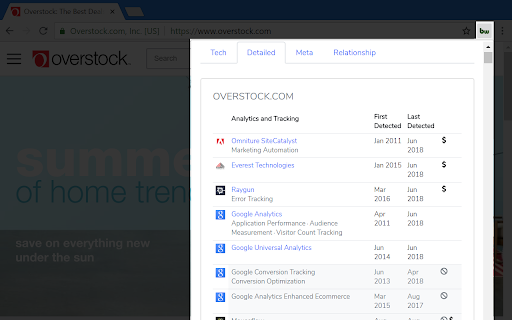
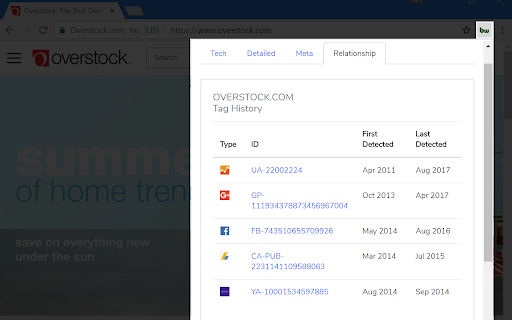
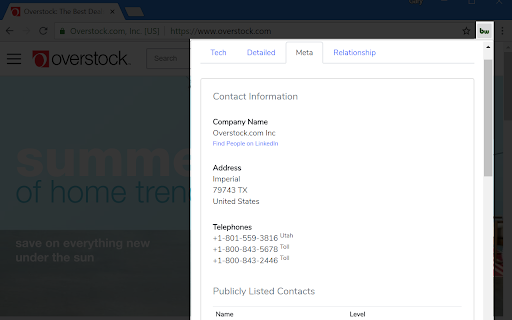
Find out what the website you are visiting is built with using this extension. The BuiltWith Chrome Extension lets you find out what a website is built with by a simple click on the builtwith icon! BuiltWith is a web site profiler tool. Upon looking up a page, BuiltWith returns all the technologies it can find on the page.

Scan WP - WordPress Theme and Plugin Detector
Have you ever been on a really great WordPress site and want to know how it was built? What theme they used? What plugins give it… Have you ever been on a really great WordPress site and want to know how it was built? What theme they used? What plugins give it such functionality? Well, all you have to do now, is install this extension and we will detect the Wordpress themes and plugins the site you are on uses. After you install the extension, an orange Wordpress logo will be added to your browser. So, go to a site that was built with Wordpress and just press that logo. Within a few seconds you will know everything there is to know about the theme and plugins. You can also go to our Wordpress theme detector website and get additional information regarding the domain such as strong keywords its ranked for, estimated traffic, main competitors for rankings and more.

View Rendered Source
View source is dead. See how the browser renders a page, not just what the server sends. A lightweight Chrome Extension that shows you how the browser has constructed (rendered) a page's original HTML into a functioning DOM, including modifications made by JavaScript. An essential tool for web developers using JavaScript frameworks like Angular, ReactJS and Vue.js, and for SEOs to understand how search engines see your pages, especially considering Google's dynamic serving workaround. Differences between raw and rendered versions are highlighted line-by-line showing how JavaScript has modified a page at render time. * Raw: The source code sent from the server to the browser before the DOM is rendered. The same as you'll see with traditional 'View Source' in the browser (after minor formatting tweaks) * Rendered: The rendered page after the source has been interpreted into a DOM, including any modifications made by Javascript * Difference: The difference between the rendered source and the raw source. Differences occur when JavaScript has modified the DOM. Adaptive website? If you serve different source code to mobile devices, emulate this easily with a mobile user-agent checkbox. Dynamic serving for Google? (More info: https://developers.google.com/search/docs/guides/dynamic-rendering) Using Google's dynamic rendering workaround designed for Javascript-heavy sites? Just request the raw source as Googlebot and ensure perfect technical SEO. Works with GatsbyJS and Prerender. DM the developer: https://twitter.com/ItsHogg

WordPress Theme Detector and Plugin Detector
WordPress Theme Detector can detect installed WordPress Themes and WordPress Plugins on the Website you are currently viewing. Free WordPress Theme Detector can detect the installed WordPress themes and WordPress plugins on the website you are currently viewing. This extension is extremely fast because it does not use your browser performance. For detecting purpose, we use only our very fast server-side API. If you are viewing a WordPress site, the extension icon turns blue, if the current website doesn’t have WordPress, the extension icon will turn grey.

Datanyze Chrome Extension
Access contact and company data directly from LinkedIn 🔥 Find and connect with B2B sales prospects within minutes using the Datanyze Google Chrome Extension. Start a free trial today and receive B2B contact details directly from LinkedIn, keeping your prospecting fresh and your sales pipeline hot. ❄️ Capture data from the places you prospect the most Get contact information, including email addresses, direct dial and mobile numbers directly from LinkedIn profiles and company websites, without leaving your browser 💰 Coverage and quality you can count on With data on-file for over 120 million contacts, including over 84 million email addresses and 48 million direct dial numbers, you’ll quickly find and connect with your next customer 🔎 Search and connect with prospects, at scale Don’t waste time using prospecting tools that can’t capture details for a bulk list of contacts. When you click to see all employees for a company on LinkedIn, Datanyze provides all of their contact information directly on the page Break the Ice, Not the Bank. Heat up your sales pipeline with Datanyze today!
