
bjccepbfbikbpbgillfgicihhmpmjbjd


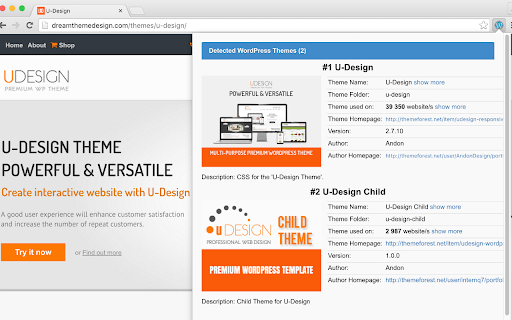
WordPress Theme Detector can detect installed WordPress Themes and WordPress Plugins on the Website you are currently viewing. Free WordPress Theme Detector can detect the installed WordPress themes and WordPress plugins on the website you are currently viewing. This extension is extremely fast because it does not use your browser performance. For detecting purpose, we use only our very fast server-side API. If you are viewing a WordPress site, the extension icon turns blue, if the current website doesn’t have WordPress, the extension icon will turn grey.

WordPress Admin Switcher
Quickly log into and switch to/from the WordPress Admin with a single keyboard shortcut or click. This extension is great for power users who want to skip the manual steps of always having to type "wp-admin" into the address bar to log in to WordPress sites, or always having to reach for their mouse/trackpad and click a link in the WP admin bar in order to switch to/from the admin. Those processes are replaced with a single keyboard shortcut instead. 1. Head to `chrome://extensions/shortcuts` in the browser and set the keyboard shortcut you'd like to use. 2. On any WordPress site, hit that keyboard shortcut to log into and switch to/from the WordPress admin. 1. You're not yet logged in to a WordPress site. Hitting the shortcut will direct you to the WordPress admin login screen. After logging in you will be directed to the admin post edit screen for the post/page/custom post type you were viewing before you logged in, if possible, or else the main admin screen. 2. You're logged in and are on the front end of a WordPress site. Hitting the shortcut will direct you to the Admin post edit screen for the post/page/custom post type you were viewing, or else the main Admin screen. 3. You're logged in and are in the WordPress Admin. Hitting the shortcut will direct you to the page on the front end for the post/page/custom post type you were editing, or else the main site URL. > How do I set the keyboard shortcut? Go to the Chrome "Keyboard shortcuts" page by navigating to `chrome://extensions/shortcuts` in a browser tab. Find the "WordPress Admin Switcher" extension on the list click the field next to "Switch to/from admin". Enter your own custom keyboard shortcut. > WordPress already provides links in the admin bar that can be used to jump back & forth between the admin and front end. How is this any different? It's about efficiency and productivity. The more you can leave your hands on the keyboard without reaching for the mouse/trackpad, the faster you'll be. Not to mention that if you're not yet logged in to a WordPress site, the admin bar links aren't there for you to click on so you'll end up manually highlighting and deleting part of the URL and typing in "wp-admin" every time.

BuiltWith Technology Profiler
Find out what the website you are visiting is built with using this extension. The BuiltWith Chrome Extension lets you find out what a website is built with by a simple click on the builtwith icon! BuiltWith is a web site profiler tool. Upon looking up a page, BuiltWith returns all the technologies it can find on the page.

Shopify Theme Detector
Are you Shopify users? Have you ever seen a really well designed Shopify website and wonder how it was built? Well, now you can.… Are you Shopify users? Have you ever seen a really well designed Shopify website and wonder how it was built? Well, now you can. Just find a site you like, click on the "Shopify Detector" tool icon and you will get your answer within seconds. Now go build your own beautiful website. * Note that this extension gets its information from a remote server and if for any reason the server is busy or down, the extension will not give you any indication of this. So if for any reason it seems to be taking too long, that means it's stuck and you should try again a little bit later. ** This is very unlikely, however, In some cases we may not be able to detect the Shopify theme being used on a Shopify website. If you encounter such a case, we would appreciate it if you could let us know about this so we can make sure the extension is up to date and works the best possible. This extension is part of the Shopify Theme Detector website where you can detect the Shopify theme used on a Shopify website and get even more interesting information about the website you are interested in. On the website you can also get a whole lot of information about Shopify, such as the best Shopify themes for specific types of shops, best Shopify apps for whatever you need done on your site, hundreds of FAQs that we answer for you, so you can spend all your time building your brand instead of searching for informations online. For any questions about the extension or anything else, we would be happy to help you out. Just send us a message from our website and we will get back to you.

WP Hive | A Better WordPress Plugin Repo
The WP Hive Chrome Extension is another revolutionary step for WordPress users, right from Chrome itself. Have you ever wondered how much impact a plugin has on your WordPress website? WP Hive’s Plugin testing tool automatically tests a plugin and gives you better insights. Easily discover new plugins or the popular ones with relevant filters. Even compare plugins like you do for phones. Get useful metrics such as impact on memory usage & pagespeed, PHP errors, warning or notices, Javascript issues, PHP 7.4 compatibility, latest WordPress 5.5 version compatibility, database footprint, activation error, resource errors - right from your WordPress.org page. WP Hive automatically tests all WordPress plugins to get useful metrics and shows them inside the WordPress.org plugin pages. You can also compare a plugin with another plugin from WP Hive and get a detailed insight of the plugin. The extension also offers an option to redirect to WP Hive plugin page for a particular plugin. Sure, WordPress repository is great, but WP Hive makes it even better with better insights & adding more value to users. The privacy policy can be found here: wphive.com/privacy-policy/
