
dafdhmnoldajiiepbmbkemnnbmnkamkp

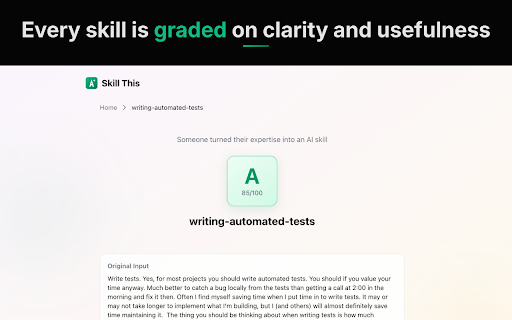


Skill This converts webpages and selected text into structured AI skills you can use with Claude Code, ChatGPT, Gemini, or any AI assistant. Click the extension icon to convert the current page, or highlight specific text and right-click "Generate Skill from Selection." Skill This extracts the content, analyzes the methodology, and generates a structured skill file with a quality grade (A+ through F). WHAT YOU GET Each generated skill includes a clear role definition, specific knowledge areas, step-by-step processes, and quality criteria. Skills are scored on clarity, specificity, and usefulness so you know exactly how effective they are before you use them. A shareable link is created for every skill, so you can send it to teammates or save it for later. - Documentation and API references - Tutorials and how-to guides - Blog posts with technical workflows - Internal knowledge base articles - Runbooks and standard operating procedures - Any page that describes a process or methodology AI assistants are general-purpose by default. Skills make them specialists. Instead of re-explaining your workflow every conversation, convert it once into a skill and paste it in. The AI adopts your expertise and follows your process.

Productivity Boost
Productivity Boost provides easy access to productivity enhancing tools via a widget on your toolbar. Get easy access to time-saving productivity tools with the Productivity Boost extension. How to use the productivity tools: - Click the puzzle icon on the toolbar, then click on Productivity Boost to access the widget - Create daily and monthly events on the calendar - Use the calculator for simple arithmetic - Create daily to-do lists - Jot down information on notes - View international time on the world clock Want to share feedback? Please fill out this form and help us improve the product for you: https://productivityboost.net/public/contactus_cc.html You can uninstall this product at any time. Please follow the instructions here: https://productivityboost.net/public/uninstall_cc.html By clicking the button above, I consent to install this Chrome™ extension and abide by its Terms of Service and Privacy Policy. Chrome is a trademark of Google LLC. Use of it here does not imply any affiliation with or endorsement by Google LLC.

ContextBolt Bookmarks
Find any tweet, Reddit thread, or LinkedIn post you saved. AI captures and tags it all. Plugs into Claude via MCP. You save a tweet. You'll definitely come back to it. Six months later, you're scrolling for 20 minutes trying to remember a single word from it. Install the extension. Visit your bookmarks page on X, Reddit, or LinkedIn once. ContextBolt captures every post in the background. No setup. No API keys. No exporting CSV files at 11pm. Then you search. Type what you remember. Get back what you saved. Across every platform at once. ★ WHAT YOU GET FREE • Auto-capture from X (Twitter), Reddit, and LinkedIn • AI tagging on every bookmark (main topic + specific tags) • Topic clustering, so you see patterns in what you save • Semantic search across all 3 platforms at once • Up to 150 bookmarks • All data stored locally in your browser ★ WHAT PRO ADDS (£4/month) • Unlimited bookmarks • Personal MCP endpoint for Claude Desktop, Claude Code, Cursor, ChatGPT Desktop, and any MCP-compatible AI tool • Encrypted cloud sync across devices • Priority AI processing ★ THE MCP THING (worth knowing) ContextBolt is the only bookmark tool with a personal MCP endpoint. Connect once and your saved knowledge becomes context for every AI conversation. Ask Claude "what did I save about React Server Components last month?" and it actually knows. If you've never heard of MCP, you can ignore this. If you live in Claude or Cursor all day, this is why we built ContextBolt. ★ PRIVACY • All data stays in your browser by default • Only bookmark text is sent for AI processing. We don't store it • Cloud sync is opt-in and encrypted • No tracking, no analytics, no data selling Install ContextBolt Visit your bookmarks on X, Reddit, or LinkedIn ContextBolt captures and processes them in the background Open the dashboard. Search. Find. Done. Works on Chrome, Brave, Arc, Edge, and any Chromium browser. Built solo. Read the build log at contextbolt.com/blog.

CEREBRO.AI
Need to go through complex regulations / procedures? CEREBRO.AI is here to simplify your work. As your dedicated AI assistant, CEREBRO.AI leverages advanced Gen AI LLM capabilities to provide accurate, relevant, and actionable advice on your needs. Trusted and Verifiable Answers: ✔ Get answers you can trust, backed by citations from reliable sources. ✔ Avoid costly mistakes and ensure compliance with the latest information. Domain-Specific Expertise: ✔ Domain-specific advisory that excels in providing industry specific information. ✔ Receive tailored advice that addresses your specific challenges. Integrated Knowledge Base: ✔ Access a wealth of information from both public and private sources. ✔ Stay updated on the latest policy changes and industry trends. Powerful AI Technology: ✔ Choose from a collection of ever-increasing foundational models to generate insightful responses. ✔ Experience the future of AI-powered advisory. Secure and Compliant: ✔ Rest assured that your proprietary data is safe and secure. ✔ Benefit from a knowledge base that is regularly updated with verified information. How can CEREBRO.AI help you? Don't let complexities slow you down. Try CEREBRO.AI today and discover the power of AI.

EmbedMelody
Inject Spotify and other embeds as overlay iframes Silence is awkward. EmbedMelody lets you embed Spotify, YouTube, Apple Music—or any iframe—directly inside the tab you’re sharing in Google Meet. Because the audio originates from that tab, Meet’s “Share tab audio” captures it automatically. Features • Multi-platform: Spotify, YouTube, generic embeds • Draggable & resizable overlay that stays on top • Minimize to an icon; restore or close with one click • Smooth animations and position memory • Manifest V3, zero tracking, zero ads Click the EmbedMelody icon → paste a link or embed code → Create Overlay. Press play, drag it where you want, minimize if needed. Close the overlay when you’re ready to present. Bring your own soundtrack—no extra windows, no dead air. Install EmbedMelody and make every screen-share sound amazing.
