
daeplkffffccbejlgacmhpebchpjbfjg
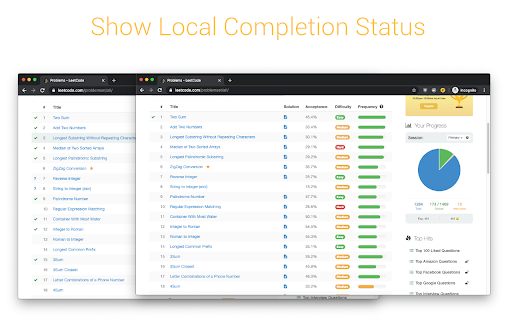


An extension that makes you more productive while you LeetCode. 09/26/25 Update: Removed features that weren't working (Notes panel and some toggles - these will be rolled out again with fixes soon. Fixed local completion status, difficulty and acceptance rate toggles) Customize your LeetCode experience! This extension allows you to choose exactly what you want to see or hide when you're solving LeetCode problems. You can show/hide things like: - Completion Status* - Acceptance Rate - Difficulty * The completion status will also keep a local record of the questions you complete while the extension is installed. This way, if you've come back to LeetCode after a long time or want to start fresh, you can clear all the completion data and start fresh!

CF Analytics
CF Analytics Chrome extension improves the Codeforces profile webpage to include statistics of problems solved by the user. The ‘Problem Rating’ graph is a bar chart showing problems solved for each problem rating. The ‘Tags Solved’ graph is a doughnut chart displaying tags solved across any problem and also lists a count for each tag. The ‘Unsolved Problems’ shows a count of all problems attempted with not correct verdict and also lists them. The extension communicates only with the Codeforces API and runs entirely on the browser.

LeetCode Timer
Leetcode timer and performance tracking This Chrome browser extension is a must-have for coders who want to track their coding time on LeetCode.com and set time limits for themselves. With this extension, you can: - Track your coding time on each LeetCode problem. The extension will automatically start a timer when you start working on a problem and stop it when you submit your solution. You can then view your total coding time at the end for each problem. - Set time limits for yourself based on problem difficulty. The extension allows you to set different time limits for easy, medium, and hard problems. This can help you to focus on and complete problems more efficiently. Release notes for Ver. 4.2: - Revert the timer hiding behavior to its previous version. Release notes for Ver. 4.1: - Fix broken features (Hiding difficulty and acceptance rates) due to UI changes. - The timer has been made robust to handle inactive tabs when practicing outside of the browser tab. Release notes for Ver. 4.0: - Fix timer not showing up due to recent Leetcode layout changes. Release notes for Ver. 3.9: - Minor bug fixes Release notes for Ver. 3.8: - Fix a bug in timer toggling functionality. Release notes for Ver. 3.7: - Fix a bug in timer auto pause functionality when a problem is submitted multiple times. Release notes for Ver. 3.6: - Fix a bug in timer auto pause functionality when a problem is submitted multiple times. Release notes for Ver. 3.5: - Show/Hide Difficulty in recommended problems list - Many more bug fixes and improvements Release notes for Ver. 3.4: - Fix broken Auto pause functionality in Dynamic layout Release notes for Ver. 3.3: - Fix broken timer animation when paused in new layouts - Fix broken Hide Acceptance rate feature in Dynamic layout - Fix timer reset button not working when problem page is loaded Release notes for Ver. 3.2: - Fix timer stuck at loading in Dynamic layout when Hide difficulty setting is turned on. Release notes for Ver. 3.1: - Fix broken styles causing timer text invisible in dark mode - Update feedback/bug report link - Add extension rating link in the popup page. Release notes for Ver. 3.0: - New Timer Design - Timer is now draggable and can be placed where ever you want on the page. - Added support for all Leetcode UI modes(Old, Split View , Dynamic) - Bug fixes Update: 2023-08-16 Fix Broken features in old UI due to the recent release. Update: 2022-09-16 New Features: 1. Improved UI. 2. Timer will now appear for all LeetCode Explore problems. 3. Set time limits for each difficulty. Bug fixes: 1. Fix: Timer showing up in the problem discussion page 2. Fix: Hide time icon not showing up Please rate it if you find this extension useful and provide feedback if you are uninstalling.

Leetcode format
Adds Format code button on leetcode to format the code using Prettier code formatter This Google chrome extension adds the Format button to the LeetCode code editor. Currently supported programming languages are Java, C++, JavaScript, TypeScript and Dart. Supports LeetCode old and new UI both, including dynamic layout. Release Notes 1.9: * Bug fix with dynamic layout Release Notes 1.7: * Bug fixes for new UI * Add hotkey support for old UI as well Release Notes v1.5: * Added support for both old and new UI.

Leetcode Analyzer
Add a graph for visualization of number of question per tag and also add a contest history table Features: - simple design - update on every reload - Graph visualization with hover effect of showing tag name - User can check how many question already done on specific tag just by hovering on it - A Table which shows Contest history with rank and score - Faster updation than leetcode real contest time graph Because Leetcode officially doesn't provide any feature by which user get to know how much question already solve by them on specific topic so by this extension we can have that feature on Leetcode account page and this extension doesn't require any username and password.
