
daeaddalijienfjkhigbifmbdckbohjg
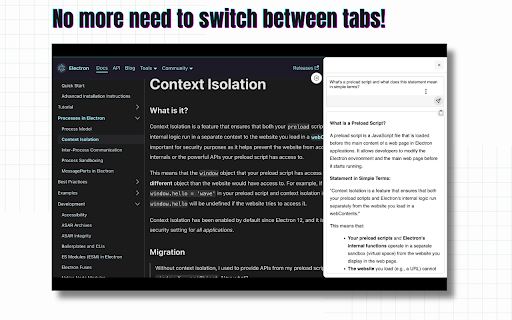
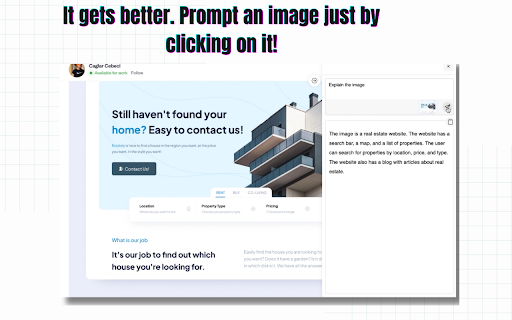
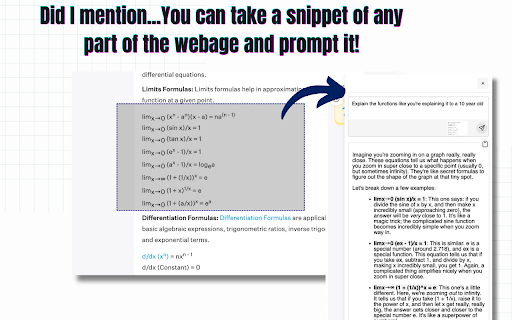
Effortlessly Access Google Gemini AI - Enhance productivity and get instant AI-powered insights directly from any webpage. Unlock the Power of Google's Gemini AI - Anytime, Anywhere! Elevate your browsing experience with Ask Gemini, the ultimate Chrome extension that brings Google's advanced Gemini AI to your fingertips. With just one click, access the latest conversational AI technology directly from any webpage, without disrupting your workflow or requiring multiple tabs. Why Choose Ask Gemini? * Convenience: Instantly access Gemini AI without switching tabs or losing your place on the current page. * Speed: No more delays or interruptions - answer your questions quickly and efficiently. * Contextual: You can prompt Ask Gemini based on the context of your selected text from any webpage, providing more accurate and relevant responses. * Advanced Technology: Leverage Google's cutting-edge AI capabilities to get answers, insights, and suggestions on a wide range of topics. What Can You Do with Ask Gemini? * Answer complex questions and get in-depth information on various subjects. * Explore new topics and discover interesting facts and insights. * Get writing suggestions, grammar corrections, and language translation assistance. * Enhance your research skills and stay up-to-date on the latest developments in your industry. * Prompt using an Image in just one click! Get Started Today! Download Ask Gemini now and experience the power of Google's Gemini AI in a convenient, one-click solution. Say goodbye to tab-switching and hello to a more streamlined, AI-powered browsing experience.

Read AI
Boost productivity with Read AI's extension—bring the benefits of connected work AI directly to your meetings and calendar. Read AI is the fastest-growing independent work AI platform designed to help everyone work smarter and get more done. With features including world-class meeting notes and coaching, connected enterprise search, and helpful recommendations, our AI Copilot makes it easier to keep track of the details and move faster towards success. Trusted by millions worldwide, Read AI transforms daily work into insights and actions that propel you forward, faster. KEY EXTENSION FEATURES: 🎤 Automatic Meeting Detection Read AI detects upcoming Zoom, Teams and Google Meet meetings and prompts you to add Read, capturing conversations seamlessly. 🗓️ Smart Meeting Scheduling Effortlessly find the best time to meet, get real-time meeting summaries, and see the cost of meetings directly in your Google Calendar. 🔗 Meeting Scheduling Link Share a single link to let others find a time to meet without the back-and-forth. 📝 Live Meeting Summaries Catch up instantly if you’re late to a meeting, with real-time live notes of ongoing discussions. At Read, we take your privacy seriously, and we want you to feel confident about how we handle your information. Your trust means everything to us, which is why we don't sell your data to anyone - period. So why do we ask for all of those browser permissions? We request permissions like “”, “activeTab”, “notifications”, “contextMenus”, “notifications” and “scripting” so Read AI can work seamlessly across all your productivity platforms, not just a limited set. These permissions allow us to deliver powerful features now and enable future updates that bring even more context and value to your workflows. By using the Read AI’s browser extension, you agree to Read's terms and conditions and privacy policy:

LucidPages — Website Summarizer
LucidPages helps you instantly generate concise, AI-powered summaries of any webpage, article, or blog post. Whether you're a student, researcher, or just browsing the web, LucidPages saves you time by extracting the key points from even the longest content with one click. Built with a sleek, distraction-free design and powered by Google Gemini, LucidPages delivers fast, reliable summaries directly in your browser—no copy-pasting, no fluff. Now, go beyond summaries with built-in AI chat: ask questions directly about the page or its summary for deeper insights. • AI Summaries in One Click – Summarize the current page instantly with a single button. • Ask the AI Anything – Chat with AI about the webpage or summary to clarify, expand, or explore further. • Quick Access Icon – Instantly summarize any page with a floating icon. • Highlight-to-Summarize – Select text anywhere and get a focused summary. • PDF Summarization Support – Summarize academic papers, reports, and other PDFs with ease. • Summary History – Automatically saves your previous summaries for quick access anytime. • Multi-Language Support – Summarize and chat in multiple languages with seamless translation support. • Listen to Summaries – Instantly convert summaries into natural, human-like audio for hands-free listening. • Smart Extraction – Works on most websites, even cluttered or long-form pages. • Light & Dark Mode – Toggle themes to suit your environment. • Clean & Simple UI – Distraction-free, responsive design. • Cached Results – Revisit summaries without repeating the process. • Copy with Ease – One-tap copy to clipboard for notes or sharing. • Reading Mode – Expand summaries to fullscreen for immersive reading. LucidPages is perfect for anyone who wants to stay informed without wasting time. Save hours of reading, ask smart questions, revisit past summaries, listen hands-free, and browse smarter with LucidPages.

Gistify – AI Web Summarizer
Instantly generate summaries of any webpage. Get the key points without the scroll struggle. Save time, stay smart. Tired of reading long articles just to find the main point? Gistify helps you cut through the noise and get straight to the gist – in one click. Gistify is a powerful Chrome extension that summarizes long-form content like articles, blogs, news reports, and web pages into short, easy-to-read summaries. Whether you're a student, professional, or just a curious mind, Gistify saves you time and boosts productivity. 🔍 Features: One-Click Summaries: Instantly generate summaries of web content. Clutter-Free Interface: Clean, minimal UI for focused reading. Supports Most Websites: Works on news sites, blogs, research pages, and more. Boost Productivity: Learn faster, work smarter, read only what matters. 🚀 Perfect For: Students & researchers Busy professionals Productivity enthusiasts News readers & bloggers Get Gistify today and transform the way you consume content. Read less, understand more.

Ask Gene - AI Assistant
Your Ultimate Web AI Assistant. Answers tough questions. Solves problems. Searches smartly. Use it anywhere. 🆕👉 Try out the new Notes feature! You may save your AI searches now to Gene Notes! Create new notes and save AI responses to a particular note - that way you can always go back to it as a reference! 🚀 Gene is your all-in-one AI assistant powered by GPT-5.5, Claude Sonnet 4.6, and DeepSeek-V3. Hit Ctrl + Q, and you’re ready to go! Gene helps you search, read, write, translate, and much more—all in one place. Key Features: 💬 AI Chat ✨ Chat with the latest ChatGPT model seamlessly across any webpage. 🧵 Doesn't matter the length of that document—just ask away! 🌐 Real-Time Data Access 📡 Get up-to-date information from the web including news, markets, sports, and trending topics in real time. Chat & Summarize 📚 Webpage Summaries: Type "/webpage" to reference page and get concise summaries of long articles without having to read everything. 🖍️ Highlight & Learn: Select any text on a webpage, and Gene will answer your questions right away. 📄 PDF Search: Freely open any PDF—whether online or from your computer—use "/webpage" or "/pdf" to reference the whole doc, or highlight any text, right-click, and ask Gene! (Note: Make sure "Allow access to file URLs" is turned on before use) 📑 Google Docs Search: Freely open any Google Docs and use highlight or "/webpage" or "/docs" feature! ▶️ Youtube Video Search: Freely open any Youtube video and use "/webpage" or "/video" feature and ask anything on that video! [◉°] Screenshot: Click the screenshot button, highlight anything on a webpage, and ask questions on it. This is useful for a picture or chart! It is also great for data analysis! Smart Search 🧠 Search Agent: Ask a question, and Gene will intelligently search the web, review the results, and deliver an accurate answer using multiple keywords. Write with AI 📝 Write Agent: Share a topic, and Gene will create structured outlines with detailed content and references. ✏️ Content Assistant: Provide a prompt, and we’ll turn it into polished, well-written content for you. Problem Solve ➕ Math & Code Solutions: Get step-by-step explanations for math problems and solve coding challenges instantly. 💻 How to Use: 🔹 Add Gene to Chrome and pin it to your toolbar. 🔹 Press Ctrl+Q to wake up Gene. 🔹 Start leveraging the power of AI instantly! 🗣️ Do I need a ChatGPT/OpenAI account? Nope! You don’t need an OpenAI account to use Gene. Get ready to supercharge your productivity with Gene! ⚡
