
dadopkaodejkpjidlmhhaediklldndob
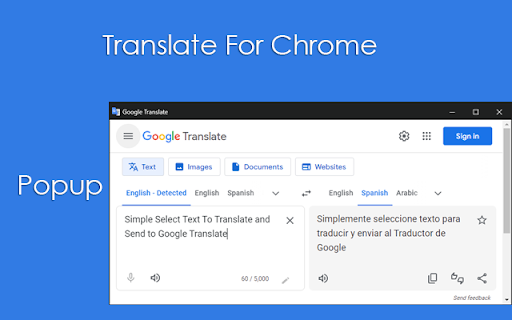

Select text on a page to instantly translate it. Break down language barriers with "Translate For Chrome Extension," your essential tool for effortless on-demand translation. Whether you're browsing foreign websites, reading articles, or simply need a quick word translation, this extension delivers accurate results directly where you need them. * Instant Tooltip Translation: Simply select any text on a webpage, and a discreet tooltip will appear with its translation, allowing you to stay focused on your content. * Flexible Display Options: For more detailed translations, right-click on selected text and choose to open the result in a New Tab or a convenient Popup Window. * Customizable Popup Experience: Your popup window's size and position are remembered, ensuring a consistent and personalized translation experience every time. * Extensive Language Support: Select your preferred default translation language from a comprehensive list of all languages supported by Google Translate. * Multi-Language Ready: The extension's interface is built with internationalization in mind, adapting to your browser's language settings. "Translate For Chrome Extension" is designed for efficiency and ease of use, making foreign content more accessible than ever. Install now and experience the web without language limits!

Quick Translate - AI Language Translator
Instant translations anywhere you read on the web. Highlight text to translate, hear pronunciation, see definitions and synonyms, and save words to review with spaced repetition—now with PDF support. ・Instant on-select: Translate text the moment you highlight it, double-click, or press a shortcut. ・Works on PDFs: Translate selected text inside PDFs in Chrome’s viewer. ・Learn as you browse: Save words to Favorites and get smart spaced repetition to retain vocabulary effortlessly. ・50+ Languages With Auto-Detect: Accurate translations powered by Google Translate plus AI enhancements. ・Rich results: Definitions, synonyms, transliteration, and pronunciation/TTS. ・Fully customizable: Choose trigger (auto on selection, bubble icon, popup, keyboard), set target language, and edit shortcuts. ・Fast and lightweight: Sub-second translations in most cases. ・Private by design: Your data stays in your browser. No sign-in. No servers. No tracking. ・Highlight or double-click text to translate immediately. ・Click the floating translate icon or press your shortcut to open the popup. ・Tap the speaker to hear pronunciation. Save any word or phrase to Favorites. ・Review saved items with spaced repetition while you browse. ・Selected-text translation on any website and PDFs. ・Auto-detect source language; 50+ target languages. ・Pronunciation/TTS, definitions, synonyms. ・Favorites/phrasebook and browsing-friendly spaced repetition. ・Translation history and copy to clipboard. ・Keyboard shortcut and trigger customization. ・Dark mode friendly UI. PRIVACY AND PERMISSIONS ・Data storage: Only on your device (Chrome storage). No backend, no cloud sync. ・Data collection: None. We do not collect, share, or sell data. ・Permissions: “Read and change site data” to translate selected text and show the UI; “Storage” to save preferences, history, and favorites. ・Disclaimer: Uses Google Translate and AI for results. Not affiliated with or endorsed by Google. PERFECT FOR ・Students, researchers, and professionals reading multilingual content. ・Language learners who want definitions and vocabulary retention built in. ・Anyone who needs a fast, reliable translate extension that respects privacy. ・Add Quick Translate to Chrome. ・Choose your target language and trigger. ・Highlight text to translate instantly.

Translator Helper
Translator Helper provides an easier and less distractive way to translate during browsing web pages. This extension will not and has no permission to access your page! This extension adds a new "Translate" option on the right-click menu when you have selected some texts on the page. Click on the new option will simply opens Google Translate page in a window pop-up, with the selected content automatically loaded in Google Translate page. The window will by default appear on top left side of your screen, you can move or resize it for your preferences. The extension will translate next item on the same window if you do not close it. The extension simplifies the process to translate some text during view websites, as opening a new tab and copy-paste it is time wasting and interruptive.

Translate for Chrome -Translator, Dictionary
Translate words, phrases or text on any webpage. Full page translator and dictionary, text to speech (TTS) using Google Translate. Translator is the most effective and user-friendly solution for swiftly translating specific content, be it words, phrases, or even menu items. By simply highlighting the desired word or text, you can instantly view its translation in your preferred language. This convenient browser extension encompasses all these functionalities in one easy-to-use package. Here are the key features: ► Completely free, no registration or subscriptions required. ► Supports over 120 languages. ► Automatically detects the language. ► Offers text-to-speech for 60 languages. ► Provides reverse translation. ► Works on all websites, including Gmail, Facebook, Twitter, and more. ► Boasts a user-friendly and intuitive interface. ► Utilizes a dictionary for word translation (dictionary works offline). Web Translator employs high-quality human text-to-speech (TTS) translation to accurately read and reproduce words, phrases, and entire texts. It also displays transcription, transliteration, correct accentuation, and stress patterns, allowing you to instantly learn the correct pronunciation without delay. Functionalities include: 1. Page Translation: Translates entire web pages by hovering the mouse over the desired text. 2. Dictionary: Provides word meanings, pronunciation, synonyms, hypernyms, hyponyms, and more. 3. Bookmarks: Keeps track of all your bookmarked translations and saves your translation history. 4. Text-to-Speech: Enables you to hear accurate pronunciation and play words and texts with the correct accent. 5. Image Translation: Select the area on your screen that you wish to translate, following the screenshot tool's working principle. Make use of the TTS function to enhance your understanding of how words are pronounced, including phonetic transcription. Full Page Translations Translate entire web pages into your desired language effortlessly with a single click. This new feature, integrated from Google Translator, is available for free in our translator. Translation History All translation history is stored in your browser's local storage. To find or delete your translation history, click the extension icon in the top right corner of your browser. Then click the "Show translation history" icon in the pop-up window. This translator does not use any cloud storage. Translate while reading Learn a language by reading whatever you like. Translate words & phrases live on any web page. Click words or phrases on any site to translate them. Simply select which translator you would like to use today: own new Web Translate or Google Translate. We genuinely hope that our translator proves valuable to you! We eagerly await your feedback and ratings.

Translator - translation of selected text
Translate selected text with Google Translate Translate selected text with Google Translate on any webpage. - Select-and-translate: highlight text and click the button to get a translation - Quick pop-up translation via keyboard shortcut or browser-bar button - Support for 100+ languages and alternative translations - Dictionary: definitions and examples for single words or phrases - One-click reverse translation, plus history with quick navigation - Text-to-speech with selectable voices (if supported by browser) - Light and dark themes
