
cponfpbdndcmnnepfncmkabjpmphncbc

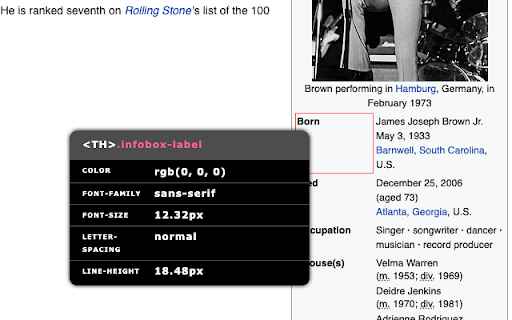
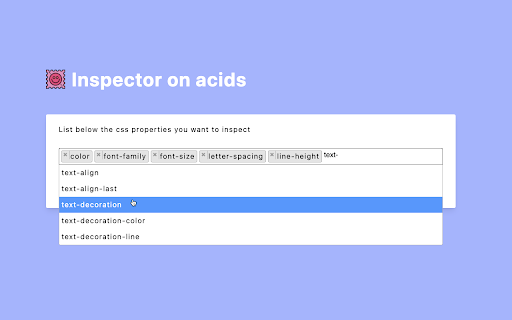
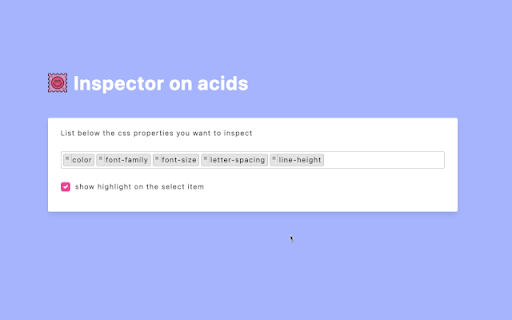
Inspector on Acids — Simplified HTML and CSS Inspection Inspector on Acids is a lightweight tool that allows you to inspect the… Inspector on Acids — Simplified HTML and CSS Inspection Inspector on Acids is a lightweight tool that allows you to inspect the CSS properties of any element on a webpage in a fast and unobtrusive way. Instead of opening browser DevTools, you can activate the inspector and simply hover your cursor to view the computed styles in a clear tooltip that follows your mouse. This extension is designed for developers, designers, and anyone who needs quick access to key styling information. Real-time CSS inspection: hover over any element to instantly view selected CSS properties. Customizable property list: choose exactly which CSS properties appear in the tooltip. Element highlighting: clearly identify the element you are inspecting, with optional custom highlight color. Optional themes: switch between light, dark, or system appearance for the tooltip. Keyboard activation: enable or disable the inspector with a configurable keyboard shortcut. Non-intrusive design: the tooltip is minimal and stays out of your way. Click the extension icon or press the default shortcut (Alt + U) to activate the inspector. Hover over any element to view its CSS properties. Press Esc or toggle the icon again to deactivate. From the extension’s Options page, you can: Select which CSS properties you want to inspect. Choose a theme (light, dark, or system). Enable or disable element highlighting. Adjust the highlight color. You can customize the keyboard shortcut from the browser’s shortcut settings page. The extension runs entirely within your browser. It does not collect, store, or transmit any personal data or browsing information. All settings are stored locally on your device.

Bubble Buddy
Bubble Buddy allows you to quickly add/remove the debugger, reveal an element in Elements tree, start/edit a workflow, switch between live and test versions of Bubble Editor, and App pages by using *Keyboard Shortcuts* Use the following 8 Keyboard Shortcuts to make the desired changes: 1. To add/remove “debug_mode” to the page URL, use “Ctrl + M” (or click on the Bubble Buddy extension icon) 2. To reveal an element in Elements tree, a) Select an element of your choice and then b) Use "Ctrl + Shift + E" 3. To start/edit a workflow on an element, a) Select an element of your choice b) Use "Ctrl + Shift + F" 4. To switch between live and test versions of your app pages, use “Ctrl + Shift + L” 5. To switch between live and development versions of your Bubble Editor, use “Ctrl + Shift + K” 6. To select first parent of an element, a) Select an element of your choice b) Use "Ctrl + Shift + Y" 7. To open app's Backend Workflows page in a newtab, use "Ctrl + Alt + B" - With Bubble Buddy sidepanel, you can organise all your URLs (Bubble Editor, App preview pages, any resource links) and Branches linked to your Bubble Projects at one place. - "Toggle Sidepanel" shortcut will work only on Bubble Editor pages. For Bubble Buddy tutorials, checkout this playlist: https://www.youtube.com/playlist?list=PL4YOHwiJinHt3S7Y7TOLxIj2lvcE776O- - - - - - - - - - - - - - - - - - - - - - - - - - - UPDATES: v2.4: - Bug fixes Version 2.0: - Open Backend Workflow in newtab shortcut - Show/Hide Buddy Buddy sidepanel shortcut - Organise your Bubble projects' related URLs and Branches [Demo Version] - Added shortcuts support to apps on Bubble Dedicated instances (suggested by Andy Kalati - @akalati)

Quick Inspect Element
Quickly inspect HTML elements with a simple mouse hover. Simplify your web development workflow with Quick Inspect Element! Ever wished you could inspect HTML elements swiftly without the hassle of opening DevTools? Now you can! The extension lets you dive deep into website elements effortlessly, allowing you to streamline your workflow and boost productivity. - Install the extension from the Chrome Web Store. - Open the extension from browser toolbar and login with your Google account. - Hover on the element while holding Ctrl-key to quickly inspect the element. - Boost productivity: Speed up your development process by eliminating the need to open DevTools every time you want to inspect an element. - Inline CSS editing: Quickly edit and experiment with element CSS. - Native interface: Enjoy the user interface that you already love in Chrome DevTools. Install Quick Inspect Element now and revolutionize your web development experience!

Snable: UI Inspector & CSS Scanner
Analyze any web page that catches your eye! Get a detailed overview of colors, fonts, and visual elements for design inspiration. SNABLE: YOUR PERSONAL UI DESIGN ANALYZER Snable provides professional UI analysis directly in your browser, revolutionizing how you explore web design. This Chrome extension meticulously deconstructs any website, revealing its core visual elements for your understanding and inspiration, serving as the essential companion for the Snable Figma Plugin. ⭐ HIGHLIGHTS — Instant analysis of a website's visual structure — Extraction and organization of color palettes and typography — Comprehensive design insights at your fingertips — Ability to favorite pages for future reference — Directly links with the Snable Figma Plugin for design asset export ⚡ TOP FEATURES — Real-time color and font style analysis — Visual hierarchy insights — Clean, user-friendly reporting — Easy page bookmarking — Figma plugin integration for seamless data flow 👥 IDEAL FOR — UI/UX Designers (inspiration) — Web Developers (pattern analysis) — Design Students (real-world learning) — Brand Managers (consistency checks) — Digital Artists (web aesthetics) — Anyone exploring design principles ℹ️ GET STARTED Install Snable Chrome Extension, then simply click the extension icon on any webpage to instantly uncover its design secrets. No setup required – professional design insights are just one click away! Also check the Snable Figma Plugin for a better experience! ⭐ Love Snable? We'd appreciate your review! 🌐 For updates & more → snable.bozzhik.com 📧 Questions or suggestions? Reach out → bozzhik@gmail.com 💬 Join our community → snable.bozzhik.com/socials

Web Inspector
Use Web Inspector tool as a CSS viewer and website inspector for any page. It is a browser plugin for google chrome inspect element. Want to inspect element for chrome like a pro? This tool helps you master front-end basics with ease. It's more than just a chrome inspector — it's your all-in-one dev assistant. Use our inspection chrome tool when you need full control over any website. 1. Access to change history. 2. View styles via css scan. 3. Real-time page updates. 📦 What Do You Get This chrome browser inspector simplifies the exploration of website structures, providing valuable insights from the very first click. Know, inspecting elements in chrome helps both beginners and professionals easily uncover details that might be overlooked. • Hover over an element to highlight its css viewer for a clear view of styles. • See spacing with margin and padding indicators that show how they affect layout. • Inspect Google Chrome to understand their structure and interactions in design. • Get detailed information about font size and family for better typography insights. 📚 Where You Can Apply It This web page inspector works on any website—there are no limits. Just click or hover and you will see a lot of details. It's time to experience the difference that the google web inspector offers. Install the extension now! 🔥 Common With CSS Peeper Extension ➣ Easily components viewing. ➣ View class attribute values. ➣ Retrieve font information. ➣ View media file sources. ➣ Extract the web color palette. ⭐ ️The ability to pick pixel colors in HEX, RGB, or HSL while inspect element chrome. ⭐️ The ability to seamlessly add, remove and change properties and their values. ⭐️ Directly edit the visible text content with web inspector app with great ease. 🧠 Frequently Asked Questions Q: Can I use this as a css plugin chrome? A: Yes, it's a full-featured plugin for the browser. Q: Is this plugin user-friendly for beginners? A: Absolutely! It has very easy navigation. Q: What is the advantage of a web inspector? A: It simplifies viewing and layout testing. 🌐 Where It Works The inspect chrome feature works seamlessly with any public resource. Test directly inside the browser. No more hunting through devtools tabs! Developers will love our browser inspector chrome. 1. Edits are live — see results immediately on the web. 2. Handles complex nested elements effectively. 3. The google chrome web inspector for various tasks. 🧩 Perfect Combo for Developers This tool brings speed and clarity to design edits and front-end tweaks. With the css chrome extension, you can change styles instantly. The web inspector app adds precision when analyzing layout behavior and structure. 💪🏻 What Can You Do 1️⃣ Grasping responsive web layouts. 2️⃣ Copying web styles with CSS scan. 3️⃣ Knowing modern website structure. 4️⃣ Isolating bugs in front-end code. 🧪 Who May Use Ready to try the full power of advanced web page inspection Chrome? It was built for developers who want speed, clarity, and direct interaction. Let the transformation of your workflow. The web inspector tool is suitable for different tasks. ❓ Quick FAQ ➤ Where can I download it? Is it available in Firefox? ✱ You may download Web Inspector from the WebStore. ➤ Can I save the changes made during the editing process? ✱ No, changes made during editing are temporary. ➤ What makes this tool different from google inspect tool? ✱ It adds a real-time editor with simplified visuals. 📥 How to Get Started After installation, simply hover over any element and hit the spacebar to activate the web page inspector. This feature allows you to easily examine specific parts of your design. Whether you're clicking buttons or headers, Google inspect with Chrome brings precision and ease to your workflow. 🔎 Explore With Google Web Inspector - Typography styles. - Detailed settings. - Element padding. - HTML classes. - Web colors used. - Margin values. Use our css extension when you need quick access to attributes. There's no need to open bulky DevTools — it's all right at your cursor. This chrome inspect tool provides an efficient way to streamline your workflow. 🌟 What You Get With Chrome Browser Inspector ✔️ Live previewing. ✔️ Grid inspector. ✔️ Color palettes. ☀️ Connect to Our Unique Experience This is your solution! Start inspect element in Chrome today. Try our web extension — a more visual way to work with styles. Create freely with a powerful, user-friendly website inspector.
