
cpmagcjkdljahahfgbjcponfaindgflm
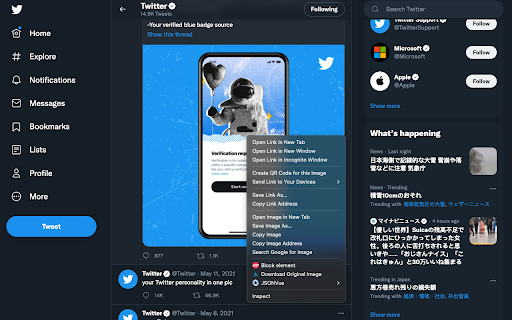
You can download the original size image from context menu by right click the image from Twitter. This extension is working on https://twitter.com/* .

X Image Downloader - Twitter Photo Downloader
Easily download high-res images from Twitter/X, batch save them, and organize with custom folders. Privacy ensured, no data tracking With this powerful and intuitive extension, you can easily download high-resolution images and videos from Twitter/X and save your favorite media in their original quality in just a few steps. Perfect For: Saving high-quality images and videos from Twitter / X Bulk downloading media from profiles Organizing your Twitter image and video collection Key Features: ✓ Batch Download: Download all images and videos from any Twitter/X profile in one go ✓ Original Quality: Preserve media in their highest resolution ✓ Single Tweets: Save images and videos directly from individual tweets ✓ Custom Folders: Organize your downloads with personalized folder names ✓ Privacy Guaranteed: All downloads are handled locally for complete data security How to Use: Download Images and Videos from Profiles: Open any Twitter/X profile Navigate to the Media tab and click the download icon (Optional) Set a custom folder name for better organization Click "Start Download" Save Images and Videos from Tweets: Open a tweet with images or videos Click the download button at the top Effortlessly build your collection of stunning images and videos from Twitter/X. Install X Image Downloader now and enjoy quick, high-quality downloads! In-App Purchases Our Extension is a freemium product with a nominal subscription fee. With a paid subscription, you can download up to 5,000 items (images or videos) at a time and receive premium support. The exact cost is displayed in the extension's interface, ensuring transparency and ease of understanding. Data Privacy Your data stays on your device and is not stored or transmitted to our servers. We prioritize keeping your information secure and confidential. Disclaimer This extension is an independently developed product by ExtensionsBox and has no association with Twitter/X.

X Media Downloader - Twitter Media Downloader
Download Twitter/X media content effortlessly! Save videos and images in original quality with this powerful media downloader extension. Perfect for: Key Features: ✓ Batch download all media from any X profile ✓ Save videos and images in their highest quality ✓ Download media from individual tweets ✓ Custom folder naming for better organization ✓ 100% privacy - all processing happens locally 1. To Download from Profiles: - Visit any Twitter profile - Click the download icon on the Media tab - (Optional) Set custom folder name - Click "Start Download" 2. To Save from Individual Posts: - Open any tweet with media - Click the download button at the top Download X(Twitter) media easily and efficiently. Install X Media Downloader now to save your favorite Twitter content in its original quality! Data Privacy Your data stays on your device and is not stored or transmitted to our servers. We prioritize keeping your information secure and confidential. In-App Purchases Our Extension is a freemium product with a nominal subscription fee. With a paid subscription, you can download up to 5,000 items at a time and receive premium support. The exact cost is displayed in the extension's interface, ensuring transparency and ease of understanding. Disclaimer This extension is an independently developed product by ExtensionsBox and has no association with Twitter/X.

Full Image Downloader - Download all images
Full Image Downloader, in a nutshell, it detects images from websites and allows you to download them to your computer. Depending on your settings, it also performs other functions. It's your turn Full Image Downloader, don't forget to vote. 😊😊 You can reach Full Image Downloader from the mail "harrylucas.imagedownloader@gmail.com" on the side.

X Original Images
Redirects X/Twitter image URLs to get the best possible image quality. A simple extension that automatically redirects you to the original quality version of images on X (formerly Twitter) by setting the quality to "orig".
