
cpchjdflfeejpegfmghbamllgdpikgaa
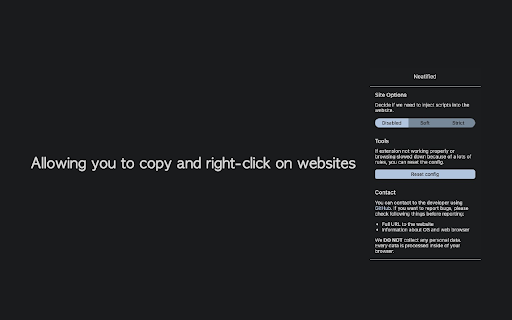
Allowing you to copy and right-click on websites. Neatified allows you to copy and right-click on websites. The differences between traditional extensions are 'we track HTML nodes to ensure prevention of nuisance things'. The extension provides three modes and "NEVER COLLECT YOUR DATA AT ALL", even the source code is duplicated on GitHub. (However, to make Neatified work, the extension will use 'website data' and 'web browser storage' functionalities internally) *There is no change between the GitHub version. Disabled: Disable Neatified on current website (default) Soft: Unblock prevention scripts on most websites. Neatified injects CSS and JavaScript files dynamically to restore original behaviours of expected event handlers which are likely used to block copying and right-clicking. Strict: To unblock websites which not work with 'Soft' mode, we restore more expected handlers to default behaviours. The source code of this extension is distributed on GitHub under GPLv3 license: https://github.com/seia-soto/neatified [FAQ] 1. Web browsing speed slowed down because of this extension. This extension saves your preferences into browser internal storage. The value of preferences is made with domain and integer, but if the number of preferences grows up, this can affect the speed of web browsing. In this case, you can click the 'Reset config' button to clear the preferences. 2. What data does the extension collect? We never send your data to external sources, even one. Also, the resources used in the popup page of the extension aren't using external sources. This extension developed with your privacy. 3. How this extension works and what data is required to process? The extension reverses technologies used to prevent copy and right-click into default behaviour. In this process, Neatified runs its internal scripts and 1) determine if the current website is enabled in user preferences, 2) injects additional scripts into the website to unblock nuisances. 4. How do you think copied posts because of this extension? Sure, I think this extension can create ethical problems. However, there is no perfect solution to prevent copying and unblocking, especially on the web. I developed this extension because of user experience of the website dropped out even I cannot notice where I am reading due to copying and right-clicking prevention scripts. If you get any disadvantages mainly because of this extension, I apologize about it and hope we can contribute to better people ethics on the web instead. We cannot determine what things are preventing dragging or copying on the website 100%. If you're using Strict mode, you may try in Soft mode which is *less strict* literally. There is code that removes functions from a website and can cause problems on websites. This is how this extension works, so this is NOT a bug. [Bug reporting] I am collecting bug reports via GitHub issues. When you write an issue, please ensure that you included OS and web browser information: e.g. ) Chrome x.y.z version on Windows/macOS/Linux. Impossible when: - Some websites are not working properly - There are contents made with images, so I cannot copy or right-click

View link source
Adds 'View link source' to the context menu. Adds 'View link source' to the context menu.

Copy Paste Clipboard
Keep things handy which you want to quickly copy. Tap on the text to copy it quickly! Keep things handy which you want to quickly copy. Tap on the text container to copy it quickly! Useful for job seekers who fill the form regularly and need to keep texts such as linkedin link, github link, resume link handy. Revamped UI and added dragging functionality and search capability.

Right Click Absolute Enable Copy
Enjoy the convenience of hassle-free auto Right Click Absolute Enable Copy Extension. Seamlessly operating in the background, it… Enjoy the convenience of hassle-free auto Right Click Absolute Enable Copy Extension. Seamlessly operating in the background, it effortlessly enables essential functions like select, copy, copy images, inspect, paste, etc., automatically upon activation on specific domains/web pages. No manual toggling needed - it's always primed to enhance your browsing experience with right-click functionality. Furthermore, this extension adapts to all types of text styles and conditions, allowing you to copy and paste images as well as all sorts of content. When pasting within existing text, it seamlessly adopts the existing text style, color, size, shape, and more, ensuring a smooth integration of copied content.

Wiki Readifyer
Have you ever tried to read an Wikipedia article, trying to gain knowledge but the page's design just hindered your eyes from locating the words that held the desired wisdom? Well, worry no more! Wiki Readifyer makes the knowledge you are searching for pleasantly readable. The wisdom you desire to read is just one installation away! And the best thing: It doesn't remove anything from the page it only changes the layout while staying 100% faithful* to the original contents. The following changes are applied to guarantee the best possible experience: • responsive layout: articles are pleasantly readable at any window size • slight reduction of text-background-contrast • reduction of article width • moving the table of contents to the right where it stays even when scrolling • the title also stays visible when scrolling down • some other little adjustments *However, if the window width is too small the extension will hide the left sidebar, only to guarantee the best use of your precious screen space. To make it visible again, just make the window wider. In 2023, many Wikipedias changed their default theme to Vector 2022, a more modern and user-friendly theme. Wiki Readifyer does not touch Wikipedia's layout if any theme other than the old (legacy) Vector theme is active. This means, to get the advertised layouts on Wikipedias with the new theme, you have to turn off the new skin.
