
cofbiemcpanejcbplenlbiekpbgaggeb
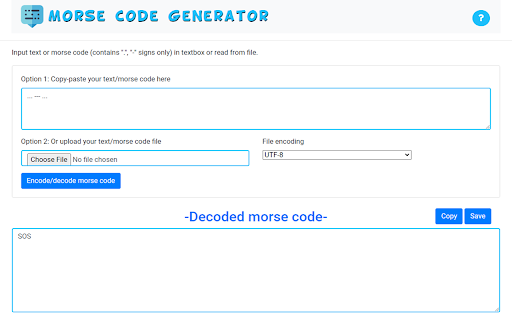
Simply install this software and you can do so today. Here is what you need to do. 1) Paste the morse code into our software 2) Press the Convert button You can also choose to enter in a text message and our software will convert it into morse code for you.

Open Google :site Search
Open new tabs of Google searches with the prefix :site in addition you can add extra queries for the search. An easy way to open new tabs of Google searches with the prefix :site in addition you can add queries for the search. The queries have to be separated by a new line. In order to open the tabs in an incognito window, you should: 1. Right-click the extension icon. 2. Click Manage extensions. 3. Toggle the Allow in incognito option. 4. Use the extension in an incognito window. Uses the storage permission in order to let the user continue with the input values even if the popup closed.

Breaking Bad Quotes - Get Random BB Quotes Instantly!
Get a fresh, iconic quote from Walter White, Jesse Pinkman, and other Breaking Bad characters every time you open the extension! 🚀 Love Breaking Bad? Get a fresh, random quote from Walter White, Jesse Pinkman, and other iconic characters every time you open this extension! 💡 Features: ✔️ Instant Quotes – See a random Breaking Bad quote with one click. ✔️ Unlimited Refresh – Tap the button to load a new quote anytime. ✔️ Sleek & Dark Design – Inspired by the gritty style of Breaking Bad. ✔️ Lightweight & Fast – Doesn’t slow down your browser. ✔️ No Permissions Needed – Simple and secure. 🔹 Why Install? Breaking Bad fans can relive iconic moments from the legendary show with unforgettable quotes from Walter White, Jesse Pinkman, Saul Goodman, Gustavo Fring, Mike Ehrmantraut, Hank Schrader, and more! 🎬 Whether you love I am the danger, Yeah, science!, or Say my name, this extension keeps Breaking Bad alive on your browser! 👉 Download now and let the best Breaking Bad quotes surprise you daily! 💬 Frequently Asked Questions (FAQ) ❓ How does this extension work? - Simply open the extension, and you’ll see a random Breaking Bad quote. Click the button for a new one instantly. ❓ Does this extension require internet access? - Yes, the extension fetches quotes from an online API. ❓ Does this extension store any data? - No, it does not collect or store any personal data.

Morse Code Translator
This is Morse Code Translator – morse code generator with sound & text. Learn morse code alphabet and translate to your language. If you want support for new languages in Morse Code Translator, just write to the developer by email. Feedback from users guides future updates, and your ideas can shape what will appear next. The extension already works with English, Russian, and International signals, but more are planned. Morse Code Translator is designed for people who want a direct and reliable way to work with dots and dashes online. The tool makes it simple to translate morse code to english and back again. Everything runs inside the browser, with no servers in between, so results appear instantly and remain private. One of the most practical features is that both fields are synchronized in real time. When you type plain text, the signal field updates automatically. When you paste or enter dots-and-dashes into the pattern side, the text field responds immediately. The extension always keeps both directions aligned. There is also a telegraph key simulation. This special button lets you tap rhythms by hand. The mode can be activated separately, turning your keyboard or mouse into a simple input tool. Each tap generates a pattern, and the translation appears in the text window at once. It feels almost like using a historic machine adapted for the browser. Why people install this translator: Online conversion without extra software A clear morse code alphabet reference inside the app Telegraph key mode for tapping signals Updates that expand languages and features Daily phrases are more fun when viewed through signals. You can use the morse code converter to see how “hello” looks, and even short greetings can take on a playful tone. Some people experiment with i love you in morse code for creative messages, while others check sos in morse code or sos en code morse for emergency practice. The system has a long tradition in the radio world, where operators often use short codes and abbreviations: 73 (--... ...--): means “best wishes” and is used to end a contact politely. 88 (---.. ---..): stands for “kisses,” often shared between friends or colleagues. CQ (-.-. --.-): a general call to all operators, translated as “call to you.” PSE (.--. ... .): short for “please,” used in polite requests. Even unusual sequences such as ..---...._, _ _.., or _. _. are decoded without delay, making every line of dots and dashes part of a living language. ▸ Common use cases include: Teachers who explain what is morse code during class Hobbyists working with morse code numbers in their spare time Creators using morse code creator tools for design The extension also works as a morse code decoder. Paste any sequence, and the translation to plain text appears at once. Whether you test _. _ or longer sequences like //, the tool shows the meaning clearly. No guessing, no delays, only smooth interaction. For many learners this becomes the simplest way to train and to convert morse to english in real time. 1️⃣ Benefits at a glance: Easy introduction to the morse alphabet Decoding of no in morse code and other phrases Creative combinations like // for experiments Sound adds another dimension. The translator can play back the patterns you create. It also allows you to change playback speed, so short dots and longer dashes match your pace. You can slow it down for practice or speed it up for realism. There is even an option to export signals and save them in a WAV file for later listening. ➤ Who will enjoy it: Students exploring code sos morse as part of projects Radio fans decoding sos en code morse for fun Designers inspired by the rhythm of the signals Privacy is always respected. The extension runs completely inside the browser, with no information sent away. Your experiments with this morse code for alphabet training or creative work remain yours alone. 2️⃣ FAQ: Can Morse Code Translator convert to english right away? Yes, instantly. Is there a morse code converter for letters and numbers? Yes, everything is covered. Does it simulate a morse code machine? Yes, through the tapping feature. Can I adjust sound? Yes, speed can be changed, and playback can be exported as WAV. Is there a morse code generator included? Yes, you can create and test your own signals. Does the extension handle unusual patterns? Yes, it decodes even rare sequences. 3️⃣ Reasons to install today: Practice with the telegraph key in its own mode Switch between morse code for alphabet and complete words Explore signals like sos en code morse with no confusion Enjoy updates with more languages and features In the end, Morse Code Translator is more than a translator. It is a way to connect with history while using modern tools. Design by Aleh: stariyleg@gmail.com Icon - Morse code icons created by Freepik - Flaticon

Text to Binary Converter
Easily convert text to binary code with the Text to Binary Converter extension. This user-friendly tool allows you to effortlessly… Easily convert text to binary code with the Text to Binary Converter extension. This user-friendly tool allows you to effortlessly convert any text into binary format. Designed with simplicity in mind, the extension provides a seamless experience with its intuitive interface. Simply enter your text, click the convert button, and instantly get the binary representation. Copy the converted code to your clipboard, clear the text, or even download the binary for offline use. This Extension is Created by Suman Help Developers, this extension is a must-have for developers, students, and anyone needing to work with binary code. Get the Text to Binary Converter extension now and streamline your text-to-binary conversions!
