
mejfbineeogghdkgfegicofnndkoklhf
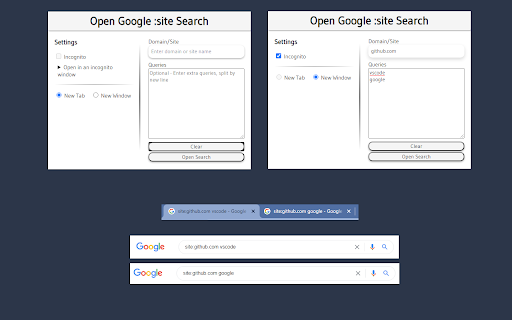
Open new tabs of Google searches with the prefix :site in addition you can add extra queries for the search. An easy way to open new tabs of Google searches with the prefix :site in addition you can add queries for the search. The queries have to be separated by a new line. In order to open the tabs in an incognito window, you should: 1. Right-click the extension icon. 2. Click Manage extensions. 3. Toggle the Allow in incognito option. 4. Use the extension in an incognito window. Uses the storage permission in order to let the user continue with the input values even if the popup closed.

Kloser
Close all tabs and open default tab Simple extension for closing all tabs in active window and opening New Tab Page or your selected page. You can edit settings of this extension, such as you can choose preferred tab which will be opened after using the extension and you can set will be extension close pinned tabs. Use the shortcut: Ctrl + Q

Atfos
Atfos stands for Automated Tool For Sculping. Main purpose is to help traders to perform daily sculping on the Libertex platform. Atfos uses our own developed AI (artificial intelligence) algorithms. Key features: 1. Automated trading - buy/sell 2. Trading based on signals 3. Trading session never expires 4. Deal rescue: it will not let your deal "drown" reducing loses. 5. A set of automated deals in row based on specified take profit. 6. Fine tuning of each and every aspect of trading. Atfoms comes absolutely free* with new Libertex account registration. * In order to get fully functional extension you are required: 1) Open libertex account using our referral link: 2) Register your copy of extension (simply by providing your email and proof of account registration using our referral link) You can register extension here: https://getatfos.com/es/register-extension

NoRef
NoRef allows you to quickly copy your current URL while removing unnecessary and potentially very long referral data (ex. ?ref=123). You can set your own key macro of up to 3 keys to copy the URL without referral, or in the cases of some sites like YouTube where referral info is needed you can set a key macro to copy the entire URL. NoRef also stores all of your recently copied URL's (on your local machine, not in the cloud) and you can delete them all or just certain ones.

YouTube Bookmarker
Bookmark your YouTube video timestamps Keep track of your timestamps with this handy little tool. No need to forget where you left off in that lengthy YouTube video anymore. Just click on the plus button in the player options and you can access that timestamp anytime using the extension. Features: - Easy to Use - Fast and minimal package size - Unobtrusive UI - Easy way to track all the timestamps you have saved - Theme based on your preference. Leave a star if you liked my work. https://github.com/nirzon47/youtube-bookmark-extension/
