
coehlfdplbcehabbpnmoenbgefldifgf

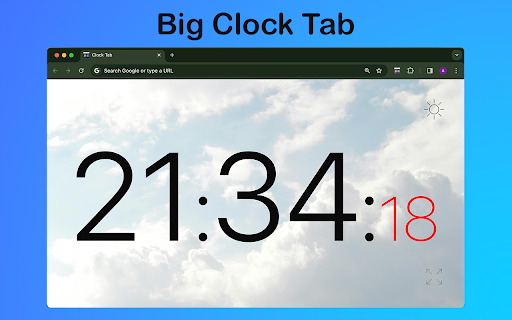
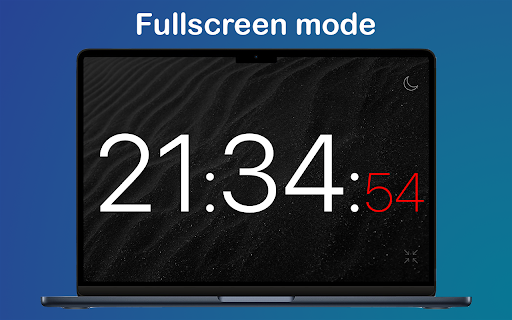
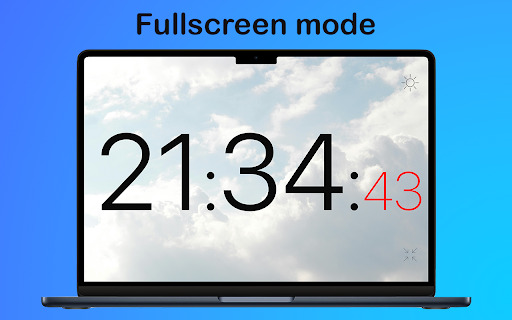
Boost productivity with Clock Tab, a Chrome Extension showcasing a big clock on your new tab. Be organized and efficient with ease 🕒 clock tab is the ultimate Chrome Extension for time management enthusiasts. Whether you need a simple clock or a big timer for presentation, our clock has you covered with its array of features designed to keep you on track and organized. Clock tab features like a simple and clear layout, dark and light themes for customization, and the option for full page or fullscreen mode, enhancing user experience with easy navigation, visual variety, and immersive viewing. 1️⃣ Straightforward and uncluttered layout, making it easy to navigate and understand. 2️⃣ The dark and light themes provide a choice of visual styles to suit different preferences and environments. 3️⃣ The full page or fullscreen mode allows for a more immersive experience, with minimal distractions. Clock tab caters to diverse preferences, offering a user-friendly interface with themes and immersive display options. 💠 Efficient Time Management ➤ In today's fast-paced world, having a reliable display on your new tab page can make all the difference. ➤ With us, you can access essential timekeeping tools without ever leaving your browser. ♻️ Presentation Assistance - Display a big digital clock online in full-screen mode while giving presentations - Allowing presenters to maintain control over timing - Ensure presenters stay within allocated limits. ❇️ Flexible Time Management Stay organized and efficient with intuitive layout that allows you to manage your time effectively. From online time to full-screen displays, clock tab provides the flexibility you need to stay on top of your schedule. ⚡ Precision Time Tracking Experience the convenience of having a clock with seconds displayed prominently on your new tab page. With clock tab, you can track time down to the second, ensuring precision in all your activities. ✨ Meeting Aid ▸ Utilize the full-screen mode to display a large digital clock online during virtual meetings ▸ Ensuring participants can easily keep track your life without distractions. 🔥 Enhanced Productivity Features - Say goodbye to cluttered tabs and hello to streamlined productivity. ⭐ Time Management Hub You can transform your new tab into a hub of productivity. Stay focused and efficient with clock tab by your side. 🔹Elevated Browsing Experience Don't settle for a standard new tab page when you can have this chrome extension that elevates your browsing experience. Enjoy the convenience of having essential timekeeping tools at your fingertips whenever you open a new tab. 🟢 Empowering Time Management Solution Package ➤ Clock tab is not just about displaying the current time; it's about empowering you to manage your time effectively. ➤ Whether you need a simple clock or advanced time-tracking features. ✅ Your Productivity Tool for Efficiency ▸ In conclusion, this app is more than just a chrome extension; it's a productivity tool that helps you make the most of every minute. ▸ Stay organized, stay focused, and stay on top of your schedule. 📌 Frequently Asked Questions: ❓ How do I install the extension? 💡 To install extension, just click on the "Add to Chrome" button and the extension will be added to your browser. You can then access it by opening a new page. ❓ Is this extension available on other browsers besides Chrome? 💡 Currently, the clock tab is specifically designed for Google Chrome and is available exclusively on the Chrome Web Store. ❓ Can I use extension offline? 💡 Once the extension is installed, you can continue to use it even if your device temporarily loses internet access.

Auto Refresh
Enhance efficiency with Auto Refresh Chrome Extension. Automate page reloads and updates for seamless browsing experience. 🚀 Auto Refresh Chrome Extension! 🔄 Say goodbye to manual page refreshing and welcome a new era of seamless browsing. ⏲️ With our cutting-edge features like auto refresh page and auto reload tab, your browsing experience will never be the same. 📈 Stay up-to-date with automatic page updates and never miss a beat with our auto refresh web page feature. 💻 Tired of constantly hitting the refresh button? Let our auto page reloader do the work for you, saving you time and effort. 🔁 Experience the convenience of our page auto reload function, ensuring your tabs are always current and ready for action. ❓ Why Choose Our Extension? ➤ Efficiency at Its Best: Say goodbye to the constant click of the refresh button. With our auto page reloader and auto tab reloader, information retrieval is faster and more efficient. ➤ Tailored to Your Needs: The customization options ensure that the auto reloader for Chrome works exactly how you want it to, fitting perfectly into your workflow. ➤ User-Friendly Design: We prioritize ease of use, making our tool accessible to everyone, regardless of their technical skills. ➤ Time Saver: Automating the refresh process with our auto webpage refresh feature saves you a significant amount of time, especially when monitoring fast-changing data. ➤ Reliability: Built with robust technology, our extension guarantees reliable performance, ensuring that the tab auto refresh function is always smooth and consistent. 📋 Here's why our Auto Refresh Chrome Extension stands out from the rest: • Tracking stock market fluctuations without needing to manually refresh for the latest updates. • Keeping up with live sports scores or news events in real-time. • Monitoring social media feeds for the most current posts. • Ensuring auction and bidding sites are refreshed to catch the latest bids. • For developers, keeping documentation or development tools updated with the latest changes. 🌟 Upgrade your browsing experience with the power of auto reloader for Chrome! 🔗 Keep your tabs fresh with the page auto refresher feature, ensuring your content is always up to date and relevant. 💪 Forget about manual updates - our auto webpage refresh function keeps your browsing experience smooth and effortless. 🌐 Enhance your productivity with our tab auto refresh capability, allowing you to focus on your tasks without interruptions. 📊 Don't let outdated content slow you down - our extension guarantees that your web pages are continuously refreshed and ready for action. 🚦 Take control of your browsing with our auto tab reloader feature, making it easy to manage and update your tabs efficiently. 📌 Upgrade your browsing game with the auto reload page feature, keeping your content fresh and engaging with minimal effort. 🌐 Unleash the full potential of your browsing experience with the Auto Refresh Chrome Extension - your key to effortless and efficient browsing! 🎯 Say goodbye to manual refreshing and hello to a smoother browsing experience with our auto reload page feature. ✨ Experience the difference our extension can make in your daily browsing routine - try it out now and discover a new way to browse the web! 🌟 Enhance your browsing experience with the simplicity and efficiency of our Auto Refresh Chrome Extension. 🛡️ Safety and Privacy: ▸ Your safety and privacy are our top priorities. Our extension is designed with state-of-the-art security measures, ensuring that your browsing data remains private. Unlike other extensions, we do not track your browsing activity or collect personal information. ▸ In conclusion, our Chrome extension revolutionizes the way you interact with the web. By automating the refresh process, it enhances productivity, saves time, and ensures you're always up-to-date with the latest information. Embrace the future of browsing with our auto refresh page, auto reload page, and auto refresh web page capabilities. ✅ Try it today and experience a seamless, more efficient way to surf the web.

Сhrome grouping tabs
Boost productivity with Chrome Grouping Tabs! Easily organize, tabs in chrome manage. Ideal for clutter-free & multitasking! 🚀 Introducing the chrome grouping Tabs extension, a revolutionary tool designed to transform your browsing experience by simplifying how to group tabs in Chrome. This powerful extension is here to streamline your digital life, making tabs grouping in chrome more intuitive and efficient than ever before. Whether you're a busy professional, a student, or just someone with a knack for multitasking, chrome grouping tabs is the solution you've been looking for. 1. Click on the extension icon in your browser. 2. Select the browser sections you wish to cluster. 3. Assign a name to your sets for easy identification. 4. Voila! Your browser sections are now neatly organized. 🔺 One of the main features of this extension is its ability to effortlessly handle chrome grouping tabs. With just a few clicks, you can organize your browser by topics, projects, or however you see fit. This feature not only saves time but also significantly reduces clutter, allowing you to focus on what matters most. ⭐ For those wondering about tabs grouped in Chrome, our extension offers a variety of customization options: - Color coding for page bundles. - Custom naming conventions. - Easy drag-and-drop interface to manage your browser sections. Another standout feature is the ability to chrome save tab groups. This means that even after you close your browser, your window clusters will be saved and ready for when you return. This is a game-changer for those who work with extensive research or need to pick up where they left off without missing a beat. ⚡ To make the most out of chrome save tab groups, follow these tips: 1️⃣ Use descriptive names for your page bundles to easily remember the purpose of each. 2️⃣ Regularly update your window cluster to remove browser sections that are no longer needed. 3️⃣ Take advantage of the color-coding feature to visually distinguish between different browser sections. But that's not all. The Chrome grouping tabs extension is packed with additional functionalities to enhance your productivity: 📌 One-click tab addition to existing window cluster. 📌 Quick ungrouping options for when tasks are completed. 📌 Seamless integration with Chrome's existing tab management features. 📝Users love the Chrome grouped Tabs extension for its simplicity and effectiveness. Here are just a few ways it can improve your browsing experience: • Keep your browser organized and tidy. • Saves valuable time by reducing the need to search through multiple browser sections. • Enhances focus by minimizing distractions. • Ensures important internet batches are easily accessible and not accidentally closed. 💎 We understand the importance of keeping your workflow smooth and uninterrupted. That's why Chrome browser sections has been meticulously designed to integrate seamlessly into your daily routine, ensuring that your internet batches are always just a click away from being perfectly organized. 💪 Chrome grouping tabs offers an unparalleled blend of functionality and simplicity, making it the ultimate tool for anyone looking to take control of their online workspace. Say goodbye to endless browser slots and hello to a more organized productivity. Try chrome grouped bandles today and revolutionize the way you navigate the web. ❓ FAQs: 📌 Can I share my tab groups with others? 💡 Yes, with chrome tab groups, sharing your organized tab groups with colleagues, friends, or family is straightforward and efficient. ➤ Create or select the tab group you wish to share. ➤ Right-click on the sections title and choose the "Share Group" option. ➤ You'll be provided with a link that you can send to others, allowing them to access your tab group. 📌 How many tabs can I include in a single group? 💡 Chrome tabs group supports up to 100 tabs per group, accommodating extensive information needs from deep research to large projects, thereby enhancing both organization and productivity. 📌 Is there a limit to how many groups I can create? 💡 Chrome tabs groups allow for unlimited sections creation, offering a flexible tool tailored to organize your browsing experience efficiently, regardless of your workflow's complexity. 🚀Stay Connected: Follow us for updates and tips on maximizing your Chrome page collections usage, and don't hesitate to share feedback. Download our extension to streamline your browsing, making it more organized, productive, and stress-free. 🌿 Troubleshooting: For any inquiries or suggestions, feel free to contact our development team olgamashtaler220@gmail.com

New Tab: Pomodoro Timer & Site Blocker for Chrome
Optimize your New Tab Page with a Focus Timer and Site Blocker for Chrome. Manage your todo list and stay productive every day. Stop losing hours to mindless browsing and fragmented focus. Ashdeck is designed to help you stay focused by blocking distracting websites & apps using a Pomodoro timer for structured work sessions, and tracking your progress. It transforms your new tab into a personalized productivity workspace, keeping you organized, motivated, and distraction-free. ✅ Why Choose Ashdeck? Unlike traditional productivity tools that live in separate apps, Ashdeck integrates directly into your Chrome New Tab—right where your work actually happens. Every time you open a new tab, you’re greeted with a calm, purpose-built environment designed to help you block distractions, structure your time, and move tasks forward without friction. Ashdeck combines a powerful site blocker, a Pomodoro-focus timer, task management, and science-backed soundscapes into one minimalist, privacy-focused experience. Whether you’re a tech professional, a remote worker or freelancer working from home, a student studying for exams, or a founder juggling multiple priorities, or someone with ADHD, Ashdeck helps you regain control of your attention. It provides the structure you need to stay focused and manage your todo list with ease. By transforming your browser into a personalized productivity hub, Ashdeck eliminates digital noise, reinforces healthy work rhythms, and keeps your goals visible—so focus becomes a habit, not a constant struggle. ✅ What Makes Ashdeck Different? 🔹Lives inside the Chrome New Tab instead of a separate app 🔹Combines blocking, focus, tasks, and sound in one simple workspace 🔹Minimalist, calm design with no feature overload 🔹Built specifically for browser-based work and deep focus 🔹Open source and privacy-first, with no invasive tracking ✅ Key Features for Deep Work 👉Custom New Tab: Transform your browser into a beautifully designed new tab that helps you feel calm, focused, and inspired. Ashdeck replaces distracting blank screens with a minimalist, productive workspace tailored to your workflow. 👉Strict Site Blocker for Chrome: Instantly block time-wasting websites or schedule focus sessions. Our site blocker ensures you don't stray from your work during critical hours. 👉Integrated Pomodoro Timer: Built on the Pomodoro technique, this pomodoro timer allows you to toggle between deep work and restorative breaks to prevent burnout. 👉Intelligent Todo List/ Tasks & Reminders: Align your daily tasks with your focus sessions. Track your progress in real-time and see exactly how much you've accomplished. 👉Science-Backed Soundscapes: Boost your concentration with binaural beats and ambient sounds (white noise, nature, café vibes) designed to deepen your creative flow. 👥 Who Is Ashdeck For? ➤Professionals: Create a disciplined digital workspace and improve your daily output. ➤Students: Use the site blocker for Chrome to stay away from social media while studying with a structured pomodoro timer. ➤ADHD Support: Benefit from a structured New Tab that minimizes visual noise and provides clear, timed intervals. ➤Creatives: Use the pomodoro timer and binaural audio to enter a flow state faster. 🛠️ How to Get Started: 1. Add to Chrome: Install the Ashdeck extension in seconds. Set Your New Tab: Grant permission to let Ashdeck organize your dashboard. 2. Pin the Extension – Keep Ashdeck accessible from your toolbar. 3. Define Your Limits: Activate the site blocker for Chrome for your most distracting URLs. 4. Start Your Pomodoro Timer: Choose your work interval and get to work. 5. Achieve Your Goals: Watch your productivity soar as you check off your todo list. Instead of creating yet another app that demands your attention, we asked a different question:

Provent: Pomodoro, New Tab & Website Blocker
The all-inclusive, customizable productivity time management Chrome Extension to tailor to your workflow. Transform your Chrome tab into a clean, modern new tab with productive widgets and custom relaxing static or animated backgrounds! 💻 Do you procrastinate a lot? With our Pomodoro timer, you can block distracting websites such as YouTube, Instagram, and Netflix when you are supposed to be productive! 🚫 With our easily accessible pop-up, you can view your to-do list, notes, and Google Calendar on any website you visit, helping you stay organized and productive! 📃 With Provent, you get: - A new personalized tab with custom backgrounds and widgets - Built-in to-do list, Google Calendar, notes, and YouTube and Spotify players - A settings page to add custom backgrounds, customize your tab, and more! - The ability to access your Google Calendar, Notes, and to-do list anywhere you go! - Time blocking feature to block distracting websites when you want to be productive! Key Features ✨ - Pomodoro timer - Website blocker - New customizable tab - Option to add custom static or animated backgrounds - Built-in offline backgrounds - To-do list - Google Calendar integration - Notes - YouTube and Spotify embed - Custom website blocker message - Settings page to modify your preferences Start preventing procrastination and being productive today! 😤
