
cnilpijpbkkefelbjobbfgdhpcdfpilg
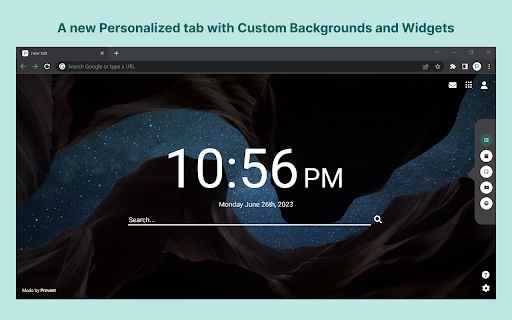
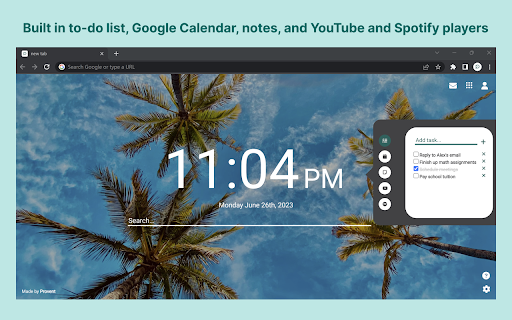

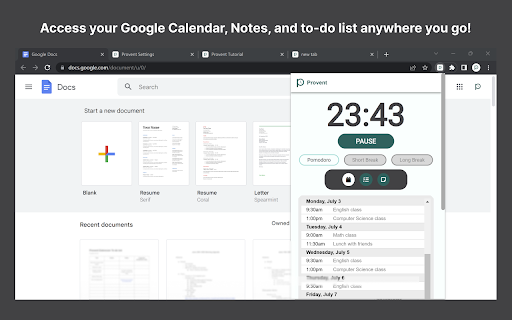

The all-inclusive, customizable productivity time management Chrome Extension to tailor to your workflow. Transform your Chrome tab into a clean, modern new tab with productive widgets and custom relaxing static or animated backgrounds! 💻 Do you procrastinate a lot? With our Pomodoro timer, you can block distracting websites such as YouTube, Instagram, and Netflix when you are supposed to be productive! 🚫 With our easily accessible pop-up, you can view your to-do list, notes, and Google Calendar on any website you visit, helping you stay organized and productive! 📃 With Provent, you get: - A new personalized tab with custom backgrounds and widgets - Built-in to-do list, Google Calendar, notes, and YouTube and Spotify players - A settings page to add custom backgrounds, customize your tab, and more! - The ability to access your Google Calendar, Notes, and to-do list anywhere you go! - Time blocking feature to block distracting websites when you want to be productive! Key Features ✨ - Pomodoro timer - Website blocker - New customizable tab - Option to add custom static or animated backgrounds - Built-in offline backgrounds - To-do list - Google Calendar integration - Notes - YouTube and Spotify embed - Custom website blocker message - Settings page to modify your preferences Start preventing procrastination and being productive today! 😤

Pomodoro Focus - Task Management
Maximize productivity with an ever-visible foreground timer plus personalized task management on every tab. 🔓 Unlock unparalleled productivity with Pomodoro Focus - Task Manager: Your go-to companion for mastering the Pomodoro Technique, time management, focus, and efficient task tracking thanks to the Chrome Side Panel integration. A Seamless Pomodoro Timer: Constantly visible on every page and tab, this foreground timer lets you embrace the Pomodoro Technique without switching or disrupting your flow. Advanced Task Management: Whether doing work, study, or personal development, you can easily add, view, and manage tasks. See your completed to-do list items and what's next at a glance. 1) Persistent Visibility: No more tab-switching! The Pomodoro timer stays visible across all your browsing, boosting your focus and productivity. 2) Universal Integration: Work, study, or research across multiple tabs - the timer keeps your concentration intact. 3) Efficient Task Management: Manage your to-do lists easily. Track your progress and view completed items swiftly. 4) Personalized Time Management: Customize your focus intervals and break times to suit your unique work rhythm, fully adapting the timer to your needs.

Otto: Pomodoro timer & Website Blocker. Block sites, Focus mindfully
Otto is a mindful focus timer and website blocker. Block websites, work mindfully with the Pomodoro timer. Be mindful while working. Otto - A Little Friend for a Wandering Mind A creature wanders through the vast winding meadows and flat plains of a place that has no name. Those who wander into it, call it the Garden. It's mysteries are shrouded in forgotten dreams and faded memories. The philosophy behind Otto is simple. It's about being present in the moment, being intentional about the things you choose to work on and a little forgiving of yourself. It's not about trying to do many things all at once, but doing very few intentional things that move you a little forward each day. But simple isn't easy. And life isn't perfect, it's mostly uncertain, and the mind always wanders. So a little structure wouldn't hurt. The Timer and Blocker are the core features of Otto. Everything else is built on top of them. The Pomodoro Focus timer helps you be intentional and break your time into focused intervals, while the website blocker helps you with your wandering mind. Pomodoro Timer: Break your time into focused intervals with the Pomodoro timer. Task Timer: Turn your Pomodoro sessions into Task sessions by naming them to be more intentional. Scheduled Website Blocker: Block websites during chosen hours of the day (does not require focus sessions to be running) Autoblock: Set a count down timer on websites instead of blocking them right away. Once the countdown reaches zero, the website will be blocked (Only works during focus sessions) Analytics: See your focus analytics and distraction analytics and more About the Game Mechanic Otto now has a new game mechanic that is more positive and mindful compared to the old mechanic (arcade style health/deplete). In the new one, your primary goal is to build a bond and friendship with Otto. As you spend more time with Otto, you get closer and closer until you reach the final stage. There are three stages for your friendship - The Stranger, The Friend and the Guardian. How does it Work? The more you focus, or the more your mind wanders, you get something called "Essense Particles", these particles represent your bond, the more you have them the more clsoer you get. Think of this as a real life friendship, where you spend time with your friend, you knew them as strangers and the more time you spent with them, the closer you got. There are no punishments or penalties for being distracted or missing a couple of days. But if you drift apart a little too much, your bond starts decaying slowly and you'll have to start over. Data and Privacy We take your privacy very very seriously. We do not spy, collect, steal, or sell your data. That goes against our values of creating good software products and building trust with our users and customers. All the data that is collect for visualization is stored in your browsers local storage and indexDB. It never leaves it! We do collect events and page views using Google analytics. This will help us improve Otto. This is a list of data google analytics colelcts - how long people use the extension - the number of daily/weekly/monthly users - what part of the UI is most active (via GA events) If you have any questions, bug reports or feature requests, email at jbnj@ottoapp.me ✌️

Tabwave
A mindful productive app to replace your browser's new tab. Tasks, notes, pomodoro, bookmarks, and site blocking, all in one place. Tabwave is an all in one mindful productive app to replace your browser's new tab . Get more done with todo lists, add sticky notes, block distractions, and boost your productivity with a pomodoro clock. Customize your new tab with a beautiful productivity app. - 🎯 Get more done with daily tasks and goals. Your daily to-do list right in your browser's new tab. - 📑 Brainstorm ideas on Sticky notes. Write down your quick ideas, short notes and things to remember - ⏳ Increase your productivity with a Pomodoro clock. Do focused work sessions with frequent short breaks - 🚫 Block distracting websites. Be mindful about your time to be more productive. - 🏷️Open and search your bookmark in single click. Add shortcuts to your favourite sites. - 🌓 Dark mode and many more exciting features. This tool is really great! It really has all the things that I wanted for productivity. - Sai Karthik I love this so much! Its a 4-in-1 extension with good graphics and a playful design. It also has a Pomodoro timer that plays a cute sound when the timer runs out. - Lu Valour

Pomodoro
The Pomodoro Technique - Focus. Relax. Improve. Achieve. Pomodoro Technique is a time management method by Francesco Cirillo in the 1980s *****There are six steps in the original technique***** 1. Decide on the task to be done. 2. Set the Pomodoro timer (traditionally to 25 minutes). 3. Work on the task. 4. End work when the timer rings and put a checkmark on a piece of paper. 5. If you have fewer than four checkmarks, take a short break (3–5 minutes) and then return to step 2; otherwise continue to step 6. 6. After four Pomodoros, take a longer break (15–30 minutes), reset your checkmark count to zero, then go to step 1. Application developed by Linh Okita and Nyan.
