
cnoplimhpndhhhnmoigbanpjeghjpohi
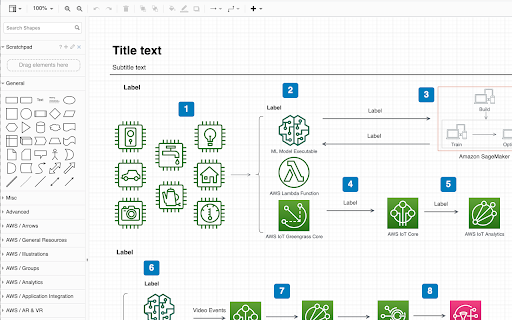
Automatic migration to draw.io and diagrams.net for tools that don't expose diagram data. Log into the Lucidchart in a browser tool and navigate to https://app.diagrams.net/tools/lucid/import.html into another tab. Once authenicated you can convert all diagrams in your Lucidchart account to draw.io and output the results to one zip file.

EdrawMind - MindMapping Tool
EdrawMind, a full-featured collaborative mind mapping and brainstorming tool. EdrawMind online version is a web-based application that allows you to create mind maps on your browser, with nothing to download or install. As an online mind mapping software, EdrawMind provides a better way for brainstorming, note-taking, and project planning. With it, you could create beautiful mind maps with various styles, and store them in the cloud or share with others immediately. You can easily export your mind maps to other files such as PDF, and graphic files. Meanwhile, you can also share your amazing work on Facebook and Twitter through Html link! Your mind maps are available everywhere and from any device.

JSON-handle
It's a browser and editor for JSON document.You can get a beautiful view. And transcoding Unicode Base64 URL with decode & encode. Edit and browse JSON document in a node tree diagram. After installed, open the URL will trigger JSON-handle: 安装后打开下面网址可以看到JSON-handle启动的效果: http://jsonhandle.sinaapp.com/demo.json

Axure RP Extension for Chrome
An extension that allows viewing of locally published Axure RP prototypes (HTML files) from Google Chrome. Add this extension to view locally published prototypes (HTML files) created from Axure RP in Google Chrome. This extension requires a high access level to allow the viewing of the file:// protocol. This extension only requires these permissions to allow viewing of prototypes in Chrome - Axure does not track or access any of your information. IMPORTANT: After installing the extension you must check the setting "Allow access to file URLs". You can access this by going to: Tools > Extensions > Axure RP Extension for Chrome from the Chrome > Preferences menu. This extension allows you to view Axure RP prototypes in Google Chrome. It is not used to open Axure RP project files (.rp, .rpteam) for editing in Google Chrome. You do not have to install this extension if you want to view prototypes hosted on the web. For example, you don't need this to view prototypes from Axure Cloud (app.axure.cloud) or Axure Cloud for Business (axure.com/enterprise). If you have any issues or questions, please email support@axure.com To download the latest version of Axure RP or a free 30-day trial, visit axure.com/download.

Markdown Here
Write your email in Markdown, then make it pretty. Markdown Here lets you write email in Markdown and render it (make it pretty!) before sending. This is great for anyone who doesn't like fiddling around with formatting buttons while writing an email. It's especially good for programmers who write email with code in them -- it even supports syntax highlighting. And for the mathematicians among us: Markdown Here will render TeX formulae as well. Totally simple to use: 1. Write your email in your email client's rich editor using Github-flavoured Markdown. 2. Right-click in the compose area and then click "Markdown Toggle". 3. Your email is now pretty! (That is, it's been rendered to HTML.) 4. If you like the way it looks, just send it. If you want to change or add something, click "Markdown Toggle" again to get back to your original Markdown. 5. Repeat as necessary. Markdown Here is primarily targeted to work with Gmail and Thunderbird, but it also works pretty well with Yahoo and Hotmail. Additionally, it works great with Google Groups and Sites, Evernote's web interface, Blogger, Wordpress, and more! Syntax highlighting note: Use fenced code blocks and specify the language name. See the project page for an example. Privacy: Markdown Here accesses and modifies web content when you activate it. It can, in theory, access other web content, but does not. It also makes no Internet requests whatsoever. Your data is modified when and where you choose, and does not leave your browser. Available as a Chrome, Firefox, Safari, Opera, and Thunderbird extension. This is an open source project. Visit Markdown Here's Github page for full instructions, more information, bug reports, or to contribute.
