
cnmmnokeenlffmhalcgpmoiagfjnohfa

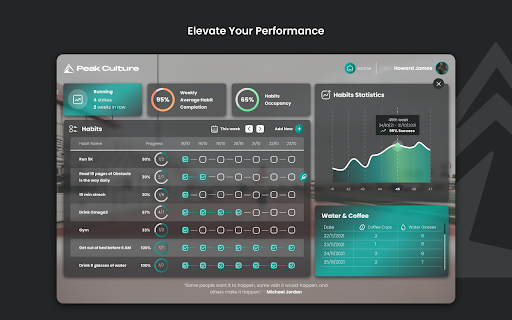


Peak Culture: build habits, Spotify, activity and progress tracking in New Tab FREE Chrome Extension That Helps You Reach Your Peak - Mentally and Physically Turn your Chrome New Tab page into a comprehensive tool with: • To Do • Event countdowns • Listen to Spotify • The possibility to create and track Habits on a weekly level and later see your success through detailed statistics • Record your Fitness Personal Records and have an overview for later reference • Write down your Goals • Save your favourite Bookmarks • Dynamic Wallpapers • Dynamic Quotes Peak Culture is your best pal when you need motivation and help keep track of your fitness & life goals and good habits. Peak Culture was created by a group of people on a constant quest to find ways to do things better and more efficiently every day. We love spending quality time with our families, nature, calisthenics, Brazilian jiu-jitsu, skiing, exploring the outdoors, technology, crypto and many more things, but these are probably at the top. Follow us on Social Media: https://www.instagram.com/peakculture.life/ https://www.facebook.com/peakculture https://twitter.com/PeakDash https://www.youtube.com/channel/UCwOgl9oDiitNCg4tKsA4_Eg https://www.linkedin.com/company/peak-culture/

Omni - Bookmark, History, & Tab Manager
Supercharge Chrome with commands, shortcuts, and more With Omni you can use Chrome like a pro. Manage tabs, bookmarks, your browser history, perform all sorts of actions and more with a simple command interface. FEATURES 🗄 Switch, open, close, and search your tabs 📚 Browse and manage your bookmarks 🔍 Search your browsing history ⚡️ 50+ actions to improve your productivity 🔮 Special commands to filter and perform more actions 🧩 Integrations with Notion, Figma, Docs, Asana... ⌨️ Shortcuts for actions such as muting, pinning, bookmarking... ⚙️ Advanced settings to help troubleshoot browsing issues 🌙 Dark mode ...and much more - all for free & no sign in needed! Want to self-host, add new features to Omni, or even make your own omnisearch extension? Feel free to check out the code on GitHub! 👉 https://github.com/alyssaxuu/omni Omni is built and maintained by Alyssa X (https://alyssax.com)

eesel: ChatGPT document search
ChatGPT powered new tab search for Google Docs, Notion pages and other work documents Your team creates many work docs in many different apps. A project brief in Google Docs, a timeline in Notion, a mockup in Figma. It can be an exhausting game of trial and error to find the links you need, and that's where eesel comes in. 🔎 Doc search in your new tab eesel filters your browser history to show your work documents right in your new tab. It’s all easy to access and fully searchable. 📁 Self-organised Folders Get your work automatically organised into Folders. Forget about tab managers and bookmarks. 🆕 A feed of work documents Share Folders with the team and receive new pages they make, directly in the new tab. Stay in the loop without chasing for updates on Slack. 💨 Skip past spinners Fly through your work with Commands to create new docs, and a shortcut to open eesel and access your documents from any page. 🌏 Works with any app eesel works with anything you open in the browser – from that hip new product only you know about to that old school company intranet. 🤯 No setup There's no need to create an account or connect the different apps you use. Install eesel and you're done. • • • PRIVACY • • • The content of your pages never leaves your browser. In fact, by default, eesel runs entirely locally. Check that for yourself - https://eesel.app/hack

Clarity notes V2
Clarity Notes V2 brings AI-powered learning tools directly to YouTube. Instantly generate smart summaries, quizzes, and flashcards for any video—helping you learn faster and remember more. AI Summaries: Get concise, accurate overviews of any YouTube video. AI Quizzes & Flashcards: Reinforce your understanding with automatically generated questions and flashcards. Effortless Note Capture: Save and revisit your notes with a single click. Minimal, Distraction-Free UI: Focus on the content that matters most. Clarity Notes V2 is perfect for students, professionals, and lifelong learners who want to make the most of their YouTube experience.

tabExtend - Easy Tab manager
Transform your new tab into a powerful dashboard. Add notes, set reminders, and sync across devices to boost productivity. The best way to manage your tabs and organize your workflow on any device. (Chrome, Brave and Edge supported) TabExtend is the easiest way to manage browser tabs, offering a seamless solution for anyone looking to organize and control their tabs. The pain caused by having too many open tabs and disorganized windows in Google Chrome is a thing of the past. You might have tried other tab management tools, such as OneTab, Workona or Toby, and run into countless problems with feature limitations and organization. TabExtend is the ultimate replacement for this. We transform your new tab into an interactive dashboard and Kanban board, ensuring your tabs and workspaces are always organized and in sync. If you are looking for a way to manage tabs in Chrome, look no further. We have you covered with TabExtend - tab management has never been easier nor more efficient. What are you waiting for? Once you install, you will finally have a way to take control of your tabs. ✔︎ Manage tabs & tab-groups across multiple windows ✔︎ Notes / To-dos ✔︎ Setup reminders for sites and notes ✔︎ Popover with saved notes on any site ✔︎ Sync to Mobile apps(iOS & Android) ✔︎ Import bookmarks and top sites ✔︎ Save selected text-snippets ✔︎ Search sites and items ✔︎ Dark/light theme ✔︎ Shared workspaces ✔︎ Share categories via public link ✔︎ Upload custom emojis Try as guest or sign up for a free account. All features included up to 30 saves. Available for Chrome, Brave, and Edge TabExtend helps users with all sorts of questions; here are just a few: How do I manage too many tabs in Chrome? How do I organize my Chrome tabs? How do I save tab groups in Chrome? How do I sync tabs across devices? How do I manage browser tabs efficiently? How to organize Chrome tabs? How to save tab groups? How to manage multiple windows? How to sync tabs between devices?
