
cnmlafajlhblgggceffcdhkoaoonlhen
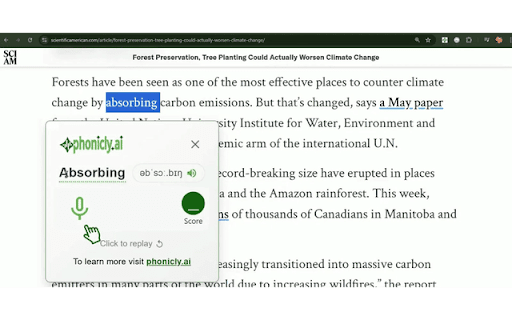


Learn and practice American accent with instant feedback for selected words using Phonicly's AI-Powered pronunciation training. This extension will allow you to practice and learn correct American accent for the selected word in your browser using phonicly.ai technology. Instructions: > Install the extension to your Chrome by clicking "Add to Chrome". > Select the word that you would like to practice. > In the phonicly extension popup, you can see the word definition, as well as a speaker icon to listen to the correct American accent. > Now click the mic button to start recording which will automatically stop when you stop speaking. > Your score will be computed using advanced AI techniques. > Repeat as much as you like to improve your accent. For more details, please see the explainer video. phonicly.ai is a revolutionary professional-grade American accent training software. It provides AI-assisted live coaching with real-time feedback coupled with solid coursework and AI-enhanced practice sessions. With advanced pronunciation correction, it's a highly effective method to achieve perfect American accent quickly. For more information and to subscribe to our complete 3-module 18-lesson curriculum, please visit https://phonicly.ai

True Paper
Turns your image into something that looks like real paper by eliminating shadows, distortions and blur. Features: • 🖼️ Perspective Fix: from 3D image to 2D, eliminating distortions. • ✂️ Auto Crop: intelligently detects and crops document edges. • 🎨 Paint: customise paper using paint tools. • ⚡ Performance: converts images to paper without delays (file not sent to internet). • 🎯 Precision: delivers highly accurate results (file quality is not lost). • 🔒 Offline Functionality: operates entirely offline, ensuring your data stays private. • ✨ Extra Options: output size control, watermarking (image/signature), metadata handling, and format selection. Shortcuts: • Paste files from your clipboard for processing: Ctrl/Cmd + V • Copy the modified selection to your clipboard: Ctrl/Cmd + Shift + C Notes: • 🧩 Compatibility: may vary across devices 😢. • ⏳ Processing Speed: depends on your system resources and file size.

Not So Fast
Prevent accidental clicks due to elements moving around on the page. Have you ever tried to click on something only to have some other button or link take its place right as you click on it? You meant to click on the first thing, and it seems obvious to everyone—that is, everyone but your browser. That's the problem Not So Fast solves. Not So Fast detects when elements have moved near your mouse and sets up a short "grace period" where any accidental clicks are ignored. This prevents unintended actions, like pressing the wrong button, losing your place on the page, or opening dangerous links. The added security also reduces the cognitive load of using your pointing device of choice, making for a more pleasant browsing experience. The extension is currently in beta, so feedback is welcome!

Best & Fast & Custom URL/Link Shortener - Sht.wf
Shorten long URLs / Links instantly with our free URL shortener. Get A Free API Key to use the extension @ https://sht.wf Shorten long URLs instantly with our free URL shortener. Create custom short links, track clicks in real-time, and boost your engagement. Try it now! An API key is required for requests to be processed by the system. Once a user registers, an API key is automatically generated for this user. The API key must be sent with each request. If the API key is not sent or is expired, there will be an error. Please make sure to keep your API key secret to prevent abuse.

Type.
Track your typing speed across Chrome browsing sessions 🟡 Track Your Real-Time Typing Speed Across the Web Type. is the ultimate tool to monitor your typing performance in real-time—no matter where you're typing in Chrome. 📈 Beautiful visualizations of your typing trends 🎯 Accuracy insights to boost your typing efficiency 🔒 Fully private — your data stays on your device 🧠 Why Use It? Whether you're a writer, student, developer, or just love speed-typing, this extension gives you deep insights into how you type. Improve your speed, identify fatigue patterns, or just geek out on data! 🔒 Privacy First We do not track or store any of your keystrokes externally. All analytics are computed in real-time locally in your browser. I’d need a server for tracking — but servers cost money, and I’m broke. So yeah, you're safe 😄 __ Type smarter. Type faster. Know your flow.
