
cmpkbfffmenpomncklhllnhbmpbpfiip
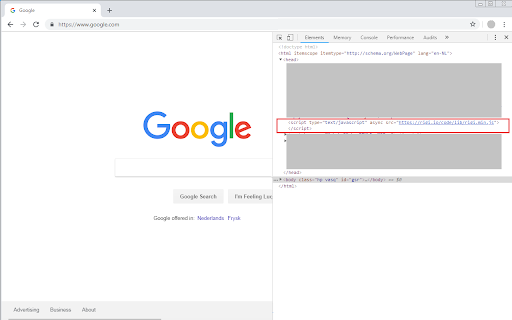
Enable rigi on all pages that you open. The Rigi Localization Management Platform enables in-context localization of dynamic web applications, what-you-see-is-what-you-get (WYSIWYG). One of the two requirements to enable in-context localization for a web application is to include a Rigi Javascript. This small extension injects that script in each page that is loaded. Visit www.rigi.io for more information.

InQA ATMS
Build for InQA ATMS Argos Multilingual is a translation company with a platform called InQA for performing quality assurance on translations we provided on Source and Target strings. This extension is a productivity tool to post into the INQA platform without the need to do it manually in another tab. The extension works by using a unique token assigned to a pre-selected resource (linguist). This persons sign's in with it and that enables the ability to copy target and source with the context menu or shortcuts. After completing that you can add a comment to it and post it into the system, if the segment exists it updates it , if not it creates it. This particular version is tailored for the ATMS system

UI5 Journey Recorder
A point-and-click adventure for your UI5 tests With the UI5 Journey Recorder you can easily record your test journeys for your UI5 app. Export it to wdi5 + OPA5 or save it for later use. Share it with others and replay tests within our browser without any framework needed.

UI5 Inspector
With the UI5 Inspector, you can easily debug and support your OpenUI5 or SAPUI5-based apps. With the UI5 Inspector extension for Chrome DevTools, you can inspect, analyze, and support OpenUI5 and SAPUI5-based apps. Key features: • Inspect UI5 controls and review their properties, bindings, and data model • Modify control properties on the fly and see how this affects the rendering and behavior • Find relevant framework information for your OpenUI5/SAPUI5 app

WebdriverIO Chrome Recorder
WebdriverIO Extension for Devtools that allows you to export tests directly from the Recorder panel. WebdriverIO Extension for DevTools that allows you to export tests directly from the Recorder panel. WebdriverIO Chrome Recorder Extension lets you export user flows as WebdriverIO test scripts from the Recorder panel in Chrome DevTools. With Chrome Recorder and the WebdriverIO Chrome Recorder Extension, you can start creating test scripts for WebdriverIO with just a few clicks. After installing this extension, you will see a new "Export as WebdriverIO Test Script" option available under the export menu. Learn more about Chrome Recorder and the WebdriverIO extension with our official guide: https://bit.ly/wdio-recorder
