
cmncoolckhinjbfghfbiionapeanngep
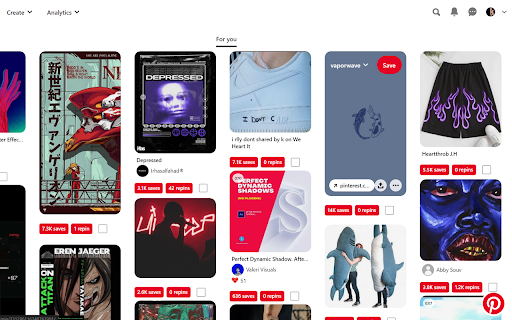

Pinterest extra allows it users to view the analytics of pins aswell as downloading them! Unleash Pinterest's Hidden Insights with Pinterest Extra! This game-changing extension unlocks a treasure trove of data for every pin, revealing insightful metrics like saves, repins, likes, dominant colors, and original source. With a single click, you can effortlessly download individual pins or batch-download multiple pins simultaneously. Perfect for content creators, marketers, and Pinterest power users, Pinterest Extra empowers you to optimize your strategy, boost engagement, and stay ahead of the game. Say goodbye to guesswork and hello to data-driven success on Pinterest!

Pin Toolbox - Pinterest Board Downloader
Please note: Pin Toolbox is a paid Chrome extension. When you add it to Chrome it will be available in free demo mode - limited to the first 15 pins of any board. Upgrade to Pro to unlock unlimited downloading. Are you tired of wasting time downloading Pinterest images one by one? With Pin Toolbox, you can easily download any Pinterest board with just a few clicks. Pin Toolbox is the Pinterest downloader used by Pinterest power users. Whether you're an interior designer, stylist, or creative professional, Pin Toolbox can save you time and streamline your Pinterest workflow. Here's how it works: 1. Add Pin Toolbox extension in your browser. 2. Visit any board on Pinterest that you wish to download from. 3. Open Pin Toolbox, and it will extract all the images and videos from the board. 4. Select your favorite pins or select all of them at once. You can also select by board section. 5. Click the download button, and all the selected files will be saved to a single .zip folder with smart file naming and numbering for easy import into Adobe Photoshop, InDesign, or Canva. Features: - Bulk download whole Pinterest boards or select specific images and videos. - Save full-size photos and videos. - Download sections of Pinterest boards. - Download over 5000 pins at a time (Pro users). - Download to a .zip folder or as a PDF. - Print Pinterest boards - Smart file naming and numbering for easy import into Adobe Photoshop, InDesign, or Canva. - Add your team members with the Teams plan Pin Toolbox was built to be a powerful, yet easy to use Pinterest downloader. It is designed specifically for creative professionals that use Pinterest day in day out and need a downloader that works reliably every time, downloading all the full size pins from any board. It is maintained and updated regularly. If you have any feature requests be sure to send them through to thomas@pintoolbox.com. Streamline your Pinterest workflow and save time with Pin Toolbox, the ultimate Pinterest downloader. By using Pin Toolbox - Pinterest Board Downloader, you agree to our privacy policy (https://pintoolbox.com/privacy). Pin Toolbox - Pinterest Board Downloader is not affiliated with Pinterest, Inc. All Rights Reserved. © 2024 Pin Toolbox.

Autopinner
Effortless growth for your pinterest! Effortless growth for your Pinterest - Grow Smarter & Faster on the World's Largest Social Media Platform. Ready to build an online empire & skyrocket your website traffic? When you try to create a pin, you can only upload a single image for a pin. First, you need to find relevant content for your niche, choose the board where the pin is destined, make a good title, a decent description, and a link for your website. Each time when you create a new pin, you need to do this same process for all pins. Which is a really hard task and a big time-consuming copy and paste work for all. Stop draining your energy on things you can easily automate. As a serious business owner, the last thing you have time for is spending hours posting pins at random and hoping it will bring in sales.. To achieve explosive and consistent growth on Pinterest, you need an automated and streamlined workflow that will keep you ahead of your competitors in the Pinterest Marketing Game. That’s why we created the perfect Pinterest tool to help you achieve explosive growth, with a seamless, automated, and time-saving workflow. AutoPinner Has Got Your Business Back — AutoPin can do more than bulk pinning images, it features powerful automation tools that will help you achieve explosive growth without the need to spend countless hours of work every day. So your time is freed up to work on the important things that will help move the needle for your business. • Bulk Import Instagram Posts straight to Your Boards • Bulk edit the pins you aim to publish • Everything runs on the cloud. Everything you add or edit stays saved on drafts. ( Even if your PC turns off AutoPinner has your back. ) • Easy & Quick Setup. You'll get it up & running in less than 2 minutes! • We respect the work of content creators. To that end, we've added a feature that allows you to automatically include credits of content creators when it's not your own content. Visit the application website (https://autopinner.com/). Download the Google Chrome Extension. Synchronize your Pinterest boards. Choose images you wish to pin - You can Bulk upload images or Bulk import posts from any Instagram account / Hashtag straight to your Pinterest Boards. Fill out the details for the images that are about to be pinned ( Descriptions, Titles, and links ). You can auto-generate descriptions from Instagram and you can also set the details for only one post, then with a simple click of a button, you can apply the same details to all the other pins. Choose which board(s) the images are to be sent to. Sit back and enjoy endless growth! If you have any questions or need any help, our customer support team is available anytime during the week, they are more than happy to help. Feel free to contact us using our website. ---> https://autopinner.com/

Contai Extractor
Extract and save content from web pages Contai Extractor Extension is the ultimate tool for effortlessly gathering data from any website. With a single click, you can extract URLs and featured images, or copy any text along with its image URL. It simplifies the process and allows you to export all your data in a CSV format, ready to work on within Contai.io. Designed to minimize effort and maximize productivity, the extension enables content creators to focus on what truly matters while saving valuable time."

Pinterest Stats Extension - SortPins.com
Track Pinterest pin performance with real-time stats. Sort by saves, likes, comments. Detect AI content & analyze strategy. Reveal Pinterest Stats & Sort Pins Automatically - The Ultimate Pinterest Analytics Tool Unlock hidden Pinterest pin statistics and sort your pins effortlessly! This powerful Chrome extension reveals saves, likes, comments, shares, and repins directly on your Pinterest feed. Sort pins by engagement metrics, creation date, or filter by content type—all automatically as you browse. Why Install This Extension? Pinterest hides valuable engagement data that could transform your strategy. Our Pinterest stats checker reveals: - Hidden Pin Statistics: See saves, likes, comments, shares, and repins on every pin - Automatic Pin Sorting: Sort pins by saves, likes, comments, or creation date instantly - AI Content Detection: Identify AI-generated pins automatically - Pinterest Analytics Dashboard: Comprehensive data table with advanced filtering - CSV Export: Download pin data for deeper analysis - Free Download: Save high-quality Pinterest images and videos 📊 Pinterest Pin Stats Viewer View hidden data of each pin including saves, likes, comments, shares, repins, and creation dates. See real-time stats overlays directly on your Pinterest feed—no clicking required. 🔀 Sort Pins Automatically The easiest way to sort your Pinterest pins! Sort by: - Number of saves (repins) - Likes and reactions - Comments count - Creation date - Engagement metrics 🔍 Advanced Filtering Filter pins to find exactly what you need: - Filter by saves, likes, or comments - Filter by content type (images, videos, AI-generated) - Filter promoted vs. organic pins - Filter repins vs. original pins - Filter by date range 📈 Pinterest Analytics Dashboard Open the Pin Stats Table for comprehensive analytics: - View all collected pins in one place - Sort by any metric - Advanced filtering options - Export to CSV for external analysis - Track performance trends 🤖 AI Content Detection Instantly identify AI-generated pins with automatic detection. Perfect for understanding content trends and making informed strategy decisions. 💾 Free Download Pinterest Content Download high-quality Pinterest images, videos, and story pins directly to your device. Quick and easy access to the content you need. 📥 Pinterest Data Scraping Extract data from your pins automatically. Collect pin statistics, engagement metrics, and content information to inform your marketing and content strategy. 🎯 Perfect For Content Creators - Find the best-performing viral pins - Sort pins by engagement to identify trends - Analyze competitor content strategies - Optimize your own pin performance Businesses - Monitor brand performance - Analyze market trends - Export data for reporting - Identify high-engagement opportunities 1. Install the Extension - Add to Chrome with one click 2. Browse Pinterest - Visit Pinterest.com and browse as usual 3. See Stats Instantly - Hidden pin statistics appear as overlays 4. Sort & Filter - Sort pins by saves, likes, comments, or date automatically 5. Analyze - Open Pin Stats Table for detailed analytics 6. Export - Download CSV data for external analysis Pinterest Stats Checker Our Pinterest stats checker reveals hidden engagement data that Pinterest doesn't show by default. See saves, likes, comments, and more on every pin. Pin Sorting Tool Sort Pinterest pins effortlessly by any metric. Whether you want to find the most saved pins, most liked content, or newest posts, our sorting tool makes it easy. Pinterest Analytics Gain actionable insights with comprehensive Pinterest analytics. Understand what content performs best and why. Local Data Storage All pin data is automatically saved to your browser's local storage. Access your collected pins anytime in the Pin Stats Table. ⚠️ Works On These Pinterest Pages: - Home Feed - Search Page - Ideas Page - Detailed Pin Page - User Profiles - Board Pages *For the best experience, please ensure you are logged into Pinterest.* - All data stored locally on your device - No data transmitted to external servers (except encrypted license validation) - You control data collection settings - Full privacy control 💡 Why Choose This Pinterest Extension? Unlike other Pinterest tools, this extension provides: - Instant Stats Display: See hidden data directly on pins - Automatic Sorting: Sort pins by any metric with one click - Comprehensive Analytics: Not just basic stats, but detailed insights - AI Detection: Identify AI-generated content automatically - Free Downloads: Save Pinterest images and videos - Clean Interface: Modern, user-friendly design - Regular Updates: Continuously improved with new features Transform how you analyze Pinterest content! Whether you're: - Looking to sort pins by engagement - Analyzing competitor strategies - Finding viral content ideas - Optimizing your Pinterest marketing - Tracking pin performance This Pinterest stats extension gives you the tools you need to succeed. Install now and start revealing hidden Pinterest statistics!
