
dnpclnddefebpffecjjfaebhoiekpggj
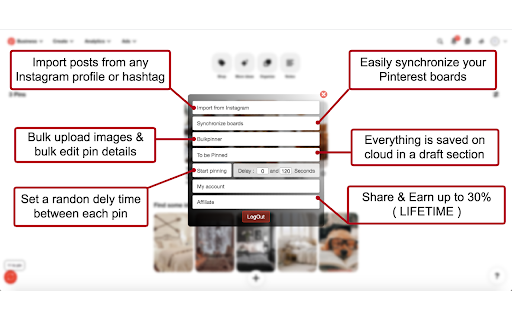
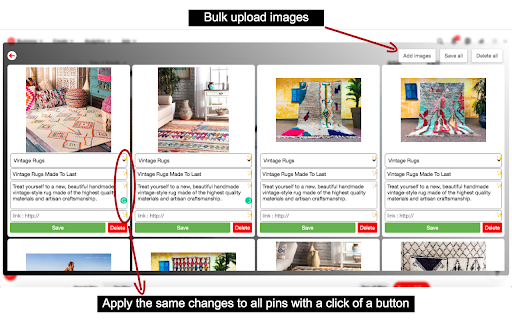
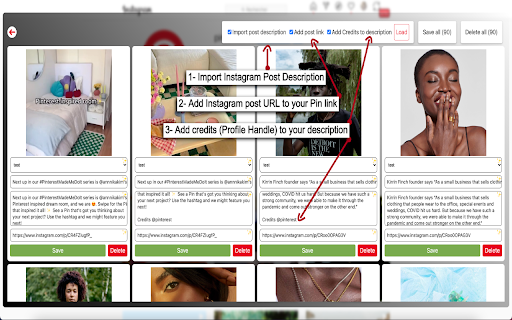
Effortless growth for your pinterest! Effortless growth for your Pinterest - Grow Smarter & Faster on the World's Largest Social Media Platform. Ready to build an online empire & skyrocket your website traffic? When you try to create a pin, you can only upload a single image for a pin. First, you need to find relevant content for your niche, choose the board where the pin is destined, make a good title, a decent description, and a link for your website. Each time when you create a new pin, you need to do this same process for all pins. Which is a really hard task and a big time-consuming copy and paste work for all. Stop draining your energy on things you can easily automate. As a serious business owner, the last thing you have time for is spending hours posting pins at random and hoping it will bring in sales.. To achieve explosive and consistent growth on Pinterest, you need an automated and streamlined workflow that will keep you ahead of your competitors in the Pinterest Marketing Game. That’s why we created the perfect Pinterest tool to help you achieve explosive growth, with a seamless, automated, and time-saving workflow. AutoPinner Has Got Your Business Back — AutoPin can do more than bulk pinning images, it features powerful automation tools that will help you achieve explosive growth without the need to spend countless hours of work every day. So your time is freed up to work on the important things that will help move the needle for your business. • Bulk Import Instagram Posts straight to Your Boards • Bulk edit the pins you aim to publish • Everything runs on the cloud. Everything you add or edit stays saved on drafts. ( Even if your PC turns off AutoPinner has your back. ) • Easy & Quick Setup. You'll get it up & running in less than 2 minutes! • We respect the work of content creators. To that end, we've added a feature that allows you to automatically include credits of content creators when it's not your own content. Visit the application website (https://autopinner.com/). Download the Google Chrome Extension. Synchronize your Pinterest boards. Choose images you wish to pin - You can Bulk upload images or Bulk import posts from any Instagram account / Hashtag straight to your Pinterest Boards. Fill out the details for the images that are about to be pinned ( Descriptions, Titles, and links ). You can auto-generate descriptions from Instagram and you can also set the details for only one post, then with a simple click of a button, you can apply the same details to all the other pins. Choose which board(s) the images are to be sent to. Sit back and enjoy endless growth! If you have any questions or need any help, our customer support team is available anytime during the week, they are more than happy to help. Feel free to contact us using our website. ---> https://autopinner.com/

PinMagic - Pinterest Marketing Tool
Sort Pinterest Pins by Repins: This tool allows you to organize your Pinterest pins based on the number of repins they have received. By sorting pins in this manner, you can easily identify which content resonates most with your audience, enabling you to focus on creating similar high-engagement content. Pin Scraper: With this feature, you can extract comprehensive data from individual pins, including: Title: The headline of the pin. Pinner: The user who posted the pin. Pinner Email: Contact information for the pinner. Pinner Followers: The number of followers the pinner has. Pinner Domain: The associated website or blog of the pinner. Pin Saves: The number of times the pin has been saved by other users. Pin Repins: The count of how many times the pin has been repinned. Pin Comments: Feedback and comments left by other users. Published Date: The date the pin was originally posted. Profile Scraper: This tool collects detailed information about Pinterest profiles, including: Username: The handle of the profile owner. Email: Contact information for the profile owner. Website: The linked website associated with the profile. Profile Views: The number of views the profile receives monthly. Followers: The total number of followers. Following: The number of other users the profile is following. Boards: The total number of boards the profile has created. Total Pins: The overall number of pins shared by the profile. Boards Scraper: This feature allows you to search for Pinterest boards using specific keywords. With the extension, you can easily find boards that have a join button, making it simpler to collaborate and connect with other users who share similar interests. Bulk Pinterest Keyword Trends Checker: This tool enables you to analyze trends by entering a list of keywords. With just one click, you can retrieve all related Pinterest keyword trends, helping you to stay informed about popular topics and optimize your content strategy accordingly.

Pinterest Tag Helper
A tool to help you build, troubleshoot and test your Pinterest Tags. For more details on how to use the extension, visit our Developer Center. https://developers.pinterest.com/docs/conversions/pinterest-tag-helper-chrome/ Release note for version 0.1.19: Display event type when POST requests are detected

Tailwind: Pinterest Marketing & Scheduling
Pin from anywhere fast! Tailwind's extension is the ultimate time-saving, productivity-boosting Pinterest marketing tool. Pin from anywhere fast! Tailwind's Chrome extension is the ultimate time-saving, productivity-boosting Pinterest marketing tool for small business owners, ecommerce stores, and content creators. 🚀 Pin anywhere, Pin instantly Say goodbye to the tedious process of downloading/uploading images, switching between tabs, and copy/pasting. With the Pinterest extension, you’ll create and schedule Pins directly from any website with just a click, without leaving the page! ✨ Effortless Pin creation Hover over any image, click 'Schedule,' and watch the magic happen. Our intuitive interface makes Pinterest marketing a breeze, freeing up your time to focus on other things. 🏆 Trusted by thousands of small businesses Join the hundreds of thousands of entrepreneurs, ecommerce stores, and content creators who've built their Pinterest marketing with Tailwind. Our users have generated over one billion free, targeted clicks to their websites! “I was not getting a lot of views until I started using Tailwind to schedule my pins. I joined some Communities and scheduled pins using this efficient extension. As a result, my viewership has skyrocketed from 5,800 monthly viewers in mid-September (when I joined) to 267,000 monthly viewers in mid-November, which is a lot of growth in just two months!” - Elizabeth Ruelas 🔥 Key features: * Start a new Pin with one-click from any website * Bulk image selection for rapid content creation * Access Tailwind’s award-winning Pin Scheduler without switching tabs Click “Add to Chrome” to grow your website traffic faster, and get your Pinterest marketing done in half the time, with the free Tailwind Pinterest Marketing & Scheduling extension!

Pin Toolbox - Pinterest Board Downloader
Please note: Pin Toolbox is a paid Chrome extension. When you add it to Chrome it will be available in free demo mode - limited to the first 15 pins of any board. Upgrade to Pro to unlock unlimited downloading. Are you tired of wasting time downloading Pinterest images one by one? With Pin Toolbox, you can easily download any Pinterest board with just a few clicks. Pin Toolbox is the Pinterest downloader used by Pinterest power users. Whether you're an interior designer, stylist, or creative professional, Pin Toolbox can save you time and streamline your Pinterest workflow. Here's how it works: 1. Add Pin Toolbox extension in your browser. 2. Visit any board on Pinterest that you wish to download from. 3. Open Pin Toolbox, and it will extract all the images and videos from the board. 4. Select your favorite pins or select all of them at once. You can also select by board section. 5. Click the download button, and all the selected files will be saved to a single .zip folder with smart file naming and numbering for easy import into Adobe Photoshop, InDesign, or Canva. Features: - Bulk download whole Pinterest boards or select specific images and videos. - Save full-size photos and videos. - Download sections of Pinterest boards. - Download over 5000 pins at a time (Pro users). - Download to a .zip folder or as a PDF. - Print Pinterest boards - Smart file naming and numbering for easy import into Adobe Photoshop, InDesign, or Canva. - Add your team members with the Teams plan Pin Toolbox was built to be a powerful, yet easy to use Pinterest downloader. It is designed specifically for creative professionals that use Pinterest day in day out and need a downloader that works reliably every time, downloading all the full size pins from any board. It is maintained and updated regularly. If you have any feature requests be sure to send them through to thomas@pintoolbox.com. Streamline your Pinterest workflow and save time with Pin Toolbox, the ultimate Pinterest downloader. By using Pin Toolbox - Pinterest Board Downloader, you agree to our privacy policy (https://pintoolbox.com/privacy). Pin Toolbox - Pinterest Board Downloader is not affiliated with Pinterest, Inc. All Rights Reserved. © 2024 Pin Toolbox.
