
cmjjfmkpcickmapganbaipcblolkapbm

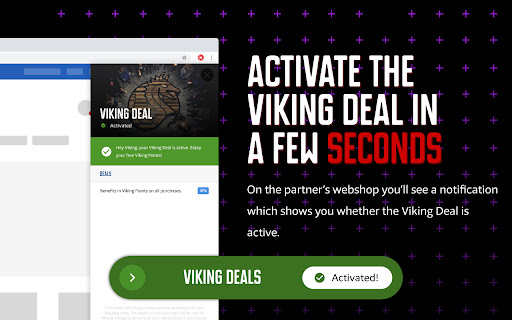
Viking Deals Browser Extension: Never forget to grab a Viking Deal! Thanks to the plug-in you’ll see a notification in your Google results and on the partners’ webshops so you never forget a Viking Deal. That way you can activate the Viking Deal directly on the webshop instead of going through the Viking Deals website. What’s more: it only takes a few clicks to install!

eID Chrome OS Extension
Chrome OS extension for the Belgian eID card The e-Contract.be BV eID services use this extension to communicate with our eID Chrome OS middleware software to access the Belgian eID card.

Squadrats Route Planning
Add thrill to your cycling route planning by hunting squadrats. Use Strava, Garmin, RideWithGPS, and other planners. No more meaningless rides. Turn your cycling trips into thrilling missions! This extension combines the power of Squadrats with your favourite route planning tool. Supported planners: * Strava * Garmin Connect * RideWithGPS (activities in Strava or Garmin) * Komoot (IMPORTANT: activities must be in Strava or Garmin) * Hammerhead Karoo (IMPORTANT: activities must be in Strava or Garmin) * and others Now you can use these tools to plan your activities so precisely, that you never miss a single squadrat! A squadrat is a mile by a mile squarish thing on the map. The idea is to go out, collect them, and connect them, forming larger chunks of land. By doing so, you'll visit strange places and amuse yourself with all the things you missed in your close neighbourhood. It will also make your cycling activities fun again. Don't have time for all-day rides? No problem. Switch to squadratinhos - tiny squadrats. Chase them on your way to work.

Elevate for Strava
Elevate your strava experience and goals! Track your fitness and progressions over time. Analyse deeper your activities. And more... Elevate extension is adding features that riders and runners would like to see in Strava web app. If theses features could be added by default in Strava... It could be cool ! Consider getting Strava Premium. There are a ton of features that you will love. Remember, this extension has for ambition to enhance the experience of all users (Free and Premium) and tends to keep users loyal in Strava. - Fitness Trend: All sports, ready for triathletes. - Estimated Fitness Trend: No sensors? If you have at least your phone, you can access the feature - Year progressions: track your progress day by day. - Enhanced activity stats: "Time in zones" graph for all your sensors; Stress scores (heart rate, power, running, swimming); Advanced speed, pace, cadence, power, stats... - Activity best splits - "Google Map" support through strava web app - and a lot more...

Cleanplaats - Marktplaats zonder spam
Zelf in de hand wat je wel én niet wil zien op Marktplaats door te filteren Cleanplaats – Jouw Marktplaats zonder spam Cleanplaats is een krachtige extensie die automatisch reclame, spam en commerciële rommel uit je zoekresultaten filtert. Jij bepaalt wat je ziet. Geen opdringerige advertenties, geen opvalstickers, geen bedrijven – alleen échte, relevante tweedehands advertenties. Wat Cleanplaats voor jou doet: * Verbergt topadvertenties, dagtoppers en commerciële aanbiedingen * Verwijdert opvalstickers uit je zoekresultaten * Blokkeert verkopers via een persoonlijke blacklist * Toont alleen particuliere advertenties als je dat wilt * Laat realtime statistieken zien van geblokkeerde advertenties * Biedt volledige controle via een handig bedieningspaneel rechtsonder Waarom Cleanplaats? * Snel, lichtgewicht en zonder tracking * Werkt automatisch zodra je Marktplaats opent * 100% gratis – geen kosten, geen advertenties, geen gedoe * Alle filters zijn eenvoudig aan of uit te zetten Jij hebt de controle – niet Marktplaats. Cleanplaats haalt de rommel weg, zodat jij vindt wat je zoekt. Steun Cleanplaats via: [https://buymeacoffee.com/cleanplaats](https://buymeacoffee.com/cleanplaats) 🔒 Veelgestelde vragen over permissies Waarom vraagt Cleanplaats om toegang tot browser-tabs en navigatie? Dat is nodig voor twee functies: – Meer resultaten per pagina (30 / 50 / 100) – Standaard sorteer-volgorde toepassen Deze functies werken door automatisch de URL aan te passen. Daarvoor is toegang nodig tot tabbladen en navigatie-activiteit, zodat je instellingen ook blijven werken bij nieuwe pagina's. Waarom zegt Chrome/Firefox dat Cleanplaats content op “alle websites” kan blokkeren? Die waarschuwing klinkt heftiger dan het is. Cleanplaats werkt uitsluitend op Marktplaats.nl en 2dehands.be. De blokkeer-permissie is nodig om advertenties zoals Topadvertenties, Dagtoppers en Opvalstickers te verbergen. Op andere websites doet de extensie letterlijk niets en heeft ze ook geen toegang. Kan Cleanplaats mijn data op andere websites bekijken of aanpassen? Nee. Cleanplaats heeft alleen toegang tot Marktplaats.nl en 2dehands.be. De extensie functioneert nergens anders, en kan dus ook niets doen buiten die domeinen. Waar kan ik de exacte permissies zien? – In Chrome: extensie-icoon → rechterklik → Beheren → Machtigingen bekijken – In Firefox: about:addons → klik op Cleanplaats → Beheren → Permissies en gegevens Is dit veilig? Ja. De extensie beperkt zich strikt tot de genoemde domeinen. Geen tracking, geen toegang tot andere websites, geen data-opslag buiten je browser. Bekijk de volledige code van de extensie: https://github.com/Aron220/Cleanplaats
