
cmboomkdkngiglblihhlokadkkocjjaa
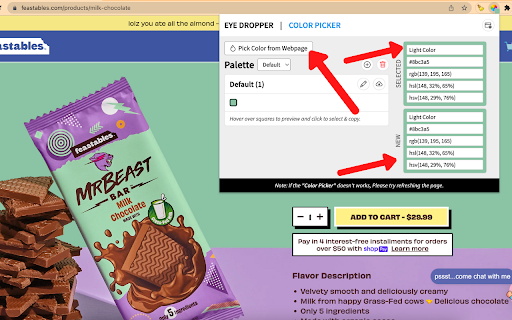

Color Eye Dropper 2.0 - Allows you to pick color from any web page or from our advanced color picker! 1. Click our extension icon 🎨 2. Choose from colors found on screen in our extension drop down page or click “Pick color from web page” 🎨 3. If you chose “Pick color from web page”, go to the color on the web page and hover over it until you found the right spot/color you want 🎨 4. Click on it 🖱️ 5. Go back to our extension drop down page & you’ll see the color & color code that you selected in the top right 🎨 6. That’s it! 2 - Choose color from web page that is already loaded on our extension drop down page 🎨 3 - Choose color from web page from our extension drop down page 🎨 4 - Color History that shows the most recent colors you color picked w/ hover ability 🎨 5 - Color Picker/Wheel that allows you to find the color based on the HEX code or from the color wheel 🎨 Install Color Eye Dropper and start picking out colors from any web page or finding colors from our color wheel! 🎨

Color Picker - Native Eyedropper
Determine the pixel's color on the screen with a magnifying glass eyedropper. It supports color selection history and clipboard copy You can determine a pixel's color on your screen (not just the browser window) using a native eyedropper tool equipped with a magnifying glass. You can modify the color value or the transparency inside the color picker's popup. This extension stores the last six selected colors and represents the color in HEX, RGBA, HSVA, HSLA, and CMYK formats. You can press a button to copy the vcurrent color value into the clipboard. Features: Uses the native eyedropper tool that works outside the browser Automatically copies the selected color to the clipboard Has an advanced color editing interface Get a readable color based on the selected background color Usage: Image Files: If you want to grab a color from an image, open the image either on a browser tab or use a native image viewer (e.g., Adobe Photoshop), then press the "Eyedropper" icon on the popup to activate the global color picker. Video Files: If you want to grab the color of an object inside a video stream, try to play the video and seek forward to the frame, then pause and use the eyedropper tool to capture the pixel's color. If your browser supports the format, you can drop it into a browser tab.

Color Dropper
An easy-to-use eyedropper tool that automatically copies the Hex Code of the desired color. Press the dropper icon on the menu bar or use keyboard shortcut and then click on any part of your browser screen. Automatically capture (and copy) the hex code to your clipboard. A small tooltip shows what color you currently have selected and, when clicked, will tell you what hex code is successfully copied. Easy to use. Copies color in just one click. Extremely useful for developers and artists. Won't work on new tab page, Chrome settings pages, and the Chrome Web Store. Works on the latest versions of Chrome.

What Font - font finder
What font? Easy identify the font on a web page, html font size, color and font family. So many brilliant fonts are used at a numerous websites. What is the easiest way to find out the fonts used in a webpage? Firebug and Webkit Inspector are easy enough to use for developers. However, for others, this should not be necessary. It's an easiest way to find out which exactly font is on the page - use the extension What Font. Extension has simple and intuitive interface for the more pleasant experience. Font extension is multifunctional and reliable tool that’s so easy to use. You’ve got a task, and we’ve got the best tool - find font extension. Easily detect any html fonts on a web page from your favorite sites using the What font chrome extension. How to use WhatFont for Chrome : 1. Click on the “Add to chrome” button to install it 2. Tap on “What font” icon, this will enable the extension 3. Click the mouse pointer on any word for which you want to get font details 4. After clicking the word you will get all the font details 5. In order to exit What font you need to click the right top corner button "Exit ". What Font allows you to know the font name, its family, color, style, size, position. Such a great tool to create designed web pages fastly. Now you can simply identify a liked font and select exactly the same for your needs without a long search for a suitable one. This extension supports Google API as a font finder, so you will have info about all popular Google Fonts. WhatFont will be useful for web designers, marketers, and developers and is useful for quickly getting information about all the fonts on a web page. Web Developers: To create a beautiful website web developers need to use attractive fonts & this extension will surely help them to pick the right font details very quickly. Freelancers: Freelancers can use this extension if their client needs to have the same font style as their competitor’s website. Designers: It can make a huge difference if you choose the right font style for your website. Fonts can have a profound psychological impact on visitors and affect their ability to read your content. As simple as just hovering the cursor to any word you want to fully inspect web fonts. Take the info about font name and color, style and position and more. Make up on the web page easily with What Font for quick inspecting web fonts. We hope you find our Font Finder useful! We are waiting for your feedback and ratings! If you’re experiencing problems or app isn't working on, please contact us.

Color Picker Dropper
Color Picker Dropper is an extension that offers a convenient and functional color identifier in the browser window. We present to your attention a tool for every user and web designers - the Chrome Color Picker extension! With this tool, you can easily select any color on a web page, find out its code in various encoding systems, fill in elements of the web page with the selected color, and save it for future use. The built-in color picker allows for precise color selection. This makes creating designs for your website easier and satisfies curiosity. Whether you're working on a personal or professional project, this extension is a must-have for any web designer. Install it now and you won't regret it! Version 1.0.0: Users can now fill text with custom colors. Minor improvements have been added, and bugs have been fixed.
