
cmbjlcbcbfemfndhhdjkmfancbcdfigj

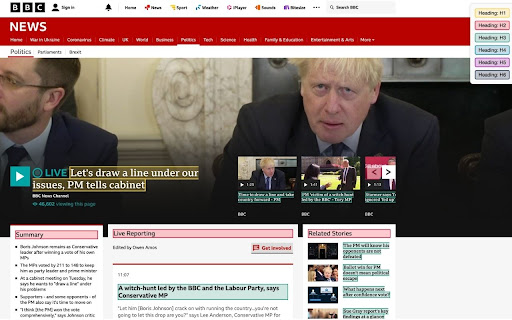

Highlight HTML headings on any webpage with one click. Easy and super useful tool for SEO. Find , , , , & heading tags.

HEX – Heading extractor
Simply extract and copy all h2 and h3 headings from the current tab. With HEX you no longer need to copy & paste headings while doing SEO research. Extract all h2 and h3 headings from the current tab and copy to clipboard with just one click.

Header Checker
Heading Tag Checker is a free header tag checker tool, which could be very useful if you want to check a page and know what kind of heading tags it is using, and how many of them are on the page. Heading tag checker is a wonderful tool that every blogger must use, because it gives a great look on how competitors are organizing their content, and this will help you to super pass them. Header Checker is very easy to use, you do not have to check every head tag manually from "Inspect Element" or by using a web application to show how many head tag or what are their types, just by adding the Heading tag checker to your browser you could know the type of Heading tags as simple as just hovering over the element. The tool will check HTML heading tags from H1 to H6, after that it will give each element a unique background color, so, it will be clear to you which elements in the page are heading tags. At the time you hover on the colored element, you will see the type of the header tag. Heading tag checker free tool is very handy and works with all kinds of websites either with HTTP or HTTPS and checks tags from H1 to H6.

Heading Tag Markup
This extension shows the h-Tags on page. This extension visual highlights the h-Tag on every page. With the add-on "Heading Tag Markup" you can highlight the h1-h6 tag on the website. - h1 - h6 Highlight day - Display which day is currently being output - differentiation of h1 - h6 tags by different colors - function can be activated / deactivated directly with a click on the Add-On icon per domain

H-tag
Visualize H1–H6 headings and meta tags on any webpage. Simple SEO inspection tool. H-tag is a free Chrome extension for SEO specialists, developers, and content editors who want to analyze heading structure instantly. ✔ Highlight H1–H6 tags directly on the page ✔ Instantly understand page hierarchy ✔ View key meta tags (title, description, robots, canonical, viewport) Perfect for: • SEO audits • Technical SEO • Content structure validation How to use: • Click "Show/Hide Tags" to display headings • Click "Show/Hide Meta" to view meta information • Click "Reset Page" to restore the original view H-tag is a free non-profit project built for the community. No ads. No tracking. No monetization. If you find it useful, consider leaving a review ⭐
