
cmbiajdlgmlogobjoihkmjkbmmkfoboa
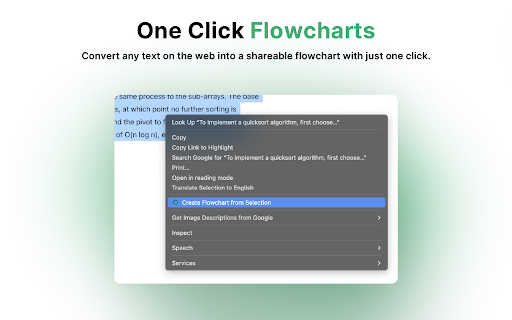


Instantly turn any text from the web into a shareable flowchart with Flowsage AI. Flowsage Chrome Extension: Transform Text into Flowcharts, Instantly Effortless Flowchart Creation, Right at Your Fingertips The Flowsage Chrome Extension revolutionizes the way you visualize and organize information. With the power of AI, it empowers you to transform any selected text into a clear and insightful flowchart within seconds, directly within your browser. No more switching between tabs or struggling with manual flowchart creation. Flowsage brings the magic of seamless idea visualization to your everyday browsing experience. - AI-Powered Text-to-Flowchart Conversion: Select any text on a webpage, article, or document, and watch as Flowsage's intelligent AI analyzes and converts it into a structured flowchart. Experience the speed and efficiency of automated flowchart generation, saving you valuable time and effort. - Seamless Integration with Flowsage: The generated flowchart is instantly hosted on the Flowsage platform, where you can further customize, edit, and collaborate with your team. Access all of Flowsage's powerful features, including real-time collaboration, AI-driven optimization, and seamless project management, all within a familiar environment. - One-Click Sharing: Share your flowcharts effortlessly with colleagues, clients, or friends using a simple shareable link. No need for complex exports or attachments. Flowsage makes collaboration and communication a breeze. - Intuitive and User-Friendly: The Flowsage Chrome Extension is designed with simplicity in mind. Its clean interface and intuitive controls make it easy for anyone to use, regardless of their technical expertise. - Enhanced Productivity and Efficiency: Say goodbye to manual flowchart creation and tedious formatting. Flowsage automates the process, allowing you to focus on what truly matters: generating ideas, analyzing information, and making informed decisions. - Versatility Across Industries and Use Cases: Whether you're a student, educator, entrepreneur, project manager, or creative professional, Flowsage adapts to your needs. Visualize complex concepts, streamline workflows, map out processes, or brainstorm ideas with ease. - Secure and Reliable: Your data is safe with Flowsage. The platform employs robust security measures to protect your information and ensure your flowcharts remain confidential. - Save Time and Effort: Automate the flowchart creation process and eliminate manual work, freeing up your time for more strategic tasks. - Boost Productivity: Visualize information quickly and efficiently, enabling faster decision-making and improved productivity. - Enhance Collaboration: Share and collaborate on flowcharts seamlessly with your team, fostering better communication and alignment. - Unlock Creativity: Break down complex ideas into clear and organized flowcharts, stimulating creativity and innovation. - Improve Understanding: Visual representations facilitate better comprehension and retention of information. - Streamline Workflows: Identify bottlenecks and optimize processes for increased efficiency and productivity. - Achieve Your Goals: Flowsage empowers you to turn your ideas into reality, faster and more effectively. - Education: Visualize complex concepts, create study guides, and present information in an engaging way. - Business: Map out processes, streamline workflows, and improve project management. - Creative Professionals: Brainstorm ideas, organize thoughts, and present concepts visually. - Personal: Plan events, make decisions, and track progress towards your goals. Who is it for? - Students: Simplify complex subjects, create study aids, and present information in a visually appealing way. - Educators: Develop engaging lesson plans, visualize curriculum, and facilitate student understanding. - Entrepreneurs and Business Professionals: Streamline workflows, map out business processes, and improve project management. - Project Managers: Visualize project plans, track progress, and identify potential bottlenecks. - Creative Professionals: Brainstorm ideas, organize thoughts, and present concepts in a visually compelling way. - Anyone who wants to: - Save time and effort in creating flowcharts - Improve productivity and efficiency - Enhance collaboration and communication - Unlock creativity and innovation - Gain a better understanding of complex information - Streamline workflows and processes - Achieve their goals faster and more effectively Experience the power of seamless idea visualization with the Flowsage Chrome Extension. Install it today and start transforming your text into flowcharts, instantly. - Privacy and Security: Flowsage takes your privacy and data security seriously. The extension adheres to strict privacy policies and employs industry-standard security measures to protect your information. - Customer Support: The Flowsage team is dedicated to providing excellent customer support. If you have any questions or need assistance, don't hesitate to reach out. - Feedback and Suggestions: We value your feedback! If you have any suggestions for improving the Flowsage Chrome Extension, please let us know. We're constantly working to enhance the user experience and add new features. Join the Flowsage Community Connect with other Flowsage users, share your creations, and get inspired. Follow us on social media and join the conversation. Don't wait any longer. Install the Flowsage Chrome Extension today and experience the future of flowchart creation!

WhisperAI - AI driven Speech-to-text
An AI-driven Speech-to-text extension leveraging OpenAI's Whisper API for efficient and accurate conversion in web input fields. Whisper AI Speech to Text (or Voice to Text) is a tool that helps you transform your speech to text effortlessly. This innovative Chrome extension, powered by OpenAI's Whisper API, allows you to convert your spoken words into written text with precision. Just click the microphone icon 🎤 next to any text input field and start speaking. Whisper AI goes beyond basic speech to text with customizable modes, including a powerful "Translate Mode". This feature allows you to speak in one language and have your words accurately translated and transcribed in another, all in real-time. Whether you're interacting in forums, filling out forms, or sending emails in multiple languages, Whisper AI adapts to your needs. Ideal for individuals who prefer speaking to typing or require assistance with typing, Whisper AI speech to text enhances productivity and accessibility on the web 🚀. Our extension ensures your speech is converted to text accurately and swiftly, making web interaction convenient and user-friendly. Embrace the convenience of speech to text technology and expand your global communication capabilities with Whisper AI. With support for multiple languages and customizable features, our extension revolutionizes your browsing experience. Dive into the future of digital communication with Whisper AI Speech to Text today!

Reforge – AI prototyping for product builders
Turn any page or flow from your product into a prototype you can edit with Reforge Build. Reforge Build is AI prototyping for product teams. Start from your product, not from scratch. Prototype with AI that understands your customers, design, features, and strategy. With the Reforge extension, you can: 1. Open any page of your product. 2. Click Capture Page with the Reforge extension. 3. Reforge Build automatically rebuilds it as a working prototype. Reforge Build enables you to: - Generate prototypes that start from your product - Explore multiple variants and built-in collaboration - Collaborate and share with your team. The Reforge extension also brings expert-backed guidance into the tools you use every day — like Google Docs, Notion, and Jira — coaching you as you write and plan product documents without ever leaving your workflow.

BiRead - Website’s Parallel Translation | Bilingual Subtitles
Transform any website content into bilingual text with a single click, using AI. Make reading in other languages easy. BiRead: An easy tool for instant Bilingual Reading. 🏄♀️Transform your browsing experience with BiRead - the easy-to-use Chrome extension that provides instant Parallel translations for any website or YouTube videos. 💡Key Features: ✔One-click parallel translation of webpage content ✔Learning mode to help foreign language acquisition ✔Bilingual subtitles for YouTube videos ✔AI-powered accurate and efficient translation 🚀How to Use: 🔸Install: Add BiRead to Chrome 🔸Activate: Follow our user tutorial to learn how to use BiRead in only three steps! 🔸Discover: Browse the web and enjoy instant bilingual content! 🔍Get Started! Install BiRead now and unlock a world of bilingual content. 📪 Contact Us: For support or suggestions, join our Discord: https://discord.gg/und4k7FjNg.

Text Shortcuts – Text Expander & Snippets
Reusable text snippets with fillable fields. Insert dynamic templates anywhere on the web, without retyping. ✨ The fastest way to insert text, emails, replies, and messages anywhere on the web. Type a short keyword and watch full snippets appear, complete with fillable fields for the parts that change. 🚀 What is a text expander? A text expander lets you turn frequently-typed words, phrases, or full paragraphs into short keyboard shortcuts. Type the shortcut, and your saved text appears in full — formatted, personalized, and ready to be sent or saved. 🛡️ Private by design. Your snippets stay in your browser. We don't collect your data, and never see what you type. Export and import anytime. 📌 Built for the way you actually work Customer support — reply to common questions in one keystroke Sales & outreach — send personalized intros and follow-ups in seconds Recruiters & HR — candidate replies, scheduling messages, offer language Developers — boilerplate code, commit messages, terminal commands Anyone in email all day — sign-offs, meeting links, polite declines, status updates What you get: 🚀 Fillable form fields — add text, date, dropdown, and number placeholders that prompt for values before insertion ⚡ Instant expansion — type a keyword, get the full snippet 🌐 Works everywhere — Gmail, Outlook, Google Docs, Word Online, Slack, your CRM, any text field on the web 📝 Rich formatting — hyperlinks, colors, bullet points, numbered lists, headings 🔍 Fast search — find any snippet by name or content in seconds 📤 Full data control — export and import your library anytime 📞 Customer Support: Create pre-written responses for frequently asked questions, troubleshooting steps, or issue escalation templates. Instantly insert responses like, "Thank you for reaching out! Our team is working on this issue, and we'll get back to you shortly." 📚 Teachers and Educators: Automate feedback for assignments, commonly used grading comments, and communication with parents or students. Quickly insert feedback like, "Great effort! To improve, focus on X. Let me know if you'd like additional resources!" 🤝 Recruiting Professionals: Draft standardized job offer letters, rejection emails, or follow-up communications. Instantly insert templated emails like, "We appreciate your application for [position]. Our team is currently reviewing it and will get back to you shortly." 📈 Sales Teams: Speed up outreach efforts by inserting personalized cold emails, follow-up messages, or product pitches. Quickly insert, "Hi [Name], I noticed your company specializes in [industry]. I'd love to discuss how our solution can help." 📣 Marketing Professionals: Insert frequently used hashtags, campaign slogans, or social media templates. Auto-insert a list of hashtags like, "#DigitalMarketing #SocialMediaStrategy #ContentCreation" with a single keyword. 💼 Lawyers and Legal Professionals: Draft standard legal disclaimers, contracts, or client communication templates. Instantly add disclaimers such as, "This communication is intended only for the recipient and may contain privileged information." 🏡 Real Estate Agents: Simplify communication with potential buyers by inserting property descriptions, open house invites, or follow-ups. Quickly insert, "Thank you for your interest in [property address]. Please let me know if you'd like to schedule a viewing!" 🩺 Healthcare Professionals: Streamline patient communications, appointment reminders, or pre-appointment instructions. Auto-fill instructions like, "Please arrive 15 minutes early and bring your ID and insurance card for your appointment." ✍️ Content Creators: Reuse common formatting for blog posts, video descriptions, or email campaigns. Quickly insert, "Subscribe for more tips and insights at [link]! Don't forget to follow us on social media." 💻 Freelancers and Consultants: Save time drafting proposals, invoicing templates, or client onboarding messages. Quickly insert, "Thank you for considering my services! Please find the attached proposal outlining the project details and timeline." ### Give us feedback and suggest ideas: https://textshortcuts.com/support or email us at
