
clobnhgmllpgmoinblefdhhajjfccmip
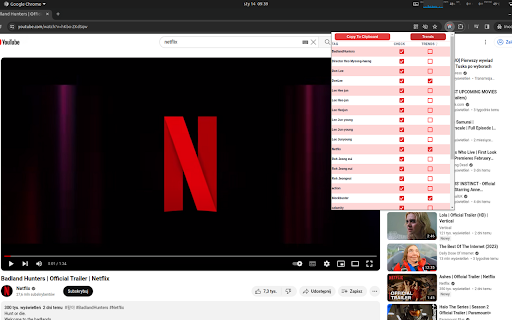

YouTube Tagger Tool - get all tags from youtube video and compare it by one click in google trends. Elevate your YouTube content to new heights with YouTube Tagger, the ultimate Chrome extension designed for content creators, digital marketers, and SEO enthusiasts. This innovative tool revolutionizes the way you optimize your YouTube videos, offering a seamless integration with Google Trends to ensure your content stays ahead of the curve. Automatic Tag Generation: Get all the tags from any video or short from YouTube. Google Trends Integration: Stay on top of trending topics! We offer real-time analysis of your tags against Google Trends data, giving you insights into current search behaviors and preferences. User-Friendly Interface: Experience a sleek, intuitive interface that makes tag optimization a breeze. Whether you're a seasoned SEO professional or a newbie, you'll find our extension incredibly easy to use. Regular Updates: Stay up-to-date with the ever-changing landscape of SEO. Our extension is regularly updated to reflect the latest trends and best practices in video optimization. Whether you're looking to increase your video views, boost subscriber numbers, or simply get your content seen by a wider audience, YouTube Tagger is your go-to tool. Install it today and take the first step towards mastering YouTube SEO!

Video to MP3
Convert any video to MP3 audio. Extract high-quality music and audio tracks with one click. Fast, free, and easy to use. Video to MP3 is the easiest way to extract audio from online videos and save it as high-quality MP3 files. Whether you want to save music, podcasts, lectures, or any other audio content, Video to MP3 handles it all with a single click. Video to MP3 lets you extract the audio track from any supported video and convert it to MP3 format. Instead of keeping large video files when you only need the audio, use Video to MP3 to get just the sound. Perfect for building your music library, saving podcast episodes, archiving lectures, or capturing any audio you want to listen to offline. With Video to MP3, the original audio quality is preserved during extraction. You get clean, high-fidelity MP3 files ready for any music player, phone, or device. No re-encoding losses, no quality degradation — just pure audio extracted directly from the source. Video to MP3 supports all popular video platforms, making it your universal audio extraction tool. 🔘 One-Click MP3 Extraction — Video to MP3 adds a convenient button right on the page. Click it, and the audio extraction begins immediately. No complicated menus or settings to configure. 🎶 High-Quality Audio Output — Get MP3 files with the best available bitrate. Video to MP3 preserves the original audio quality so your music and recordings sound exactly as intended. ⚡ Fast Conversion Speed — Our powerful backend processes your MP3 conversion quickly. Video to MP3 uses optimized servers to extract audio in seconds, not minutes. Even long recordings are processed efficiently. 💻 No Software Installation Required — Video to MP3 works entirely in your browser. No desktop applications to download, no plugins to install, no system resources consumed. Just add the extension and start extracting MP3 audio. 📊 Real-Time Progress Tracking — Watch your MP3 conversion in real time. Video to MP3 shows you exactly how far along the extraction is, with progress percentage and estimated time remaining. 🌐 Multi-Language Support — Video to MP3 is available in 10 languages including English, Spanish, French, German, Portuguese, Chinese, Japanese, Korean, Turkish, and Russian. Use it in your preferred language. 📁 Smart File Naming — Every MP3 file is automatically named after the original video title. Video to MP3 keeps your audio library organized without manual renaming. 🔒 Secure Processing — All audio extraction through Video to MP3 happens over encrypted connections. Your data stays private and secure throughout the entire MP3 conversion process. 1️⃣ Navigate to any supported video page in your browser. 2️⃣ Click the Video to MP3 icon in your toolbar. The extension will detect the available audio tracks. 3️⃣ Press the "Convert to MP3" button. Video to MP3 will begin extracting the audio and show you the conversion progress. 4️⃣ Once complete, your MP3 file downloads automatically. Open it in any music player and enjoy your audio offline. Video to MP3 respects your privacy. We do not collect personal data, browsing history, or track your activity. The extension only activates when you choose to extract audio from a video. No background processes, no analytics, no data harvesting. Your MP3 conversions are processed through secure, encrypted connections and files are automatically deleted from our servers shortly after download. Video to MP3 does not require unnecessary permissions. We only request the minimum access needed to detect videos and perform audio extraction. Video to MP3 is built for speed and reliability. Our dedicated processing servers ensure your MP3 extractions complete quickly, even during peak usage. The extension is lightweight and does not slow down your browser or consume excess memory. Automatic retry logic means that if a conversion encounters a temporary issue, Video to MP3 will handle it gracefully. You get your MP3 file without manual intervention. Video to MP3 ensures a smooth experience from start to finish. ✅ Truly one-click operation — no complicated setup ✅ Best available audio quality preserved in every MP3 ✅ Fast cloud-based conversion — no load on your computer ✅ Clean, intuitive interface anyone can use ✅ Works on all Chromium-based browsers (Chrome, Edge, Brave, Opera) ✅ Regular updates to ensure compatibility ✅ Completely free with no hidden fees ✅ Lightweight — no impact on browsing speed ✅ Automatic file cleanup for your privacy ✅ Active development and support ✅ Trusted by thousands of users worldwide Video to MP3 is the smart choice for anyone who wants to extract audio from videos without hassle. Try it today and build your MP3 collection effortlessly. Install Video to MP3 now and start saving audio from your favorite videos!

YouTube Tag Extractor
Use YouTube Tag Extractor tool to view tags under YouTube video titles - no extra clicks! Reveal tag secrets with our extractor. 1️⃣ Add the YouTube tag extractor extension to Chrome with one click. 2️⃣ Navigate to any video you want to thoroughly analyze today. 3️⃣ Check youtube tags that appear automatically below the video title! 🔑 Key features our tool offers for maximum visibility: 🔸 Swift analysis: see results of youtube tag extractor work instantly in your browser. 🔸 Priority insights: view important data directly in creators' chosen display order. 🔸 Easy export: use our app features to save and organize data effortlessly and securely. 🔸 Competitive edge: let the YouTube video tags extractor reveal top performers' strategies. 🌟 Who benefits from the YouTube tag extractor: - Content creators: use our extractor to discover winning strategies. - SEO experts: let the extension help analyze competition. - Marketers: leverage the web application for better visibility. - Researchers: youtube tags extractor perfect for marketing studies. 📋 Essential features you'll love: 1. Extractor helps you stay ahead effectively through competitive research. 2. Find and extract youtube tags as you browse with real-time analysis. 3. Use our metadata checker to understand prioritization and gain strategic insight. 4. The metadata inspector helps identify opportunities by conducting gap analysis. ● Easy discovery: extract meta attributes from YT video in one click. ● Better performance: the video meta data extractor tool optimizes your content. ● Efficiency: let youtube tag finder do the work and save your time by automating analysis process. ● Versatility: use our powerful meta data inspection tool effectively for any yt digital video. ● Seamless experience: the youtube tag extract process happens right on the page. ● Real-time updates: stay ahead by monitoring how top creators optimize their video content. ● User privacy: our extension securely analyzes videos without storing any personal data. ❓ FAQ about the extension: 📌How does our extractor work? 💬 It's a Chrome extension that helps you extract youtube tags and so view metadata which creators use for any public YT video. 📌 Can I use it for Shorts? 💬 No! The app does not yet work with Shorts. 📌 Will it improve my rankings? 💬 Using the extractor features can help optimize your content strategy. 📌 Is it safe? 💬 Absolutely! The youtube tag extractor runs locally and respects privacy. 📌 How often should I analyze competitors? 💬 We recommend weekly monitoring of top performers in your niche for best results. 📌 Can I use it on mobile devices? 💬 Currently available for Chrome desktop browser only. 📌 Does it work for private videost? 💬 The extension only analyzes publicly available videos to ensure user privacy. 📌 What about different languages? 💬 Our youtube tag extractor works with content in any language, helping you optimize for global audiences. ► Check hidden metatags effortlessly. ► YouTube tag extraction made simple. ► Find meta attributes for video. ► Optimize videos for better visibility. ► Boost engagement with insightful data. ➤ Comprehensive analysis: our solution extracts hidden metadata and keywords that drive success and lead to better decisions. ➤Automated workflow: save hours with our streamlined and efficient system. Focus on creating while we handle all the technical details. ➤ Performance optimization: transform data into actionable strategies. See youtube tags and learn from top performers to stay ahead. ➤ Content discovery: uncover what works in your niche. Get insights from successful creators and adapt winning strategies. ➤ Strategic planning: simplify your research process. Extract yt metatags and make decisions based on data from top channels. ➤ Growth acceleration: boost visibility with proven methods and implement data-driven approaches to expand your audience reach. 💠 Use the youtube tag extractor online for instant results. 💠 Apply top-performing strategies powered by videos meta attributes. 💠 Improve rankings with data-driven decisions. 💠 Optimize metadata across your channel with proven methods. ✅ We hope you will enjoy our extractor extension for Google Chrome, find it helpful in your daily tasks, and achieve great success. Let this tool make your browsing experience faster, easier, and more productive!

Tag Snag
Automatically snag all of your competitor's video tags on YouTube. This extension is great for SEO, and will help you find popular relevant tags for your YouTube videos. ★ Single Mode - Navigate to a single YouTube video and grab all of the video tags. ★ Multiple Mode - Search a keyword on YouTube and grab all of the video tags for the top 10 videos. ★ Easily copy all of the tags to your clipboard and start implementing them into your own videos

YouTube Tag Extractor
Displays all tags from YouTube video under the video header The YouTube Tag Extractor extension is a handy way of extracting and revealing meta tags associated with any public video. Extracting YouTube Tags can be very insightful to understand how competitor videos and other high-performing videos are using these tags to boost their performance. YouTube tags are the hidden meta tags associated with videos on YouTube.
