
clbadmmkinhmiblhkkiiabbbcpljohob

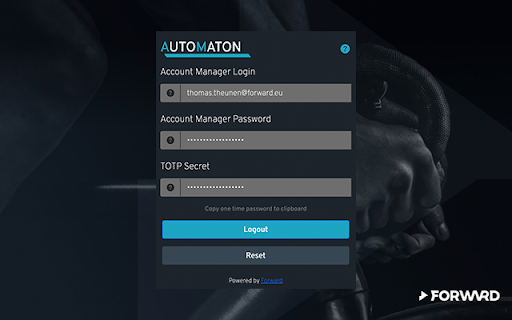
An extension to make life a little easier logging into Salesforce Account Manager using 2FA (TOTP only - Generator APP). A Salesforce Commerce Cloud browser extension brought into being to make life a little bit easier when working with the Account Manager. It works the same way as a Password Manager, requiring an "encryption key" to enable automatic login into Account Manager. It will automatically prefill your username, password, and One Time Password too.

Adswerve - dataLayer Inspector+
DataLayer Tools for Digital Analysts The Adswerve dataLayer Inspector+ is a tool kit of utilities for a digital analyst. Inspect Google Analytics activity - Monitor the dataLayer in real time - See the Google Analytics hits in the console, as they happen - Evaluate common dataLayer pushes formats: events and ecommerce Insert additional resources in the page - Push a dataLayer message for setup - Add a GTM container to test it - Insert code into the page to monitor and modify How to use the dataLayer Inspector+: https://adswerve.com/resources/adswerve-data-layer-inspector-2 Update for v2024.11.1.1 Due to new restrictions on external script tags in Chrome extensions, the "Insert GTM Container" option has been removed from dataLayer Inspector+. Follow these steps to insert a GTM container into a web page with the "Inject Code" feature instead: Go to tagmanager.google.com. Under the Admin tab for your container, select "Install Google Tag Manager." As shown in the screenshot below, where it says "Paste this code as high in the of the page as possible," copy just the snippet code content. Note: Do not include , only the code between them. In the DataLayer Inspector popup, under "Add Functionality," check "Inject Code." Paste the code snippet from Tag Manager into the text box that appears. Click the button to "Save Settings & Reload." The GTM container will be inserted until the "Inject Code" box is unchecked and "Save Settings & Reload" is clicked again. Be sure to do this when you've finished testing.

Datalayer Checker
The easiest way to debug and check the dataLayer implementations without having to use the browser console! We are happy is happy to release Datalayer Checker 3 with several new features and a revamped design! NEW VERSION AVAILABLE! 🔹 Redesigned interface and intuitive user experience 🔹 Integrated event search engine 🔹 Flexible variable visualization: table format or JSON object 🔹 Google Tag Manager container injection removed (to respect manifest v3 rules) EXCLUSIVE FEATURES: 🔹 Capture what matters! Save up to 100 dataLayers with our revolutionary "Snapshot" function 🔹 Deep analysis! Verify your dataLayers in batches by methodically inspecting your captures 🔹 Organize efficiently! Structure your workspace with intelligent filters by domain, dataLayer name, or specific search (e.g.: event_name) to automatically classify your snapshots 🔹 Stay up-to-date! Reopen all your snapshot URLs to capture new data and compare them instantly Transform your analytics experience with Datalayer Checker! Because we're passionate about analytics...

InfoSE
Quickly access relevant information for selected word Introducing "InfoSE," the ultimate extension for lightning-fast access to relevant information right at your fingertips. With InfoSE, effortlessly explore top relevant results for selected word, neatly organized within accordion-style panels, each offering a concise summary for quick insights. Key Features: Effortless Access: Simply highlight any word or phrase on your browser, and InfoSE springs into action, fetching relevant information instantaneously. Accordion Interface: InfoSE presents search results in a sleek accordion format, allowing you to expand and collapse each panel effortlessly. This intuitive design enables efficient browsing without cluttering your screen. Comprehensive Summaries: Dive into succinct summaries within each accordion panel, providing essential details without overwhelming you with excessive information. Whether it's definitions, explanations, or background context, InfoSE delivers the highlights at a glance. Wikipedia Integration: Seamlessly explore Wikipedia entries directly within InfoSE. With a single click, delve into comprehensive articles, gaining in-depth understanding on your chosen topic without leaving your browsing session.

Commerce Cloud Recommendation Validator
This is a tool to help with preliminary validation of Salesforce Commerce Cloud Einstein integration This is a tool to help with preliminary validation of Salesforce Commerce Cloud Einstein integration. It helps you validate the correctness of your site's activities and recommendations. 1.0.0 - Migrate from Manifest V2 to V3 - Pausing the validator makes the extension icon black & white to more clearly indicate that it is paused - added additional human friendly field names - removed email tab as it is no longer a supported product 0.10.7 - fix bug that caused certain activities using the new API to not report in the extension 0.10.6 - Add support for new version of backend API 0.9.11 - Warnings about missing product ID fields are now more intelligent and depend on the "type' field of the product. 0.9.7 - Add user friendly names to fields. Hovering over a field will display the corresponding key in the pebble request. 0.9.6 - Detect Pixel for non .com domain extensions 0.9.3 updates: - Detect more types of incorrect pixel URLs and improve validation for them - Fix bug that was causing 'pixel is visible' error not to show - Better formatting for pixel validation url/warnings/errors - Add messages for links that look like they are for us but are otherwise unrecognizable - Better warning for 'Pixel is visible' error -- gives a suggestion on how to fix 0.9.2 updates: - Salesforce rebranding - Event loading bug fixes - Improved pixel validation (warning when non email address used for user ID) - Fix bug that was causing certain pixels to not be detected 0.9.1 updates: - Add support for cm_mmc field for email recommendations - Add additional validation for email links - Support non-numeric email versions Version 0.9.0 - shows an error when the email pixel is visible (should be hidden) - fixes some linting / formatting - fixes misleading error w/ automatic viewPage activity Version 0.7.0: - ui improvements - converted to a panel instead of a tab in dev tools - shows badge notification on activity capture - better 'product' object validation - add support for email open tracking pixel
