
cknijndocnnlkpenngcdcpleddlmckkm

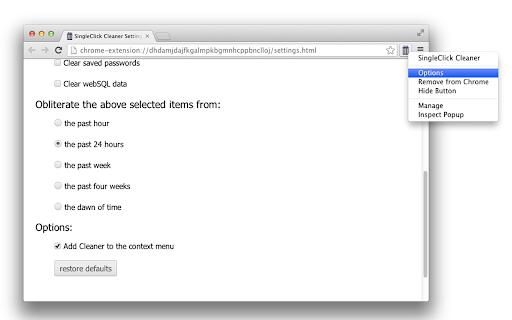
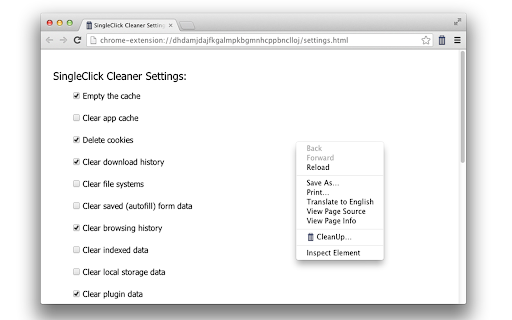
Single-click Chrome cleaner: clean up the trash in one single click Google Chrome keeps a lot of data while you’re browsing the Internet – browsing history, cache, cookies, form data, temporary files and more. This data is usually used to speed up the browsing process. However, sometimes the cache gets too large and starts to slow down Chrome. When this happens you definitely need to clean up your browser. You can clear history and all the data manually but it’s a tedious work and it’s boring. So, why not leaving it to our cleaner? Single Click Cleaner will empty the cache, clear history, remove cookies, clear saved passwords and form data, zap the download history and more... in one single click! You want only specific items to be cleaned? Or maybe you need to clear the cache for a certain period only? No problem, Single Click Cleaner can do it all. Just go to the Options page and set your preferences. Features: * Single-click cleaner (set cleaner options and then just click the cleaner icon, no confirmation screens etc.) * You choose what to clean when clicked (see the "Options" page) * Clear history, cache and browsing data for specified time period * Add/remove shortcut to the context menu Notes: * Please, be aware that SingleClick Cleaner will delete only chrome history, but will not interfere with your google history (your search history on google.com). To deal with your google search history you should go to your account in the search engine itself and deal with the google history from there) * If you delete cookies, you'll be signed out from most current sites (don't select "clear cookies" if you don't want to log-in again every time you use the cleaner)

Forget Button - Clean your Browser
Quickly delete recent browser history, cookies, cache, downloads, forms, and passwords for a custom period. This extension allows you to wipe various types of data, including recent application cache, browser cache, cookies, downloads, stored files, forms, history, IndexedDB databases, local storage, certificates, passwords (with caution), plugins' data, and service workers functioning similarly to the built-in Firefox add-on "Forget Button" feature. Additionally, you have the flexibility to designate a proper zone for data wiping, with support for the following zones: - Normal websites - Protected websites (exercise caution!) - Extensions zone (proceed with care!) Definitions: - Extensions zone: Contains data from installed extensions and packaged applications. - Protected websites zone: Includes data from websites installed as hosted applications. For bug reports, please visit: https://github.com/andy-portmen/ecleaner Change log: Version 0.1.4: 1. Introduces the ability to define a custom period for cleaning tasks.

Browser Cleaner
Easily clear your browser's data and speedup browsing via toolbar popup. Browser Cleaner is an extension that help you easily clear browsing-data via toolbar popup UI. All the available options are listed in toolbar popup, but, the number is dependent on your browser and platform. Simply mark a desired item, and then click on the big - eraser - button at the top. When the cleaning process ends, a desktop notification will notify you that the browser data has been cleared. Note: None of the browsing-data items are selected by default. You need to open toolbar popup and select at least one item to start working with this addon. Moreover, the extension interface supports dark mode. To switch the interface theme to dark, please press the moon icon on the top-left toolbar. To report bugs, please fill out the bug report form on the addon's homepage (https://mybrowseraddon.com/browser-cleaner.html).

Cleaner
Cleaner Extension Clear your browser history, cache and cookies on a selected interval in just one click. Clean Chrome is a useful and lightweight add-on designed for a more comfortable browsing experience. One of the best cleaning history and cache tools for your Chromebook, Windows PC, Mac or Linux. ⚡️Features ------------------ It clears your Chrome's - History, - Cache, - Cookies, - Saved Passwords, - IndexedDB's, - Local Storage and more Based on the time you set. Clean Chrome lightweight, fully cbustomizable extension enables you to do all that mentioned above instantly, with just one click on the Wipe icon in the Chrome browser toolbar. It's never been easier to erase Chrome history and cache data. Protect your privacy and delete all activity from your browser with Clean Chrome. Clean Chrome is simple, innovative and totally free tool for your favourite chrome browser. ❤️

Dólar Hoje
Veja a cotação do Dólar através do DolarHoje.com A aplicação do DolarHoje.com serve para calcular a cotação do dólar em relação ao real sem a necessidade de uma calculadora externa ou folhas de papel. :) É possível realizar a conversão do dólar americano para o real através da barra de endereços: - Digite dolarhoje - Aperte TAB - Digite o valor em dólar!
