
ckkfnchnfmgpiejgaacmbngkcjbaaipd
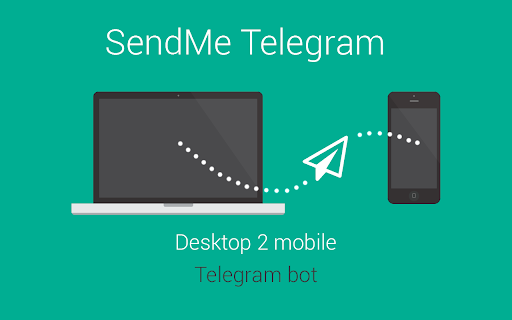
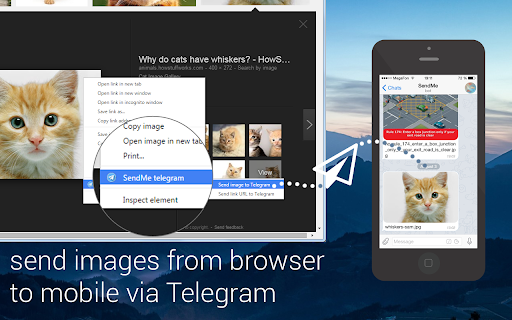
Allows you to send links, images, maps, quotes from browser to your Telegram via bot. Extension allow to send any links, images and text to Telegram directly from your web browser! What's new in 0.3.2: - migration to extension Manifest V3

PhotoShow
Hover to zoom and view high-definition images. Instantly enlarge visuals, crafted for all your favorite websites—and for you. PhotoShow is a tool for browsing and downloading high-definition images by hovering mouse on image thumbnails, working on most websites and carefully crafted for over 400 popular ones of your daily use, including Amazon, Facebook, Google, Instagram, YouTube, etc. - Viewer control: Esc: Close viewer X: Suspend viewer while held Space: Switch to reading mode while held A / F / L / M / P: Switch view mode V: Toggle between last two used view modes - Image control: Shift + Ctrl + ← / →: Rotate image counterclockwise/clockwise Alt + Ctrl + ← / → / ↑ / ↓: Flip image horizontally/vertically ← / → / ↑ / ↓: Scroll image left/right/up/down PgUp / PgDn: Scroll image up/down by page Home / End: Scroll image to the top/bottom - Image actions: Tab: Open HD image in new tab S: Save HD image C: Copy HD image Alt + C: Copy HD image address Shift + C: Copy image caption PhotoShow comes with a rich set of settings designed to adapt to your browsing needs, from customizing how the image viewer appears, to adjusting controls, shortcuts, and behaviors. Whether you prefer a clean, distraction-free interface or a feature-packed experience, PhotoShow lets you fine-tune the viewer to suit your style. - Whitelist Mode: Disable PhotoShow globally, then enable per site with its popup toggle. - Viewer Trigger: Require an assist key press to show the viewer. - Thumbnail Types & Viewer Exceptions: Control which thumbnails trigger the viewer. - Viewer Positions: Default is beside the thumbnail, but you can allow fullscreen by choosing "center". - Image Info Display: Show captions, dimensions, formats, or file sizes. - New Tab Opening Behavior: Choose whether new image tabs open in the foreground or background. - Transition Animation: Smooth animations, or reduce/disable them. - Viewer Color Scheme: Choose either "light" or "dark" theme for the viewer. - Keyboard Shortcuts: Enable/disable specific shortcuts. - Image Download: Customize filenames with placeholders (e.g. "my images//"). - Assistance & Enhancements: Extra tools like marking viewed images or enabling/disabling context menu items. - Settings Management: Export/import your settings to transfer between devices, or reset either global or site-specific settings. For more information, please refer to the Options page (global settings) and PhotoShow’s popup window (site-specific settings).

NopeCHA: CAPTCHA Solver
AI Solver for reCAPTCHA, hCAPTCHA, and all CAPTCHA. Solve any CAPTCHA freely with NopeCHA for Chrome Ranked as "the best free CAPTCHA solver" by HackerNoon, NopeCHA is able to solve all popular challenges such as reCAPTCHA, hCaptcha, and more. View the complete list of supported challenges at https://developers.nopecha.com Use NopeCHA for Chrome to: • Automate sign-ups and logins on websites. No more manual solving. • Bypass CAPTCHAs on any website with ease. • Keep your session running in websites that require periodic verification like Google Colab. Do more with NopeCHA with your favorite programming languages: • Seamless integration into Selenium, Puppeteer, and other browser automation tools. • Use NopeCHA API to in your Python, Node.js, or any other programming language. • Extract words from documents, images, or any other source with our state-of-the-art OCR API. Best of all: • Free for personal use, NopeCHA works seamlessly across all major websites, providing a smooth browsing experience without interruptions. With up to 3+ million users worldwide, NopeCHA is the go-to solution for browser automation. Feedback? Open an issue on GitHub: https://github.com/NopeCHALLC/nopecha-extension

Extension Manager
Manage extensions, Quickly enable/disable, Support batching operation, Smart sorting. Fast, Simple and Secure. 1. One Key fast enable/disable extension 2. Lightning Group: Quickly enable/disable extension groups according to the scene (except for locked or theme class extensions) 3. Smart Sort: intelligent sorting according to your frequency of use (default sort by name) 4. Right-click Menu: provides shortcut functions such as lock, uninstall, option configuration, home page, APP running, etc. 5. Smart Search: Quickly find the extension you need with keywords or phrases 6. Reminder: display the extended status in real time, remind reset after use, reduce resource consumption (except for locked or theme class extension) 7. View Selection: Provide list view and grid view, in line with user habits 8. Group management: general group and fixed group, flexible management 9. Extension Naming: Give your extension an alias you like 10. Automatic matching: You can turn extensions on and off according to different websites 11.Support dark mode

Telegram desktop online
Send unlimited Telegram messages, photos, videos, and voice notes, and conduct efficient group chats. Telegram Desktop Online is an extension for smooth communication and collaboration with friends, family, and colleagues. Offering all the functionalities of the renowned messaging app Telegram, this desktop online version ensures you stay connected and productive wherever you go. This extension then provides most of the Telegram key features: • Secure Messaging: Telegram prioritizes user privacy and security by providing end-to-end encryption for all messages, ensuring that only intended recipients can access the content. • Secret Chats: Engage in private conversations with end-to-end encryption, self-destructing messages, and the ability to prevent screenshots, catering to personal and professional needs. • Group Conversations: Create groups with up to 200,000 members, ideal for large communities or professional teams. Group admins can assign roles, conduct polls, and manage settings. • Channels: Broadcast messages to a vast number of subscribers for announcements, news, or content sharing, with no limit on subscribers. • Voice and Video Calls: Enjoy high-quality voice and video calls, providing a real-time communication alternative with less tracking compared to other platforms. • File Sharing: Share various file types, including documents, photos, videos, and audio files, with a file size limit of 2GB. Telegram offers a cloud-based storage system for easy access across devices. • GIFs and Stickers: Express emotions creatively with a wide range of stickers and GIFs. • Bot Interaction: Interact with automated services through Telegram's robust bot platform, including news, weather, and productivity bots. • Customizations: Personalize your Telegram experience with themes, chat backgrounds, and notification settings. Experience the convenience of accessing messages, files, and contacts in one place, with a larger screen and keyboard for easier typing and navigation. Send unlimited messages, photos, videos, and voice notes, and conduct efficient group chats. Stay organized by creating channels to broadcast messages to a large audience, ideal for sharing updates or announcements. Protect your conversations with end-to-end encryption, ensuring privacy and security. With Telegram Desktop Online, seamlessly switch between mobile and desktop devices, syncing messages and files across all platforms. Stay connected, productive, and in control with the Telegram Desktop Online extension. This extension has used the Telegram GPL license that allows its online distribution. • File Manager Integration for files This extension allows users to automatically detect files while browsing the web and open them directly in the Telegram online file manager to be used by the application.
