
ckihgechpahhpompcinglebkgcdgpkil

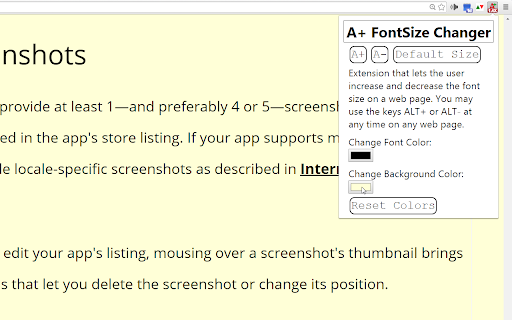
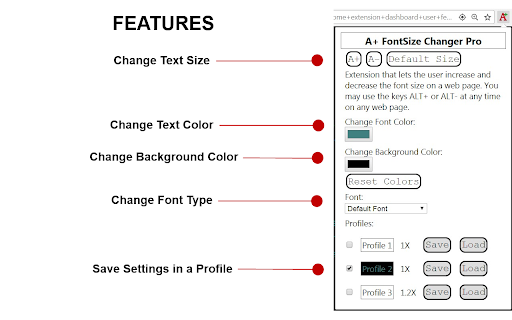

Extension that lets the user change the font text size, font type, font color and background color on a page. A+ FontSize Changer is a Chrome Extension and Edge Chromium add-on that lets the user customize the font text size, font text color, background color and font family on a page. It actually changes the fontSize of each element unlike Chrome's action with CTRL+ and CTRL- which zooms the page. Sometimes you wish to increase the text size without zooming the page so that paragraphs do not scroll past the edge of the screen. A+ FontSize Changer works where others fail! Even on pages with dynamic (ajax) content! Even on pages with iFrames! Just use the buttons to change the fontsize or use keyboard shortcuts ALT+ and ALT- ( or use ALT+Up Arrow and ALT+Down Arrow. You can change these hotkeys at chrome://extensions/shortcuts ) Some website authors use a gray text color instead of black which can be hard on the eyes. With A+ FontSize Changer you can also change the text color and background color on a page. With this feature you can also create your own custom Night Mode where you choose the text color and background color yourself and it does not invert image or video colors so that they are still viewable. If ALT+ and ALT- are not working on a website then try these steps: 1. Reload the website (F5 key) or restart Chrome or Edge. 2. Click on a blank space on the website page before using the ALT+ or ALT- key. 3. Extensions are not allowed to work at Chrome Web Store, Edge Add-ons store or a chrome:// or edge:// page or the new tab page. The extension popup will display a red notice with "NOTE:" if you are on one of those pages. 4. If the website has disabled keyboard keys then click on the extension icon in the toolbar and use the buttons there. 5. If ALT+Up Arrow and ALT+Down Arrow are not working then see if they are active on the extension at chrome://extensions/shortcuts FREE FEATURES: * Change font type for the current webpage * Change text size for the current webpage * Change text color for the current webpage * Change background color for the current webpage * Create profiles to save text settings and color schemes. * Saves custom font type for each website you visit * Saves custom text size for each website you visit * Saves custom text color for each website you visit * Saves custom background color for each website you visit 1/11/2026 - Version 1.5.4 + Some Youtube captions were sometimes displaying at default text size instead of the size set by the extension. Fixed! 8/23/2024 - Version 1.5.2 + Better support for Opera browser. + Extension popup now tells the user if the current website needs to be reloaded. 12/25/2022 - Version 1.5.1 + Added "Blacklist" for locked profiles so that users can add websites that will not be changed by the profile that is checked. + Grammar correction: from "it's" to "its". + Fixed bug of font-family not loading a profile with "Load" button until page was reloaded. 8/20/2022 - Version 1.5.0 + Updated to Manifest V3 + Checked (or locked) profiles no longer save the values to each website so that you can uncheck the profile and those websites will default to normal. 8/19/2022 - Version 1.4.9 + Performance improvements + Extension badge now displays if the user has changed the font color, background-color, font-family or as usual the font-size multiplier for a website. 1/6/2022 - Version 1.4.6 - Added Chinese Traditional (zh-TW) and Chinese Simplified (zh-CN). 4/7/2021 - Version 1.4.3 - Cosmetic changes. Changed buttons and input fields to use font-family: Consolas, monospace. Changed footer background color. Added German language. 4/7/2021 - Version 1.4.3 - Cosmetic changes. Changed buttons and input fields to use font-family: Consolas, monospace. Changed footer background color. Added German language. 3/4/2021 - Version 1.4.2 - Now displays a notice if the user did not allow the extension to use the user's email address to check for license status from servers. Hopefully fixed it so that text size does not get larger than set size on some websites on page refresh because of slow loading external stylesheets or dynamic content. It will not work in all cases, otherwise the extension would have to be delayed for 10 seconds or more on some websites with many external resources. 2/16/2021 - Version 1.4.1 - Fixed a bug where the extension would not work when first installed on websites that were already open in the browser. Now it will work on a fresh install without refreshing the page. Also added better support for Edge Chromium browsers. 2/11/2021 - Version 1.4.0 - Fixed a bug in the license status check. It will now display an error message if the user did not approve access for the extension to check license status or if the user is not signed into Chrome and therefore the license status cannot be checked. 2/10/2021 - Version 1.3.9 - Fixed a bug from version 1.3.7 where backgrounds with url images with partial transparency would get a partial transparent background so that some video players like jw-player would not get the video blocked out. But the fix was being applied to the body tag as well. Fixed so that the body tag will always get a solid color and no transparency. Also added more error checking to license status check. 2/2/2021 - Version 1.3.8 - Added a filter to lower the brightness on page load for users that set the background-color to black or a dark color to try and prevent the original white background from showing. Unfortunately, it only works well some of the time. But the original white background is less bright more quickly than before. Also fixed a bug where Pro users that already paid were not getting the correct license. 1/31/2021 - Version 1.3.7 - A number of performance improvements. It should use less resources now. Added Dark Mode support for the A+ popup. Added colors for hyperlinks including visited hyperlinks being a different color! Also boxes and buttons that do not have a default white background will now have a slightly different color than the color chosen by the user so that boxes and buttons are easier to identify. Version 1.3.5 was not converting background colors for elements with full transparency but was still converting elements with partial transparency. Now it will convert colors but with the transparency value also saved with the conversion. Hopefully this will help some video players like jw-player controls that use alpha to display correctly. Also elements with IMG or background-image with url images will have a slightly different color background. This helps if the image has a transparent background and a dark icon such as icons and the user has selected a black background color. IMPORTANT UPDATE: Chrome Web Store Payments in being deprecated by Google, therefore this update has a new permission to read a user's email address to process license information for both old Chrome Web Store payments and the new payments processor. 5/22/2020 - Version 1.3.6 - It seems that font changes and color changes were not working in iFrames since about version 1.2.5. This has been fixed. Previously, font size changes were only working if the user clicked on the iFrame first and used ALT+ or ALT- to change the size. Now pressing ALT+ ALT- and ALT-Backspace on the main page will change the text size for both the main document and iFrames without having to click on the iFrames first. Known Issue: Some iFrames with content like Disqus comments may have a problem loading saved settings correctly because of the delayed way that Disqus loads content and css. Text may get too large and crowded (line-height). This may also cause "Reset Colors" to not reset the iFrame without refreshing the webpage (F5 key). Now removes the default font from saving if reverting back to the default font on the page. 4/18/2020 - Version 1.3.5 - It now does not change the background color of elements that have a transparent background so that they can still be seen through. Also if the background-image is a gradient instead of a url then it will set the background-image to "none". 4/16/2018 - Version 1.3.3 - Added "user-select:none" to css of the buttons in the popup. 4/6/2018 - Version 1.3.2 - Now you can use ALT+Up Arrow and ALT+Down Arrow to change text size. You can also change these hotkeys at chrome://extensions/shortcuts 3/30/2018 - Version 1.3.1 - Removed trying to make it work with Google's new tab page. With apologies it was not realized that there is no way to tell the difference between chrome://newtab and extensions that created their own new tab. 3/22/2018 - Version 1.3.0 - Lite and Pro Edition - Now the Lite Edition also changes font size by .1 increments instead of .2 increments, just like Pro. Also fixed in Lite Edition the contentEditable bug that would change size when the user changes to bold or italics. Bug Fix: Keeps the current page view scroll position in the same place after a font size adjustment for most pages by calculating the position before the change and then setting the scroll position after the change. This version also shows the color picker and the text input for color hex values, so you can manually enter hex colors or use the color picker. Also new setting added "Underline Links". So users can choose if links are underlined or not when the color is changed. The default is to "Underline Links" because on most websites it would be difficult to see the links when they are the same color as the rest of the text on the page. But some users prefer not to have links underlined. Also now line-height is adjusted if line-height is too small after a text size change. 3/21/2018 - Version 1.2.9 - Pro Edition and Version 1.2.5 - Lite Edition - Now using the custom color picker instead of the HTML 5 color picker because now some Windows users were having the same bug that Mac OS users were having of the HTML 5 color picker window opening and the extension popup closing. Using the custom color picker fixes that bug. 5/8/2017 - Version 1.2.4 - In the Pro edition you can now change the font type (font-family) for each website you visit and the font family will be saved. 4/20/2017 - Version 1.2.3 - Added note in extension popup that explains that extensions do not work in special chrome:// pages or at the Chrome web store. 4/12/2017 - 1.2.2 - Bug Fix for Mac OS X. I believe I have fixed the bug that some Mac users are experiencing of not being able to change the color. Apparently Chrome extensions have a bug with Mac OS using the HTML 5 color picker where when the color picker opens the extension popup closes causing the popup to not recognize the color commands. Now using a different color picker for Mac users. 4/9/2017 - 1.2.1 - Added change event to color picker to see if it would fix the problem for some users not able to get the text color or background color to change. 9/12/2016 - 1.2 - Now you may not have to reload the current page when you first install this extension or if you disable it and re-enable it. 08/12/2015 - 1.1 - Fixed alert "ERROR: Could not establish connection." when clicking on A+ icon when the extension is first installed. Now it tells the user to refresh the page.

Zoom Page WE
Zoom web pages (either per-site or per-tab) using full-page zoom, text-only zoom, automatic fit-to-width and minimum font size. Zoom Page WE provides facilities to make the contents of a web page larger or smaller (either per-site or per-tab) using full-page or text-only zoom and minimum font size. AutoFit (fit-to-width) can be applied manually or automatically. Small images can be scaled to fit the browser window. After installation, there will be a new blue 'floppy-disk' icon on the main toolbar with a blue badge showing the current zoom level. To change the zoom level for a page, click on the toolbar button to show the popup panel, then click on one of the six buttons on the right side of the popup panel: • Type - toggles the type between Full and Text. • Level (%) - shows a drop-down menu from which a specific level can be selected. • In (+) - increases the level to the next defined level or by a fixed step. • Out (-) - reduces the level to the next defined level or by a fixed step. • Autofit - adjusts the level so the page contents fit the width of the browser window. • Reset - applies the defined default full/text level depending on the current type. To change the minimum font size for a page, click on the toolbar button to show the popup panel, then click on one of the two buttons on the left side of the popup panel: • Minimum Size (px) - shows a drop-down from which a specific minimum font size can be selected. • Reset - applies the defined default minimum font size. Distributed under the GNU General Public License version 2. See LICENCE.txt file and http://www.gnu.org/licenses/

fontSwap - Custom fonts for every website
Tired of boring default fonts while browsing? With FontSwap, you can transform the way websites look by applying your favorite fonts. Choose from 2000+ Google Fonts, load system (local) fonts for faster performance, or even upload your own custom font files. Easily change font size, weight, color, line height, and letter spacing—all without slowing down your browser. Transform your browsing experience by applying custom fonts to any website. Set different fonts for different domains, target specific elements, and enjoy perfect typography everywhere you browse. ✪ 🔠 2000+ fonts available — access Google Fonts, system fonts, or upload your own. ✪ ⚡ Lightweight & fast — just 30KB, with no impact on browsing speed. ✪ 🖋️ Advanced font rules — fine-tune styles for full control of webpage text. ✪ 🔒 No unnecessary permissions — does not ask to “read and change all your data on all websites.” ✪ 🌙 Dark mode support — for a comfortable browsing experience anytime. ✪ 🚀 No FOUC (Flash of Unstyled Content) — fonts load smoothly on static and dynamic pages. ✪ ✅ Enable/disable with one click — switch rules on or off instantly. ⇒ 2000+ Google Fonts available instantly ⇒ System/local fonts for faster loading ⇒ Upload custom font files (TTF, OTF, WOFF, WOFF2) ⇒ Set fonts per website domain ⇒ Target specific HTML tags or CSS classes ⇒ Advanced rule editor for power users ⇒ Adjust font size, weight, color, spacing, and line height ⇒ Only 30KB - won't slow your browser ⇒ No FOUC (Flash of Unstyled Content) issues ⇒ Works on static and dynamic websites ⇒ Instant enable/disable toggle ⇒ No "read and change all data" permissions required ⇒ Zero tracking or analytics ⇒ No ads or data collection ⇒ 100% open source on GitHub 1. *Browse any website* - FontSwap detects the domain automatically 2. *Choose your font* - Pick from Google Fonts, system fonts, or upload custom files 3. *Apply instantly* - See changes immediately without page reload 4. *Set and forget* - Your font preferences save per domain 💡 Perfect For ⇒ *Readers* who want better readability on news sites and blogs ⇒ *Designers* testing fonts across different websites ⇒ *Accessibility users* needing specific fonts for better reading ⇒ *Typography enthusiasts* who appreciate beautiful fonts everywhere Unlike other font extensions, FontSwap only requests essential permissions. No access to your browsing data or personal information. FontSwap is completely open source and available on GitHub: https://github.com/anilkumarum/font-swap ⇒ *Community*: Join our Google Group at https://groups.google.com/g/fontswapper ⇒ *Email*: webrailhelp@gmail.com ⇒ *GitHub Issues*: Report bugs and request features https://github.com/anilkumarum/font-swap/issues 👨💻 Connect with the Developer Download FontSwap today and make the web more beautiful, one font at a time! 🚀 Version 0.0.25 ⇒ ADDED: Apply font style on dynamic text ⇒ ADDED: Refresh installed fonts button ⇒ ADDED: Google fonts search input box ⇒ IMPROVED: Press enter to add match and exclude urls ⇒ FIXED: Exclude urls bug

Better Text View
Makes webpage text larger and readable. Small text on a screen of device takes less pixels than larger text, causing loss of clarity and definition of text. If this small text is enlarged, the page and website becomes easily readable (especially for far-sight condition of eyes). This extension enlarges text and makes text colors a contrasting black / white color and a few subroutines. Text contrast can be increased by the 'Strength' slider, with high positive values making text more black / white and negative values keeping text color unchanged. The strength slider also determines the Zoom %, with default zero strength giving 175% (1.75) zoom value. The text size is increased inversely depending on its size. This means small sized text is made much bigger than larger text, which is slightly increased in size. All text within size of Threshold setting is increased in size with text closer to Font Threshold size increasing less than text much lower size than Threshold, depending of Font Increase % setting. Text size of ANY TEXT IS NOT DECREASED (unless '--g_smaller_text' is enabled) to less than its normal size. Smaller text becomes as large as (or larger than) text of Threshold size. Text near the Threshold size is unchanged or changed very slightly. NEW CHANGES In 'Start 3 letters bold', change weight addition of bold font to add 300 instead of 400. Added '%' / '#' .. 'U' options to --g_start3_caps for changing number / percentage of letters to make bold / capitals. Setting Filter rule of hue rotation now will not affect most of images. Remove 'CORS bypass' non-working code to prevent sites with CORS enabled showing error page. New filter rule to set hue rotation of BODY element by specified degrees when enabled. Bring back the old rule that ODD "strength" values make INPUT elements high contrast. "Input Border" and "All CAPITAL text" are changed dynamically without a "refresh/reload" of page. Keycode of pressed key is displayed after Version number on 'All settings' page. This keycode can be specified in the variable '--g_zoom_keycode' to set key for zooming and spoken audio. Changes (or 'mutations') to webpage after loading are now considered when dynamically changing text size through popup settings. The sizing of text when 'Font increase %' is less than 8 has been changed to keep the 'small text big' rule consistent with values more than 8. WEBSITE SETTINGS having "Font increase %" less than 8 will have different text size(s). Sliders of font sizing now have markers for 5/10/15/20.. values. If 'Font increase %' is set to zero, the sizes are updated correctly and if a font name is set ( through 'Font name' in popup or '--g_btvfont' in custom CSS ), that font does not change when updating size. Bugfixes for Font name, size and weight updates without page refresh. Update text size WITHOUT PAGE REFRESH when adjusting font increase %, threshold and weight in popup settings. Copy / paste of settings from / to site now uses the Clipboard of the OS (and the internal "#preset999" as well). The 'fast' option now has 'faster' to reduce hue correction processing time a little bit more. New option '--g_font_weight_offset' which when set to non-zero value, makes differential font weight change. The font weight of text is increased / reduced by the DIFFERENCE of font weight slider and 400 (normal font weight). Font Weight changes are now dynamic and no need to refresh page (except at beginning) Allow ADDING to existing list when clicking "Import whitelist / blacklist settings" after file selection. REPLACE existing list will work as old "Import settings". Add '--g_tags_to_include' to include any of CANVAS / EMBED / IMG / OBJECT / SVG / VIDEO tags to process instead of skipping. Add '--g_btvfont' variable to set font for all sites, through All settings custom CSS. Can also be set in popup custom CSS. Setting '--g_start3_caps' to "fast" or 'fast' (with quotes) improves speed of reverse colors processing. BEWARE, the text/background colors on some sites will not be same as before if 'fast' option is set. Audio text through TTS now WORKS FOR NON-ENGLISH language pages after bugfix. "Reset Settings" button added to reset all settings to default values. When page is being processed, a 'modal' (non-interactive) layer is set to prevent mouse / keyboard events modifying the styling of page. Bugfix for style changes always marked 'important' in stylesheet processing. Bugfix for style rules of images in reverse colors. Bugfix for text, that is also child element of an image, becoming 'invisible' due to Invert image filter in reverse colors. This fix depends on EVEN values of '--g_load_crossorigin' and the length of text less than '--g_load_crossorigin' value. Bugfix for VERY slow processing when 'Process :before/:after elements' is enabled. Bugfix for 'lazy' loaded images, and images set by 'content' attribute in reverse colors and Invert image colors enabled. Another bug causing 1 second delay in processing fixed. Documentation updated and icon changed. Bugfix for disabled (false or zero) values of some variables not correctly set. If '--g_avoid_negative' variable is not enabled, browser will process somewhat faster (or look faster, as all changes are made visible). If enabled or 'nowait', there will be no (or very little) image 'negative' colors (though page loading might appear slower). Bugfix for 'Disable temporarily' not working when '#full_url' is appended to URL. 'High contrast dark mode' disabled in 'Dark mode' will prevent images from changing color due to brightness / contrast setting (as was case long ago). Bad bug of buttons on some sites turning 'invisible' FIXED. Fixed major bug of 'Force max opacity' that, when enabled on some sites, would make backgrounds black. Images in reverse colors do not get 'negative' effect for short time that occurred in older versions. '--g_avoid_negative' only use is the 'nowait' option (which does not wait for loading of background image of BODY element). The numeric value of '--g_load_crossorigin' is now compared with text length to skip color inversion of image if there is text beside image and the text length is more than this value. Previously, it was hard-coded to 95. Setting '--g_skip_css' to 'emo' will disable hue correction for emojis in reverse colors, which is enabled by default. New variable '--g_site_reminder' which can be set to text that is displayed in alert box on visiting site. "Strength" slider value now added to '--g_bg_threshold' value and total compared with text foreground color brightness to decide black / white color. New variable '--g_load_delay' to delay start of processing. Bugs fixed. In hue correction of reverse colors, slightly complex CSS variable values for color / background / border can be processed by setting '--g_skip_css' to 1998. If the color variables values have only one variable and start with 'var(', they are processed even without setting the variable '--g_skip_css' ( to 1998 ). If size (area) of background images of BODY tag is greater than 100 times '--g_min_image_size', their colors are preserved in reverse colors. '--g_smaller_text' now does normal scaling of font sizes, instead of inverse increase. Text sizes will appear similar to original text. The amount of smallness of text sizes is adjustable by "Increase font %". Style sheet processing for colors is skipped if 'Dark mode' is set. Bugfix for images with 'PICTURE' tag not displayed in reverse colors on some sites. Stop the mutation observer when applying settings. Mark as done the parent nodes of new mutation nodes. If content is 'appended' to page after it loads, the page settings will now also apply to the new content. In 'Start 3 letters bold', the variable '--g_start3_caps' can now be set to line / paragraph mode, in which starting LETTER of line / paragraph is changed to different style specified in the variable value. Added Pause / Resume function of speak out loud when zooming text. The Escape key pauses the reading, and pressing Escape again resumes the speech from where it was stopped. Enabling 'Process black text' now changes originally black text to white color if background color brightness is less than '--g_min_bg_brightness'. New variable '--g_skip_css_colors' which skips hue correction (and contrast) of elements processed in stylesheets. Setting '--g_skip_css_colors' to greater than 10 skips more elements than less than 10, and if greater than 99, skips text contrast. Default value is disabled. The '--g_svg_bg_white' now also works for PNG images. Set this to enabled / 'dontinvert' if icons do not appear correct in reverse colors. Bugfix for speak out loud text-to-speech, which would stop speech after few sentences. Now it might stop in long sentences, but less often. Simplified contrast calculation. If text color brightness is more than background color brightness, text is made white, otherwise black. SOME SITE SETTINGS will need adjusting. As the calculation relies on background color being correct (text color is generally always correct), most adjustment will be setting background color, through custom CSS, of elements having mismatch in color of background displayed vs. background calculated in CSS. For SVG images in reverse colors, setting '--g_svg_bg_white' to 'dontinvert' will not apply invert filter to the images. If icons are not appearing correctly in reverse colors, try setting '--g_svg_bg_white' to 'dontinvert'. Many small bugfixes. The '--g_skip_css' now processes only pseudo elements/classes (:before/:after/:selection/:hover) part of stylesheet. To skip ALL processing of stylesheets, either set '--g_max_css_rules' to 0 (zero) or '--g_skip_css' to 99 (which skips pseudo class/elements AND rest of stylesheet). New variable '--g_smaller_text' which is opposite of 'inverse text increase'. Text size is decreased proportionally to size. So sizes near the threshold get much more small than sizes away from threshold. New variable '--g_min_image_size' in place of hardcoded value 199 for images less than this size to skip applying 'Invert image' filter in reverse colors. Part of the stylesheet processing is now done by new variable '--g_change_vars' which changes variables of color values. Set this to enabled if some site colors are different. '--g_keep_colors' now works with text background / border colors and :hover/:selection/:before/:after classes of text. Support for loading of cross-origin stylesheets which depends on variable '--g_load_crossorigin'. "Process :before/:after elements" now does ::hover/::selection colors for hue correction in reverse colors. Use with '--g_load_crossorigin' and '--g_max_css_rules' to load all stylesheet rules. Default value of '--g_max_css_rules' changed from 1000 to 100. "Start 3 bold" option now has variable '--g_start3_caps' which, when enabled, makes start 3 letters CAPITAL and bold. Text is now READ OUT LOUD by speakers through Text-To-Speech engine when a page element having text is zoomed. The language of speaking is set by webpage language. "Avoid colored text" option works correctly with reverse colors. The amount of colorfulness is specified by '--g_min_colorfulness' below which text can be made high contrast. A value of 256 / 300 will make all text high contrast, depending on strength slider. Copy/Paste icons on popup menu to copy settings of one site and paste the settings to another site. New option 'Process gradient colors' to enable / disable processing of background gradient colors in hue correction to keep original color pattern. Keep text color same as original for short text with colorful backgrounds in reverse colors hue correction, which is enabled by setting --g_keep_colors to true or 1 (one). New option 'Process black text', which is false by default, that allows processing black text when enabled or skip black colored text if disabled. New variable "--g_svg_bg_white" which set to true, will make background of SVG images white in reverse colors. Child elements of shadow root are processed similar to HTML elements. Variables to allow skipping classes/tags/ids of elements from being reverse colored. A new variable "g_max_css_rules" sets the maximum CSS rules count. If style sheet exceeds that, it is not processed. Default value is 1000. Background color is preserved in reverse colors if the colorfulness is more than "--g_min_colorfulness" value (default: 41) Adding "#full_url" to URL in Address box will store the settings with the full URL of the page so settings of special pages can be changed by adding "#full_url" to the Address box URL. Variable '--g_max_child' which sets maximum child elements a node should have to set its line height. Variable "--g_foot_re" in either custom CSS or global CSS rules will make footer areas of website colors as normal in reverse colors. Zoom value (and the keycode assigned to it) can be given in custom CSS rules. as following : html { --g_zoom: 5.0; --g_zoom_keycode: 17; } which sets the zoom value of 500% (not possible by Strength slider) and the 'Control' keycode (17) to press (along with Numlock enabled). Setting Strength to -300 (minus 300) skips doing high contrast text changes totally, resulting in faster processing. Rest of changes described in Help.

change all UI fonts
Changes all the UI font to a user-given font. Transform the appearance of any website by changing all fonts to your preferred typeface. Simply enter your desired font name in the extension options and watch as all text across the web adopts your chosen style. **Key Features:** - Apply custom fonts to all websites instantly - Exclude specific sites from font changes - Sync settings across all your devices - Built with modern Manifest V3 for reliability **How to Use:** 1. Click the extension icon and enter your font name (e.g., "Consolas", "Arial") 2. Save your preference and refresh any webpage 3. Use the exclusion feature to keep certain sites unchanged **Note:** This extension changes all text fonts, including icon fonts (like Font Awesome), which may display as squares. Perfect for simple websites and personal customization. Please leave your feedback. Thank you.
