
bcdjhkphgmiapajkphennjfgoehpodpk


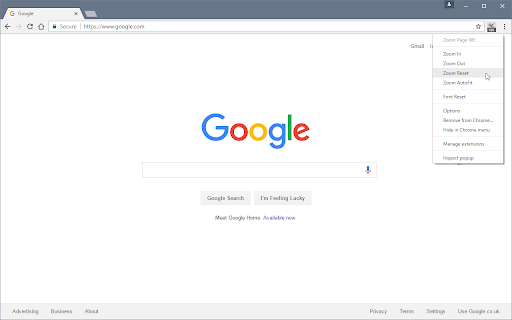


Zoom web pages (either per-site or per-tab) using full-page zoom, text-only zoom, automatic fit-to-width and minimum font size. Zoom Page WE provides facilities to make the contents of a web page larger or smaller (either per-site or per-tab) using full-page or text-only zoom and minimum font size. AutoFit (fit-to-width) can be applied manually or automatically. Small images can be scaled to fit the browser window. After installation, there will be a new blue 'floppy-disk' icon on the main toolbar with a blue badge showing the current zoom level. To change the zoom level for a page, click on the toolbar button to show the popup panel, then click on one of the six buttons on the right side of the popup panel: • Type - toggles the type between Full and Text. • Level (%) - shows a drop-down menu from which a specific level can be selected. • In (+) - increases the level to the next defined level or by a fixed step. • Out (-) - reduces the level to the next defined level or by a fixed step. • Autofit - adjusts the level so the page contents fit the width of the browser window. • Reset - applies the defined default full/text level depending on the current type. To change the minimum font size for a page, click on the toolbar button to show the popup panel, then click on one of the two buttons on the left side of the popup panel: • Minimum Size (px) - shows a drop-down from which a specific minimum font size can be selected. • Reset - applies the defined default minimum font size. Distributed under the GNU General Public License version 2. See LICENCE.txt file and http://www.gnu.org/licenses/

Text Zoom & Reader — enlarge text, hide images
Text zoom to 200%, distraction-free reader mode, and one-click hide images - improve readability in your browser now. Instantly enlarge text up to 200% • distraction-free reader • hide images Transform cluttered web pages into comfortable, readable articles — perfect for low-vision users, students, and anyone who wants to focus. Why install Text Zoom & Reader? • Text Zoom to 200% — enlarge fonts on any website instantly. • Distraction-Free Reader Mode — strips ads, sidebars and clutter for a clean reading view. • Hide Images & Media — one click removes unnecessary visuals to avoid distractions. • Works in Chrome & Chromium browsers — Chrome, Edge and other Chromium-based browsers supported. • Lightweight & Fast — minimal memory and CPU usage. Who it helps: • People with low vision or reading difficulties (dyslexia) • Students and researchers reading long articles or papers • Anyone wanting a focused reading environment on news sites, blogs, docs How it works (3 steps): 1."Install the extension." 2."Click the toolbar icon." 3."Pick zoom level or reader mode — enjoy comfortable reading." Privacy & Security We respect your privacy: Text Zoom & Reader does not collect your browsing content. Permissions are limited to what’s necessary to change page appearance locally. Trusted by users: Rated ★★★★☆ by thousands of users — “The simplest, most effective reader mode for Chrome.” Get started Install Text Zoom & Reader now and make web pages readable in seconds.

Zoom Per Tab
Zoom one tab without affecting other tabs of the same domain! Chrome doesn't let you adjust the zooming of different tabs under the same domain independently? Well you found the cure! I know there are a couple of similar extensions out there. At first, I wanted to just download one and save myself some time. I soon realized that existing extensions out there for this purpose are so bulky and complicated. Some of them even ask you to install a daemon process that's available on Windows only - this is real bad, and dangerous, but also real bad. This extension simply makes page zoom settings independent across tabs, regardless of whether they have the same origin. It's ultra-lightweight. It uses a built-in Chrome API, just a few lines of code, no configuration needed at all! You can unpack the extension to verify that it's not doing anything malicious. In fact I encourage everyone to read it because it's so simple. You could've written it yourself! A copy of the source code is at https://github.com/xinan/zoom-per-tab.

Scroll Zoom
Zoom web pages with the left or right mouse button and the scroll wheel. Scroll Zoom is a browser extension which lets you zoom web pages by holding the left or right (default) mouse button and moving the scroll wheel. The mouse gestures can be configured from the extension's options, and the customization of zoom levels is also supported. The continued development of Scroll Zoom is made possible thanks to the support of awesome backers. If you'd like to join them, please check out https://armin.dev/go/patreon Due to browser restrictions the extension does not work on the Chrome Web Store website or local browser and extension pages, such as chrome://extensions. The "Allow access to file URLs" option must be enabled to zoom saved web pages opened in a tab. Visit the chrome://extensions page and open the extension's details to find the option. Relevant browser bugs: • On macOS and Linux the secondary (right) mouse button gesture does not zoom pages as expected, the context menu is shown The extension is also available for Edge and Firefox: https://github.com/dessant/scroll-zoom#readme Reviews are not monitored for bug reports, please use GitHub for issues and feature requests.

SmoothZoom – Quick Page Zoom
Pinch-to-zoom convenience, now on your desktop. Hold right-click and spin the mouse wheel to zoom toward the cursor. Enjoy the convenience of pinch-to-zoom functionality from touch screens, now available on your desktop. Many touchpads support pinch-to-zoom in a way that they trigger the built-in page zoom. You can intercept this action by changing the zoom activation key from "RClick" to "Ctrl". This way, you don't need a mouse wheel to use SmoothZoom!
