
ckgeaghalgglnfmdfjbajmlckkkicdfm
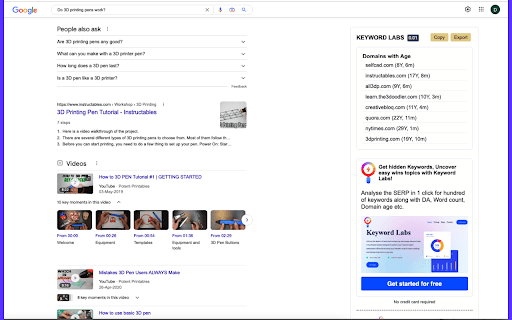


Find & highlight domains under 4 years old on Google SERP for SEO analysis. Introducing Semantic Pen Domain Age Extension, the ultimate tool for SEO professionals and digital marketers! This powerful extension allows you to quickly and easily view the age of any domain that appears in your Google search results. With the Semantic Pen Domain Age Extension, you can quickly and easily identify which domains are newly established and which ones have been around for years. This information can be incredibly valuable in helping you decide which domains to target in your SEO and content creation efforts. One of the unique features of this extension is that it highlights domains that have been in existence for three years or less, giving you an instant indication of which domains have proven staying power. In addition to displaying domain age data, the Semantic Pen Domain Age Extension also provides you with the ability to copy all of the domains with their age data, as well as export all domains and their age data as a CSV file. This makes it incredibly easy to analyze and work with large amounts of domain data. The extension is easy to install and use, and is compatible with all versions of Google Chrome. With the Semantic Pen Domain Age Extension, you'll have all the information you need to make informed decisions about your SEO and content creation efforts. Try it today and take your digital marketing efforts to the next level! --- Semantic Pen is a powerful web app that utilizes AI and machine learning to enhance search engine rankings and drive traffic to websites. It provides real-time factual content creation and generates ready-to-rank semantic optimized articles, making it the ideal solution for bloggers, publishers, and website owners looking to improve their content marketing efforts. With Semantic Pen, users can create high-quality, SEO-friendly content in real-time, providing up-to-date insights into the performance of keywords and helping stay ahead of the competition. The app is designed to provide the necessary tools for creating targeted, relevant content that will help users rank higher in the SERPs and attract more traffic to their websites. The Semantic Pen web app is a game-changer in the world of content marketing. With its powerful features and cutting-edge technology, it helps users create effective SEO strategies that deliver results. Don't let your competition get ahead – start using Semantic Pen today and take your content marketing strategy to the next level. Privacy policy: https://www.semanticpen.com/chrome-extension-privacy-policy

Bloom Extension
Adds BloomBot trading buttons for the fastest possible execution on your favorite trading terminals. ⚡ BLOOM EXTENSION: SUPERCHARGE YOUR SOLANA TERMINAL Bloom Extension brings Telegram trading directly into your terminal. Faster fills, full customization, and zero tab-switching on Axiom, Photon, GMGN, DexScreener, J7Tracker, and more. Full list of supported sites available in the extension settings. 🛠️ FEATURES → Quick Panel: one-click buy and sell from any supported terminal → Presets: create and switch between multiple trading configurations instantly → Limit Orders: limit buy, limit sell, take profit, stop loss, and trailing stop loss (supported on Axiom, Photon) → Dev Sell: automatic sell when the developer sells → Split Tokens: distribute tokens across wallets in a single action → Scrapers: auto-buy from Telegram and Discord channels → Multi-Wallet: trade with multiple wallets simultaneously → PnL Cards: customizable shareable performance cards → Keyboard Shortcuts: full hotkey support for speed execution 🚀 WHY BLOOM? Your terminal, enhanced. Faster execution, advanced order types, and automation you can't get from the terminal alone. Presets, wallets, and strategies sync between desktop and Telegram mobile. 🔐 SECURITY & PRIVACY Bloom Extension has been reviewed and verified by Google. Your data stays yours. → No private keys or seed phrases, ever → No clipboard access, no screenshots, no screen recording → No browsing data or keystroke collection → The only data processed is related to your Bloom trading activity (transactions and orders) through the Telegram bot

Hide Discord Sidebar
Hide Discord Servers and Channels! Installs a button that hides/shows the Discord server list and autohides the channels list. If you find this extension helpful, I would be grateful if you can buy me a coffee at https://ko-fi.com/patrickxchong. 🙏 Hide Discord Sidebar is a Chrome extension that minimizes the channels list into a small left sidebar when it is not in use and installs a button on the top right corner to hide/show the Discord server list. Users are able to customise the extension with the popup that shows when the extension button is clicked. Appreciate feedback/support in the reviews! Or email me at patrickxchong@gmail.com. Source code can be found at https://github.com/patrickxchong/hide-discord-sidebar. IMPORTANT: This extension is only meant to work on Discord in Chromium based browsers. Tested and working on Windows, Mac and Linux versions of Brave Browser and Chrome. === Version History === v5.0.0: Update extension selectors after Discord update v4.4.0 Update channel list query v4.3.0: improve server list query v4.2.0: fix servers query from Discord update v4.1.0: Proxy refresh event with onUpdated instead of webNavigation API v4.0.1: UX improvements on client startup and server list v4.0.0: migrate extension to Manifest V3 v3.3.1: fixes hide/show servers button covering inbox button v3.3: fixes autohiding channels not working after discord update v3.2: update code to use Vanilla javascript for Firefox support v3.1: revamp architecture to support auto initialising extension when moving from Discord non-chat page (like homepage) to chat page v3.0: add extension popup menu to customise extension behaviour v2.17: update extension description for SEO v2.16: fixes extra space on the right of sidebar after discord update v2.15: fixes hide server button not working after discord update v2.14: set !important on some CSS properties to fix sidebar not collapsing on Edge Dev v2.13: enable/disable extension by clicking on extension button v2.12: changes tab permission from discordapp.com to discord.com v2.11: fixed width of left sidebar on hover v2.10: fixes channels issue from discord update

Domain Age Checker | Website Age Checker
A professional tool that allows you to instantly check the registration date and age of any domain. This extension is designed to check the age of any domain and provide the result in a detailed format, including years, months, and days. Benefits And Use Case ✅ Easily check the exact age of any domain name in just a few seconds, helping you understand how long a website has been active and established online ✅Get a complete and detailed breakdown of domain age, including years, months, and days, instead of just a rough estimate ✅Perfect for SEO analysis, competitor research, and website credibility checks, giving you deeper insights before making decisions ✅User-friendly extension interface that delivers accurate results instantly without requiring technical knowledge ✅Helps marketers, bloggers, and developers evaluate domain authority and trustworthiness based on its age ✅Saves time by automating domain lookup and presenting all relevant information in a clean, easy-to-read format

Domain Age Checker | Site Age Checker by Dotpapa [Free]
Domain Age Checker shows any website's age instantly when you open the popup. Fast, accurate & privacy-friendly WHOIS lookup. Instantly check any domain's age with one click. Perfect for SEO analysis, domain research, and digital marketing professionals who need fast, reliable WHOIS data. Key Features: One-click domain age lookup on any website Instant WHOIS registration date display No login or signup required Completely free to use Works on HTTP and HTTPS sites Lightweight and fast performance Real-time accurate data Perfect For: SEO specialists, digital marketers, content strategists, backlink analysts, domain investors, and web researchers who need quick access to domain information. How It Works: Simply visit any website and click the extension icon to instantly view the domain registration date and calculate the total domain age. No complex setup or configuration needed. Comprehensive Coverage: Powered by WhoisFreaks WHOIS data, supporting over 1,526 top-level domains (TLDs) including generic TLDs (gTLDs), country-code TLDs (ccTLDs), and thousands of second-level domains (SLDs) for unparalleled accuracy. Privacy & Performance: This extension is lightweight, secure, and respects your privacy. No personal data collection, no tracking, no hassle. Need Bulk Checking? If you need to check bulk domain age checking then you can use our free tool For multiple domain lookups, visit: https://dotpapa.com/domain-age-checker/ Essential SEO Tool: Domain age is a valuable metric for evaluating website authority, competitor analysis, and identifying quality backlink opportunities. Get the insights you need instantly while browsing. You can our extension direct from chrome web store and also you can Download and add now and streamline your domain research workflow!
