
ckgdggmpioeabapnhoglbmeibhbdmmoe


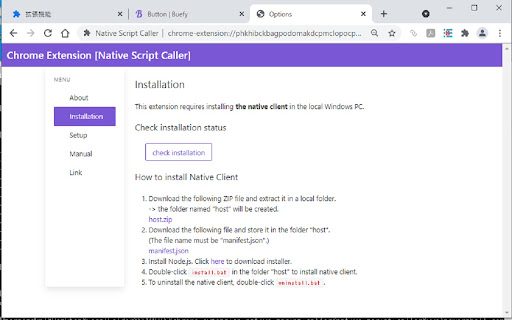
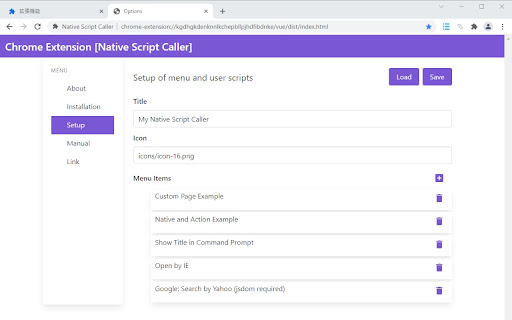
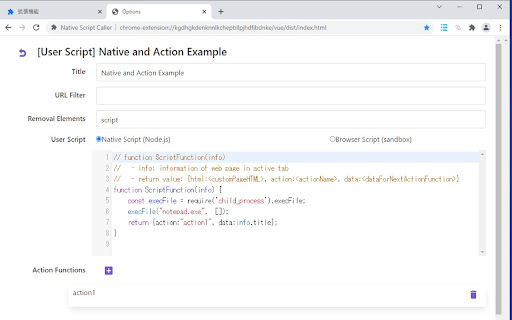
Custom MENU to execute user Javascript and arbitary local PC programs, and display custom pages This extension provides a customizable menu to run user scripts (native or browser Javascript) and arbitary loccal PC programs. User script can include HTML of custom page to display messages or input forms. Action functions for the input forms can be written in native or browser Javascript. Features: - Customizable icon and menu in Chrome toolbar and context menu - By clicking the menu item, user Javascript code is executed - User script can be a Node.js Javascript executed in the local PC (Arbitary program of local PC can be called from Node.js scirpt) - User script can be javascript executed in sandbox in the web browser - User script receives info. of the active page (URL, title, HTML, etc.) - User script can include a HTML text of a custom page which would be used to display messages or user input forms - Action functions for the input forms can be written in natieve or browser Javascript. - Action function receives the form data from custom page and return value from the previous user script or action function. - Action function also can include custom page HTML - Action function can be called directly from the user script or action function. - Filter menu items by prefix of URL of active page - For Windows PC only Installation: This extension requires Native Client installed in the local Windows PC. The installation instruction is displayed at the installation of this extension.

Simple User Scripts
Simple user scripts for Chrome ※Needs Chrome Extensions Develop Mode to be enabled. Go to chrome://extensions/. At the top right, turn on Developer mode. https://support.google.com/chrome/a/answer/2714278?hl=en#:~:text=Go%20to%20chrome%3A%2F%2Fextensions,right%2C%20turn%20on%20Developer%20mode. Simple User Scripts is a powerful Chrome extension designed for users who want to inject custom JavaScript into specific webpages seamlessly. Similar to Tampermonkey, this tool allows you to personalize and automate your browsing experience by running predefined scripts on chosen websites. Navigate easily through an intuitive dashboard to upload, edit, and manage your JavaScript files. Custom Script Execution Assign scripts to specified URLs or URL patterns, ensuring they run only where you want them to. Real-time execution lets you see the immediate effects of your scripts upon loading the target webpage. Advanced Configuration Utilize wildcard characters and regular expressions for precise script targeting. Manage execution order to account for dependencies between multiple scripts. Export Functionality Export your entire script setup, including all configurations, into a single file. Easily share your setup with others or import it onto another device. Security and Privacy Runs only user-defined scripts, protecting against unauthorized code execution. Simple User Scripts offers a robust yet straightforward way to customize website behaviors, enhance productivity, and streamline your web development workflow.

Oily Monkey
Rock with injecting user script but simpler! Rock with injecting user script but simpler! This extension allows users to easily inject user scripts into the target page. Users can use regular expressions to match the URL of the target page and set the script to be injected. When the extension starts running, the script will be injected every time the target page is opened. Users can manage multiple rule configurations, but only one configuration will actually take effect in the end

Extension manager
★ English version ★ 1. Managing extensions in the Chrome side panel. 2. Enable and disable extensions directly from the management interface. 3. Enable or disable multiple extensions at once. View detailed information about extensions such as ID, permissions, status, etc. 4. Remove extensions directly from the management interface.

Vanilla Pudding🌿🍮
Vanilla Pudding Userscript Manager helps you manage and run browser userscripts When Do You Need This? 1、A modern script manager with default support for ESM script loaders. 2、A script manager similar to Tampermonkey, but without support for GM_* APIs. 3、Built-in MonacoEditor. 4、A powerful manager that supports advanced API capabilities from the plugin.
