
cjomabbghdjkioodjpgejgfcpphaajpa
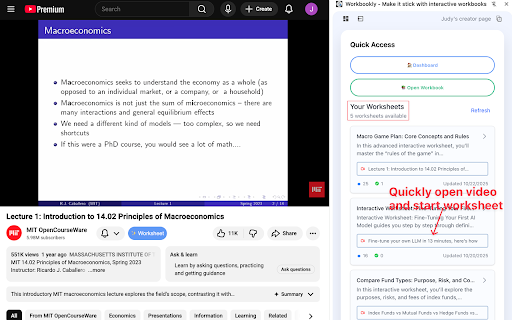


🚀 Creators, save hours of time developing PDFs and worksheets for your educational YouTube videos with one-click. Unlock reinforcement learning with engaging practice workbooks 🚀 🚀 Students and self-learners, the new side panel helps 'make it stick' by pairing engaging worksheets with videos. Don't just watch, but actually learn. 🚀 🧠 Workbookly turns YouTube educational content into practice worksheets. With one click, generate multiple-choice questions, fill-in-the-blanks, and matching activities from any video with transcripts available. 🚀 Perfect for: ▶ One click of the Workbookly button to import videos ▶ Generate one or more unique interactive worksheets ▶ Download PDF worksheets ▶ Share workbook links ▶ Host all your workbooks on your own branded learning hub ▶ One-click video import from YouTube ▶ Your unique @creator url ▶ AI generated practice questions ▶ AI generated fields ▶ Professional PDF exports ▶ Student-friendly public pages ▶ Mobile-optimized workbooks ⚡Import up to 2 videos and create 2 workbooks per month at no cost This extension is offered as a personal-use utility and is not sold or monetized through the Chrome Web Store. Related services may be offered separately on an external website.

NotebookLM Web Importer
Import web pages and YouTube videos to NotebookLM with one click NotebookLM Web Importer is a powerful Chrome extension for saving web pages, YouTube videos, links, browser tabs, RSS feeds, and more directly to Google NotebookLM. Stop copying URLs, switching tabs, and manually organizing sources. With NotebookLM Web Importer, you can capture online content in seconds, add it to the right notebook, and start using NotebookLM to summarize, ask questions, generate insights, and create Audio Overviews. Built for students, researchers, creators, writers, analysts, and anyone who uses NotebookLM as an AI research assistant. ## One-Click Web Page Import Save the current web page to NotebookLM instantly. Turn articles, blog posts, documentation, reports, and reference pages into NotebookLM sources without copy-paste. ## YouTube to NotebookLM Import YouTube videos into NotebookLM so you can study lectures, interviews, tutorials, podcasts, webinars, and long-form videos more efficiently. ## Bulk Import Add multiple sources at once from link lists, open browser tabs, YouTube playlists, RSS feeds, and more. Build a complete research notebook faster. ## Notebook Management Manage your notebooks in one place and keep your NotebookLM research workflow organized while you browse. ## Audio Overview Management Manage NotebookLM Audio Overviews and sync them to a podcast feed, making it easier to listen, review, and learn on the go. ## Full WebSync Workflow Send pages and videos to NotebookLM from your browser, then chat with your sources, generate summaries, create study materials, or produce podcast-style Audio Overviews inside NotebookLM. NotebookLM is great for understanding sources. NotebookLM Web Importer makes it much faster to collect those sources. Use it to: - Save articles, reports, and documentation to NotebookLM - Import YouTube videos and playlists for research or learning - Collect sources from multiple tabs in bulk - Build notebooks from RSS feeds or link lists - Organize research for school, work, writing, or content creation - Turn saved sources into NotebookLM summaries, Q&A, study guides, and Audio Overviews - Reduce repetitive copy-paste work while browsing # Perfect For ## Students Collect lecture videos, course readings, articles, and research materials in NotebookLM. ## Researchers Build source collections from papers, websites, reports, documentation, and reference links. ## Creators and Writers Save inspiration, competitor research, scripts, articles, and YouTube videos into structured notebooks. ## Professionals Gather market research, product docs, news, client materials, and internal knowledge sources for faster analysis. 1. Install NotebookLM Web Importer from the Chrome Web Store. 2. Browse the web or watch YouTube as usual. 3. Click the extension icon. 4. Choose where to import your source. 5. Open NotebookLM to chat with your sources, generate insights, or create an Audio Overview. NotebookLM Web Importer helps you turn the web into a searchable, organized AI knowledge base. If you use NotebookLM for research, learning, writing, analysis, or content creation, this extension saves time every day. Works with Google NotebookLM. This extension is not affiliated with Google.

YouLoop
Put YouTube videos on loop with one click Loop your favorite YouTube videos. Just click the new loop icon next to the other YouTube video control icons while watching a YouTube video - the icon rotates and turns red indicating that the current YouTube video will be repeated. You can stop looping by pressing on the icon again. So why choose this extension instead of the others? • Much smaller than other extensions (= 100kB) • No support for Flash player which is old and deprecated. Let's help remove Flash Player from the internet! • Low memory usage since it is just a script. • Fancy animations! • Vanilla JavaScript only! • Other extensions of the same kind include unnecessary code and the code base is very messy. • If you have any problems or suggestions, feel free to click on "Support" and shoot me a question. • If you like this extension, please consider rating it.

Copy Youtube Transcript
Copy YouTube video transcripts with one click. Copy Youtube Transcript lets you instantly copy or download video transcripts with a single click. 🎯 MAIN FEATURES: • One-click transcript copying • Clean, formatted output • Works with regular YouTube videos and Shorts • Customisable formatting options • Dark mode support • Optional AI summary prompt for easy content analysis 🔍 PERFECT FOR: • Students taking notes • Researchers analysing content • Content creators repurposing videos • Anyone who needs quick access to video transcripts • AI/LLM users seeking structured input 💡 HOW TO USE: 1. Open any YouTube video with captions 2. Click the extension icon 3. Click "Copy to Clipboard" 4. Paste anywhere you need! ✨ SIMPLE, FAST, AND RELIABLE: • Clean, modern interface • No ads or tracking • Works offline once loaded • Respects your privacy • Lightweight and fast Note: This extension requires videos to have captions/transcripts available on YouTube.

YouTube Repeat
Let youtube repeat replay song in one click! Loop youtube video, listen song on repeat, and enjoy infinite loop for hours 🎵 Meet youtube repeat, your new Chrome tool developed by professionals from Milext Studio. This extension lets you loop any part or the whole of a youtube video. Set it up once, and it runs till you stop it. 🚀 How to loop a youtube video? Just follow these simple steps: 1️⃣ Download youtube repeat extension from the Chrome Web Store. 2️⃣ Open your favorite video. 3️⃣ Click on the newly added repeat button in the status bar. 4️⃣ Choose to loop the full clip or set a part. 5️⃣ Sit back and enjoy non-stop playback! 🎶 Youtube repeat is packed with useful features designed to enhance your video viewing experience. 🎬 Seamless Integration: It blends in with youtube video interface effortlessly. This makes it feel like a inherent part of YouTube. It's simple and intuitive, making it a breeze to use. You get a seamless, native look and feel with repeat youtube. 🖥️ Browser Compatibility: Built to work flawlessly on Chrome, it's browser friendly. It doesn't interfere with your browsing speed or performance. Enjoy uninterrupted browsing and looping with youtube repeat. It's unobtrusive, light, and efficient. 🔁 Control over Loops: With our tool, looping a specific part of a video is a walk in the park. Just pick the start and end points, and voila! Repeat any section of a video as much as you want. You now have precision control over the loops. 🎼 Repeat Count: Not just the segment, you can decide the number of repeats too. Want to play it ten times, or until you decide to stop it? You get to choose with youtube repeat. Enjoy a personalized video experience! 🎞️ Works with Vimeo: And it doesn't stop with youtube. The extension extends its looping love to Vimeo videos too! Now enjoy your favorite Vimeo content with our repeat feature. It's more fun across platforms. 🎓 Youtube repeat thrives on offering benefits to learners and students. ➤ Repeat Lessons: Do you need to grasp a tough part of a lesson? Loop the part with looper for youtube. Watch, pause and replay till you get it. ➤ Foreign Language Drill: Are you learning a new tongue? Pick a phrase or word in a language video and repeat! Listen and practice till perfect. Youtube repeat can be your language friend. ➤ Exam Prep: Revising for tests gets a boost. Repeat parts of a lecture, a study guide, or an exam tip. The more you hear, the more you recall. Get your loop youtube study edge now. 🎤 Youtube repeat extension brings in a host of benefits for singers and musicians too. ➤ Perfect Pitch: Got a tough part in a music piece? Want to get the pitch and tone right? Use repeat youtube to replay the part and practice along. Sing or play it till you hit it right. ➤ Music Pieces: Working with a complex music piece? Break it down into parts. Loop each part using youtube repeater and master one at a time. It's like your own music tutor. ➤ Song Lyrics: Need help with the lyrics? The chorus or a line not catching up? Set it on a loop and play youtube video on repeat. Listen, sing along, and get those words tight. 🕺 Welcoming all dancers to a better practice session with youtube repeat. ➤ Dance Practice: Got a tough step to master? Use looper youtube to replay the part. Mirror the moves till you nail it. ➤ Choreo Learning: Step by step, learn a whole choreography. Break it down, loop each part, and put it all together. Youtube replay makes it easy. ➤ Sync Drills: Syncing with a team? Use loop youtube to play the group parts. Practice till you all move as one. 🎧 Youtube repeat goes beyond students and musicians, helping various users. ➤ Workouts: Keep up with your fitness regime. Repeat a workout or yoga move till you get it right. Let yt video looper be your virtual fitness partner. ➤ Cooks and Chefs: Repeating the steps in a recipe has never been this easy. Loop the tricky part till you master the dish. Looper youtube is your kitchen companion. ➤ DIY Lovers: Not clear with a step in your DIY video? Just repeat that part until clear. Let youtube repeater guide you in your DIY tasks. 📌 Frequently Asked Questions: ❓ How do I install the extension? 💡 To install youtube repeat, just click on the "Add to Chrome" button. After quick installation, you’ll be able to looping youtube videos. ❓ How to loop a certain part of a youtube video? 💡 To replay a specific part of a youtube video, load the video page, click on the repeat button, set the start and end points for the loop, tick a box "Loop a portion" and voila! ❓ Does youtube count repeat views? 💡 Yes, our extension has a built-in counter, which help you to know how many times youtube video has been played. ❓ Does youtube repeat require access to my personal data? 💡 No, the extension does neither require access to your youtube account nor your personal data, ensuring your privacy. ❓ Do I need to sign up or create a youtube account to use it? 💡 There's no need to sign up or create a youtube account to use our extension, providing you with instant access ❓ I have some ideas and feedback for youtube repeat. Can I share them with the developers? 💡 Absolutely! Our team is always open to hearing from our users. Don't hesitate to send in your proposals, ideas, or reviews. We value what you have to say. ❓ If I encounter a problem while using youtube repeat, is there a customer support available? 💡 If you have any problem, feel free to contact us directly via email or leave a ticket in the Chrome Web Store. We’ll be glad to be of help 🥇 Youtube repeat is the ultimate Chrome extension for loop playback and YouTube replay functions. Download and install our extension today and get the best out of your YouTube experience! Happy viewing and repeated listening! 🎉
