
cjdgehgngjapndihjoddmpiafiagbcpb
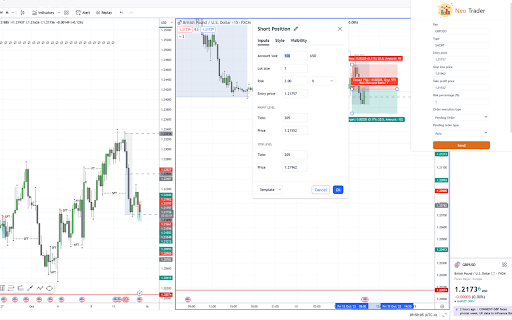
Send orders from Tradingview to Metatrader platform with one click. This extension integrates Tradingview platform with Metatrader platform. Currently there is no straightforward way to send the orders from Tradingview to Metatrader. Using this Extension, trades can be sent to Metatrader with one click! Metatrader terminal should be run in the same computer where the Tradingview chart is opened. Extension sends a POST request to MT terminal with details of the position. MT platform should be configured with Expert Advisor to accept and place trades.

Markets Guide: Meet TradingView Ultimate Power Extension
Master Trading and Technical Analysis with Markets Guide! 🚀 Master Trading and Technical Analysis with Markets Guide! 🚀 Experience TradingView like never before. Our AI-powered dashboard, strategy-driven lessons, and powerful technical analysis tools ensure you never miss a trading opportunity! 📈 🔥 Real-Time Signals: Get instant buy and sell alerts using advanced analysis for indicators and candlestick patterns. 🎯 Strategy-Driven Lessons: Learn from a variety of trading styles, including day trading, scalping, swing trading, and strategies for breakout, trend following, range trading, price action and more. 📚 Extensive Learning: Dive into hundreds of lessons and trade replays to deepen your market knowledge. 🖥️ Intuitive Dashboard: Easily navigate with our user-friendly interface. 🔍 Confluence Filter: Utilize our filter to identify trading signals that align in the same direction. So are you ready to become a top-tier trader? Simplify your market analysis and elevate your trading decisions with our comprehensive, AI-enhanced extension. Upgrade Your Trading Today with Markets Guide ✨

Mom Trader
A powerful browser extension tailored to supercharge traders' skills in analyzing and mastering chart patterns. Supercharge Your Trading Skills and Maximize Profitability with Mom Trader - a browser extension designed for traders, by traders. Similar Pattern Finder Highlight any market data that has a popular trading pattern in it supported by Mom Trader on TradingView, and Mom Trader will find and display multiple instances of the pattern selected that closely resemble the one you highlighted– all within the same asset and timeframe. These highly similar patterns allow you to analyze what market conditions led to their success, giving you valuable insights to refine your strategy and recognize profitable setups faster. Non-Similar Pattern Finder Mom Trader locates every instance of the selected pattern for the chosen asset and timeframe. This comprehensive view allows you to detect recurring signals in the market data that causes a pattern to succeed, giving you a clearer understanding of pattern consistency. Pattern Success Rate Tool View the exact percentage success rate of a selected pattern for the asset and timeframe you are analyzing. This insight enables you to make informed trading decisions by focusing on patterns with higher probabilities of success and steering away from lower-performing ones. Surrounding Market Data Access market data that appears before and after a pattern to see how earlier price action may contribute to the outcome. This feature allows you to evaluate if preceding trends or signals play a role in the pattern’s overall performance, helping refine entry and exit points. Failed Patterns Finder Mom Trader identifies every failed instance of the selected pattern for the asset and timeframe, providing you with a detailed look at where patterns break down. By analyzing failed patterns alongside success rates and surrounding market data, you can better understand why certain patterns do not work. This allows you to adjust your strategy, avoid common pitfalls, and even trade against patterns with consistently low success rates if that becomes your strategy. Instant Pattern Delivery with TradingView Charts Mom Trader delivers every occurrence of the pattern you select directly through TradingView-powered charts in our browser extension. This fast and seamless process provides hundreds of patterns in seconds, making it easy to analyze and compare market data effortlessly. Turn Data into Smarter Trades Mom Trader equips you with the tools to analyze patterns from every angle, offering detailed insights that lead to more strategic and profitable trades. By understanding both successful and failed patterns, you gain a deeper perspective on market behavior and improve your trading outcomes.

TradingX for Tradingview
A Chrome extension to place orders on Binance from TradingView charts

TradingView Settings Exporter
Export, import, and save TradingView indicator settings Export, Import, Save, Update, Load and manage settings for indicators and strategies in Tradingview. If you find yourself experimenting with different settings on indicators/strategies and need a quick and easy way to store and retrieve that information for later use then this is the tool for you. You can also share the settings with others.
