
cijiljolaemabjeaklgnfgofglfbonpa
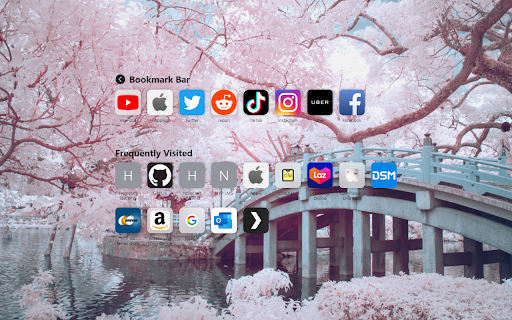
Big Sur inspired web start page. Still in early development, feedback much appreciated New Page tab inspired by safari start page on MacOS. Still in early development, feedback much appreciated. Features: + View and navigate your bookmarks. + Auto icons for your bookmarks. + Edit, rename, and remove your bookmarks. + View your Frequently visited pages. + Set Background Images.

Bookmarks Startpage
Displays your bookmarks on simple, customizable pages. The 'Bookmarks Startpage' browser extension displays your bookmarks on simple, customizable pages. There are options to customize colors, fonts, and the number of columns used. Note: the default display works best with short bookmark names, and, nested folders where bookmarks are included at the same level and roughly the same amount per folder.

Quick Startpage
Advanced Newtab with your bookmarks, apps, tabs and search Quick Startpage is Chrome's advanced newtab with Search, based on your bookmarks. Quick Startpage allows you to quickly access your Tabs, Visited pages, Apps and Search. Also, you can easy save tabs and windows to bookmarks and restore them later.

Bookmark Plus New Tab
Experience a minimal new tab page with this extension. The new tab will include a Web search feature powered by Yahoo! Choose from over a dozen unique background images or upload your own. Go with an uncluttered look or include your favorite web sites on the new tab. Please read carefully: By clicking the "Add To Chrome" button and activating this browser extension, you agree to install this application, and you agree to the End User License Agreement and the Privacy Policy. You can uninstall the program at any time. Permissions Requested By This Extension To perform the functions described in this extension, the following permissions are requested: Bookmarks Access Needed to display user's bookmarks in the omnibox. Tabs Access Clicking a bookmark from the extension will may launch a new tab if the user initiates that option in General Settings. Storage Access This is needed to pull the favicon of recently visited sites. Topsites Access Needed to display the most recently visited sites on the new tab page.

Favorites Tab
Display favorites and bookmark on new tab. Favorites Tab is a designed to help you organize and access your bookmarks and favorites effortlessly. With a simple favorites list, you can keep frequently used sites at your fingertips and seamlessly switch between bookmarks and favorites. Features: - Favorites List: Store your favorite sites above your bookmarks for easy, clutter-free access. - Bookmark Management: View and organize all your bookmarks in one place. - Automatic Icon Retrieval: Displays site favicons automatically, or uses placeholders for a consistent look. - Drag-and-Drop Sorting: Reorder your favorites with simple drag-and-drop functionality. - Dark Theme Support: Compatible with dark mode for a smooth browsing experience.
