
cijidiollmnkegoghpfobabpecdkeiah

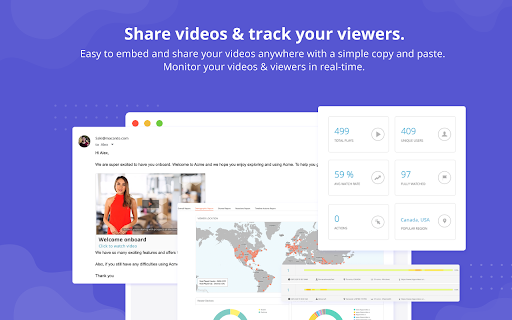


Best screen recorder for Chrome. Create, edit, and share your professional looking videos instantly. Best screen recorder for Chrome. Record, edit and share your professional-looking videos instantly. Hippo Video is an all-in-one platform for all your Video Needs. Record amazing videos, edit with our powerful video editor, share across multiple platforms and see how your video is performing. Hippo Video acts as a video distribution platform and helps sales & marketing teams to leverage their visual content effectively. It’s a powerhouse with many stunning features like: 🎥 Video & Screen Recorder ✔ Use your webcam or front-facing camera to record the video ✔ Screen capture of tab, window or the entire desktop ✔ Record video using both your webcam and screen capture at the same time ✔ Generate Gifs from videos ✔ Set custom image or Gifs as thumbnails for your videos ✂️Powerful Online Video Editor ✔ Hippo Video comes with two editing options - ‘Quick Edit’ for novices and ‘Pro Edit’ for power users ✔ Use edit options like Trim, Crop, add Call-outs, Emojis, and Tags ✔ Blur or mask a part of your screen to hide any confidential info ✔ Stitch and join clips with ‘Hippo Video's Editor’ - to tell your stories in a wholesome manner ✔ Add ‘Intro’ and ‘End’ cards to create personalized stories 📢Branding ✔ Customize the video with your brand’s standardized colour scheme. Add your logo, custom thumbnails and many more ✔ Option to share your file directly with your domain using our SSL-enabled custom domain option 👥Collaborate ✔ Invite your colleagues to Hippo video and collaborate as a team to create hassle-free visual presentations ✔ Assign roles and permissions to your team members easily 📊Reports ✔ Get detailed insights on who is viewing your video? How are they seeing? where are they sharing and how are they reacting to your videos ✔Dive deep into your video performance with insightful reports And many more Are you looking for remote working tools? Hippo Video has everything that you need to set up remote working for your teams in sales, marketing, team collaboration, education, or support. Hippo Video also integrates with your everyday video conferencing and collaboration tools. Working from home just got a lot easier with Hippo Video. Why HippoVideo scores over other video or screen recorder tools? ✔ Ease of use ✔ Many advanced features for all the video needs ✔ Forever Free Plan - Create Unlimited Videos, Host Unlimited Videos, 100GB Bandwidth ✔ Pricing: The paid plans of Hippo Video starts from $5/month You can sign up for free without giving any credit card information and explore for yourself on how effective Hippo Video is? For any feedback/queries, feel free to contact us at support@hippovideo.io or visit https://help.hippovideo.io/support/home

ScreenPal - Screen Recorder & Video Editor
Record your screen & webcam, take screenshots, edit videos & images - easy & free! Get the all-in-one tool that lets you capture any part of your screen with webcam and narration, easily edit your recordings and screenshots, and then share your content securely with a click. Say goodbye to multiple apps and extensions, and say hello to ScreenPal – making your workday easier, more efficient, and fun! Easily record your screen & webcam directly in your browser or quickly launch ScreenPal's free desktop screen recorder, screenshot tool, and video & image editor. Capture, edit, and share screencast recordings and videos with just one click. Capture your screen, add a webcam, and use drawing tools and effects to customize your video. It’s a fast, free, and easy-to-use video maker. 🚀 CAPTURE YOUR SCREEN AND WEBCAM Launch the desktop screen recorder or record through your browser. Record your screen, webcam, or both for picture-in-picture effect. Easily capture your entire desktop, single tab, or application window. Capture any area of your computer screen with the desktop recorder, or easily crop your browser recording to any area. Screen Recording Features: ▸ Recorded an unlimited number of videos for free. ▸ Annotate with easy drawing tools during your recording. ▸ Record voice narration from any microphone. Additional Desktop Recording Features: ▸ Blur, remove, or replace your background. ▸ Zoom in and out while recording. ▸ Annotate with additional highlight and drawing tools. ▸ Editable cursor highlight and mouse click tracking. ▸ Add stock music to engage your audience. ▸ Import a captions file for free or upgrade for AI speech-to-text. 📽️ RECORD VIDEO MESSAGES Save time and improve collaboration with seamless, asynchronous communication through video messaging. Quickly record video messages in your browser and share with a secure link. Click in any text field or comment box in your favorite browser-based apps, record your message, and share. ScreenPal automatically embeds your video message with an animated GIF preview! Reduce back-and-forth, communicate clearly, and build better connections—all without leaving your browser. 📸 TAKE AND EDIT SCREENSHOTS Launch the free screenshot tool to capture your full screen, active app or window, or any part of your screen, then quickly paste to share or easily annotate to communicate clearly with images. Screenshot Features: ▸ Capture full screen or single window with a click. ▸ Click and drag to capture any part of your screen. ▸ Screenshots are automatically copied to your clipboard! ▸ Open in the image editor to add easy annotations and text. ▸ Highlight any area to focus attention. ▸ Document processes with easy sequential steps. ✂️ EASY VIDEO EDITING Create engaging, accessible videos with our easy video editing software. Upgrade to any subscription to create videos with interactive storyboards, combine multiple video clips, and make any video accessible with automated speech-to-text captions. Video Editing Features: ▸ Mix and match content and import videos from multiple devices. ▸ Add video effects, including green screen. ▸ Use engaging transition effects in your video clips. ▸ Enhance any video with overlay tools and add text, images, shapes, and more! ▸ Add images and videos from the ScreenPal Stock Library. ▸ Control the speed of your video and use slow motion to tell your story. ▸ Import your own music, or add from our extensive stock music library. ▸ Type in your own captions or use speech-to-text technology to add captions to your videos. 🎬 CREATE VIDEOS FROM STORYBOARDS Start your video from an interactive storyboard, drag and drop content into your video sections from anywhere, easily rearrange to tell your story your way, polish in the video editor, add music, and share! Video Storyboard Features: ▸ Start your video from a storyboard or script mode ▸ Import Google Slides or PDFs to create easy presentation videos ▸ Drag and drop videos and images to build your video ▸ Add narration with the easy teleprompter feature ▸ Add transitions, audio, and background music ▸ Easily edit any section of your storyboard ▸ Automatically turn your script into captions ⬆️ QUICKLY SAVE AND SHARE It's easy to save and share videos and images with your audience! With just a few simple clicks, you can download your video to your device, easily publish it to YouTube, Vimeo, and Google Drive, and upload to ScreenPal to share with a link or on social media. Download images in common formats or copy to your clipboard to share. 📺 WATCH VIDEOS IN CONTEXT Hover over any ScreenPal video link or thumbnail to preview and watch the video where you are, without any need to click through. Or open the full-page video to watch, engage, and collaborate with text and video comments. ☁️ HOSTING MANAGEMENT TOOLS Hosting allows you to manage, protect, and personalize your video and image content. Hosting Features ▸ Organize videos and images into folders and channels. ▸ Share content to individuals, your team, or company-wide with easy sharing capabilities. ▸ Set the privacy of your videos and images, and use password protection for extra security. ▸ Personalize the video experience with custom links or embed codes. ▸ Customize the video player. ▸ Use custom thumbnails. ▸ Set a publish or expiration date.

Vidyard - Screen Recorder & Screen Capture
Capture your screen, share your video and track who's watching it! Record your screen or webcam, share your video, and track who's watching it! This screen recorder for Chrome is built to help you sell better. Easily record your webcam, screen, or both in just a few clicks. Share your video with a link and track when your videos get watched. From prospecting to proposals, Vidyard’s screen recorder makes it easy to connect with more leads, qualify for better opportunities, and close more deals with personalized video. 🖥 Record your screen directly from your browser ✨ Use AI to write personalized scripts at scale 📝 Automatically generate clear, relevant video titles from your content 🎒 Customize your background to look professional from anywhere 🔗 Easily share your video link through email, social media, and more 💬 Get notified whenever someone views your video 📚 Manage all your Vidyard videos in one place, across devices and teams 🤹♀️ Integrate Vidyard videos with the sales tools your team already uses From HubSpot, Microsoft, LinkedIn, Marketo, Salesforce, and more, Vidyard is the video creation tool built to help sales teams sell better. Screen Recorder - Record your screen to create HD sales videos - Record videos wherever you are with Vidyard’s iOS, Android, and desktop apps - Choose a custom background image to look professional from anywhere - Use AI to write speaker notes and deliver your message with confidence - Access on-screen drawing tools to highlight important information and drive your message home - AI automatically generates clear, descriptive titles from your transcript, so every video is ready to share instantly Edit Your Videos - Trim your videos to remove unwanted footage - Stitch multiple videos together into one, so you don’t have to master the perfect single take - Choose an animated thumbnail from your footage Share Your Videos Everywhere - Share a link to your video via email, social, or however you communicate for free—no downloads or attachments - Embed videos for inline playback on your website, blog, landing pages, and more - Easily share videos to Facebook, Twitter, and LinkedIn with just a couple of clicks - Get notified whenever anyone watches your videos - Track engagement to see who’s watching your videos and for how long - Integrate Vidyard with your CRM to quantify video pipeline, revenue, and ROI Vidyard is the Video Platform Built for Sales From easy video creation to powerful video analytics; from small business to enterprise. Vidyard’s free screen recording platform has all the features your business needs to connect with your audience, drive engagement, and delight your customers, wherever they are. Vidyard is the leading video platform for salespeople. More than 250,000 companies use its video messaging and video hosting tools to engage their customers and prospects more effectively.

Screen Recorder
Record your computer's screen with just one click! Screen Recorder extension helps you record video from the computer's screen. To work with this addon, please click on the toolbar button. Once the recorder interface appears, please adjust desired options, and then click the - Start - button. The video source could be your screen, window, or tab. The audio source can be the system's audio, microphone, mixed, or no audio at all. When you click the start button, a popup will appear within the interface. This popup window allows you to select the desired screen, tab, or window. To start recording please click on the - Share - button. When you are done recording the screen, please press the toolbar button (or the stop button on the app interface) to stop the recording process. The recorded video will be download to your computer automatically (on the default download location). By default, recorded media is in - webm - format. To get more information about webm video format, please visit this Wikipedia page (https://en.wikipedia.org/wiki/WebM). If you want to change this format to a different one, please use a different software. Moreover, to switch the interface theme to dark, please press the moon icon in the right toolbar. To report bugs, please fill out the bug report form on the addon's homepage (https://mybrowseraddon.com/screen-recorder.html).

ApowerREC Screen Recorder
One-click to start your unlimited recordings! ApowerREC Screen Recorder is a lightweight screen recording software providing a bunch of amazing features. With its high flexibility, you can customize the whole screen, browser window, or tab exclusively. More so, if you desire include the audio, sure it can! Multifunctional Screen Recorder ▶ Microphone & System sound recorder Record system sound, microphone, or both audio sources at the same time. ▶ Browser Recorder Screen record a selected browser tab. ▶ Desktop Recorder Record all the desktop activities. ▶ Webcam Recorder Include webcam screen into the recording. ▶ Application window Recorder Record designated application interface. Contact Us ☛ Customer Service: support@apowersoft.com ☛ Desktop Program: https://www.apowersoft.com/record-all-screen
