
cibhknlofbcifmgfbffmkdebcnllmpka
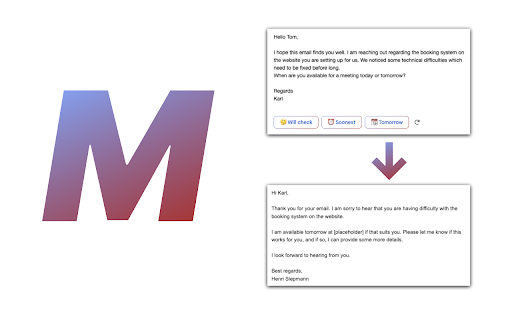
Mailwrite is the #1 extension to speed up your email workflow. Get instant reply recommendations and create write full replies in… Mailwrite is the #1 extension to speed up your email workflow. Get instant reply recommendations and create write full replies in just a single click!

Snoooz - AI Email Writer
AI email assistant for Gmail and Outlook. Draft, auto-reply, and write better emails instantly with one click. Write smarter emails in Gmail and Outlook — instantly. Snoooz is an AI email assistant that instantly creates your drafts. Write your email using AI or saved templates, or highlight the text, click the "Improve" button, and watch it transform into clear, professional, confident language. No retyping, no second-guessing. 💡 What you can do with Snoooz: – Write and improve your email drafts within Gmail, Outlook, and other popular email clients. – Auto-reply to emails with personalized responses – Categorize and route emails – Set up smart out-of-office replies – Use AI to save hours managing your inbox 👌 Perfect For: – Sales reps sending outreach emails that need to land – Customer support teams responding to tickets quickly – Professionals who want to sound confident without spending 20 minutes on one email – Non-native English speakers who want their emails to sound natural – Anyone tired of overthinking every sentence they write 😎 Why Choose Snoooz Over Other Email Writers: – Unlike other AI email tools, Snoooz doesn't generate emails from scratch. It improves what you've already written. This means your emails still sound like you, just better. You stay in control of the message while Snoooz handles the polish. 🏆 Why 10,000+ professionals use Snoooz: – Rated 4.8/5 on G2 – Top Product of the Day on Product Hunt – Startup of the Year by Hackernoon – Used in 60+ countries 📥 Let Snoooz Handle Your Entire Inbox: – The Chrome extension is just the beginning. Upgrade to Snoooz's full platform and unlock powerful email automation features that save 5-10 hours every week: – AI-Powered Auto-Replies: Set up smart, context-aware auto-replies that read incoming emails and respond with personalized messages matching your tone and style. – Smart Out-of-Office Management: Go beyond basic auto-replies. Automatically block your calendar, decline meetings, reassign tasks, and assign backup coverage while you're away. – Email Triage & Routing: Let AI categorize incoming emails and route them to the right person or folder without you lifting a finger. – Custom Automation Rules: Create rules based on sender, context, sentiment, or CRM data to draft, send, or ignore emails automatically. – Team Collaboration: Copy backups on critical conversations, reassign tasks during absences, and keep your team in sync. – Integrations: Connect with Gmail or Outlook for a complete workflow solution. – Analytics Dashboard: Track email response times, template usage, and automation performance to optimize your workflow.

MailMaestro - Gmail AI assistant
Get to Inbox Zero in no time with AI. Write, reply, improve, and summarize email threads in seconds Start today for free. No credit card required. What if you could effortlessly summarize email threads and attachments in Gmail and quickly reply with AI, all in seconds? With a free trial, you can experience MailMaestro's full potential as your personal Gmail AI email assistant, using a combination of the latest LLMs like GPT4o and Claude 3.5 for faster, higher quality emails in your preferred tone, language, and length. MailMaestro is a generative AI tool built for Gmail users with a simple interface that lets you write and reply to emails in seconds. It's designed for teams and professionals who want to save time and communicate without stress, increasing productivity and minimizing the risk of data breaches. Increase your productivity by up to 86% with MailMaestro. Our AI-powered tool provides instant summaries of long email threads and attachments, and helps you reply to any email in seconds using a combination of conversational context and custom prompts. ✉️Improve the Quality of Emails Quickly create high-quality business emails to improve relationships and engagement. Our AI email assistant currently supports 14 languages, including English, Spanish, Portuguese, German, French, Dutch - and more. No more generic AI. MailMaestro adapts based on your feedback, making it the ultimate email assistant. Choose from 7 writing styles (from professional to casual to fun) and 4 preferred email lengths (from extra short to long). Each time you prompt our artificial intelligence assistant, it will provide you with 3 suggestions you can choose from. 🛡️Stay protected with enterprise-grade user privacy Unlike many AI tools, MailMaestro keeps your data secure. While 70% of professionals use various unprotected AI tools, posing security risks, we strictly adhere to protocols to protect your sensitive data. To ensure your security, we anonymize data before it is shared with machine learning algorithms, and we are AICPA SOC and SOC2 compliant. 🚀New features right inside your Google Inbox on a weekly basis We're constantly evolving our extension to bring you a new Gmail AI feature every week, so you're always using the latest technology to help you navigate your inbox. - Use AI's compose window to write emails from prompts in your chosen tone, language, and length directly in Gmail - Quickly reply to emails using data from all previous messages in the email thread - Let our AI assistant improve the draft message for your important emails, giving you 3 different options to choose from - Instantly summarize the entire conversation. Get to the most relevant information in less time with a summary card - whether the thread is 3 or 30 emails long - Sync with your Google Calendar for 1-click meeting responses - Save your favorite templates in the add-on and use them to communicate even faster Revolutionize your Gmail management, write better emails faster, and increase your productivity. Install MailMaestro today and achieve email zen. Get started now for free! How the Gmail Chrome Extension works ❓ - Start by installing the MailMaestro Gmail Chrome Extension into your browser. - Either open any email account or create a new message and click MailMaestro Gmail Chrome Extension in your browser's Extensions. - Write a prompt as if you're instructing an AI writing assistant to compose the message for you. - Make it easier by using our magic templates that will compose the email for you. - Or compose your own email and let our AI improve your draft using the Improve with Artificial Intelligence feature. - Voila! Your Ai Email Assistant has now created 3 versions of your desired email for you to choose from. - MailMaestro works in Chrome with the latest version of Gmail. - If you have any problems launching MailMaestro for Gmail, please contact us at feedback@maestrolabs.com. MailMaestro uses a combination of advanced language models from OpenAI and Anthropic, including models such as GPT4-o and Claude 3.5. This fusion of leading language technologies gives MailMaestro unparalleled natural language processing capabilities, helping you write important messages faster than ever before. Using unprotected AI tools for work puts your company's security at risk. At MailMaestro, protecting your data is our top priority. All emails containing sensitive information such as names, birthdates, purchase details, etc. are anonymized and encrypted before being sent to Large Language Models (LLMs). Our commitment to data security is further demonstrated by our SOC2 compliance, which ensures adherence to rigorous industry standards for both security and privacy, so you're safe whenever you use AI in your inbox. Google, the search technology giant, recently introduced AI capabilities to Gmail as part of its Gemini for Google Workspace launch. However, if you're not a Google Workspace subscriber, the best way to try out some of the Gmail AI features is to download a Gmail extension like MailMaestro. 4. Is there a ChatGPT plugin for Gmail? To access ChatGPT-like features in Gmail, you need to download one of the AI extensions or sign up for Google Workspace Labs. MailMaestro has some free basic AI features to help you write and improve your emails, as well as more advanced features like email thread summarization, machine learning powered 1-click replies, and more.

AI Email Generator & Dictation for Gmail - Speak2mail
AI Email Generator with Voice Typing is an AI email writer that converts speech to text and creates context-aware AI email responses Speak2mail is an AI email generator and voice-to-text Gmail extension built for people who spend too much time writing emails. Our goal is simple: save you hours every week by handling the email writing for you. ⚡ Faster AI Email Generation Reply to dozens of emails while staying fully in control of the final response. Stop wasting your mornings writing and rewriting emails. 💭 Typing Slows You Down You already know what to reply. Turn raw thoughts into clear, context-aware email replies instantly. Speak naturally and let the AI email writer structure your response. 💼 Professional Communication Generate professional email responses with the right tone and phrasing for business communication. 🌍 Built-In Language Translation Speak in your native language and automatically generate emails in your recipient’s language. Perfect for international communication. 🧩 No Complicated Setup Just install the extension and the button appears directly inside Gmail, ready to use. No integrations or complex configuration required. 🚀 Two-Click Workflow Click "Start Recording" → "Stop Recording", and your AI email response is ready. No typing required. No copying and pasting. No manual prompts. 🟣 Perfect for: - Executives and managers handling high email volumes - Sales and account managers closing deals and managing clients - Customer support specialists responding to inquiries fast - HR professionals and recruiters communicating with candidates - Consultants and freelancers juggling multiple clients - Real estate and insurance agents with constant client communications - Non-native English speakers who think faster than they type - Anyone with typing fatigue 🎙️ Real-time speech recognition Watch your words appear on screen as you speak. Our high-speed voice recognition for Gmail helps you express thoughts naturally, keeping you in the flow. ✨ AI email writing from speech Dictate email in Gmail and watch AI transform your casual speech into polished, professional messages. 🧠 Smart, context-aware replies AI Email Response Generator automatically analyzes the thread context to craft responses that are clear, professional, and perfectly aligned with the conversation. 🌍 Instant language translation Speak naturally in your native language, and Speak2mail instantly translates your response into the recipient’s language. 🔒 Privacy-first design Your email dictation is processed in real time. We never store voice data or email content. Your conversations stay private. 📩 Seamless Gmail integration The ultimate Gmail voice typing tool. Dictate, generate and send. All without ever leaving the Gmail window. No tab switching, no copy-pasting. 1️⃣ Open any Gmail message Reply to an existing email or start a new one. Our dictation tool for Gmail works everywhere in your inbox. 2️⃣ Start speaking Click "Start Recording" and speak naturally. Our Gmail dictation engine displays your words on screen in real time. 3️⃣ Stop speaking and get a polished email Click "Stop Recording". Within seconds, a clean, professional email is inserted directly into your compose window, ready to send. 📌 What is Speak2mail? Speak2mail is an AI email generator with voice typing that works inside Gmail. It transforms your spoken words into polished, professional emails. It is designed to help you save hours every week by eliminating manual typing. 📌 How does Speak2mail work? Our AI email writer with speech-to-text integrates seamlessly into Gmail, appearing as a button in the email compose window. Click the Start Recording button, speak your thoughts naturally, and the system converts them into text in real time. You can track the speech recognition process and correct any misrecognized words to avoid mistakes in the generated email. Click the Stop Recording button, and the AI refines your spoken words into a context-aware, ready-to-send email, inserting it directly into the Gmail compose window. 📌 What are the benefits of using Speak2mail? You save a significant amount of time on email writing. You no longer need to think about professional phrasing, structuring emails, or crafting polite business communication. It helps your emails sound professional, well-structured, and polished while including all the essential elements of business communication. 📌 Is it safe to use Speak2mail? Yes. Your security and privacy are our top priorities. Speak2mail uses secure data protection measures and does not store any of your conversation data. We do not store your speech or generated emails. All your emails and personal information remain completely private, ensuring a safe and trustworthy experience. 📌 Is it just simple voice typing for Gmail? No. Basic voice typing inserts exactly what you say as email text. Speak2mail uses your speech to understand your intent and crafts a complete email with the tone, structure, and phrasing required for professional business communication. It may rephrase your words, but it always preserves your original intent and message. 📌 What languages does it support? Speak2mail supports 14 languages: English, Spanish, French, German, Portuguese, Russian, Chinese, Japanese, Korean, Arabic, Italian, Hindi, Turkish, and Dutch. You can use Speak2mail to communicate with recipients in a foreign language. Just speak your intent in your native language and Speak2mail will generate a professional email response in your recipient's language. 📌 What email writing tasks is it best for? It works best when you need to reply to a high volume of emails every day. 📌 Do I need to switch tabs? No. Speak2mail works directly inside Gmail, next to the “Send” button. 📌 Can I use it for free? Yes. You can start for free with 1,000 credits (up to 100 AI-generated emails). No credit card is required. It is the perfect way to experience the AI Email Generator with Voice Typing for Gmail. Once your free credits are used, you can switch to a subscription plan or purchase additional credits to keep up with your regular email workflow.

Jetwriter AI: Reply Emails, Ask Page, Summarize, Fix Grammar, and More
Write emails & messages, chat with page, improve writing, translate, and do much more. Powered by the most intelligent AI models Get personalized, context-aware AI help on any website with Jetwriter AI. Write emails and messages, chat with page, fix grammar, improve your writing, translate text, and much more - all in seconds. Powered by the world's most intelligent AI models. Free to try. 📧 ADVANCED GMAIL INTEGRATION: REFERENCES PAST EMAILS, WEB SEARCH, and HELP DOCS Generate personalized, context-aware replies in your exact tone directly from the Gmail compose window. Jetwriter AI learns your unique style from your sent emails, while seamlessly pulling accurate, real-time answers from your linked website, help docs, or live web searches. ✍️ GENERATE CONTEXT AWARE REPLIES IN YOUR VOICE Get AI assistance on email and messaging platforms such as Gmail, WhatsApp, LinkedIn, Outlook, Zendesk, and more. 🚀 HIGHEST QUALITY RESPONSES Go beyond generic AI. Our system is fully personalized to you, generating intelligent, context-aware responses. Powered by the world's most advanced AI models, including GPT-5.2 Thinking, Claude Sonnet 4.6, Gemini 3.1 Pro and more. 🌐 WEB SEARCH & READ LINKS Accesses the web to get the latest info for your replies. 📄 CHAT WITH ANY PAGE - Summarize articles - Find key information - Proofread your work - Explain complex terms ✨ SELECT ANY TEXT TO TRANSFORM - Correct grammar and spelling - Improve writing clarity and style - Rephrase and change the tone - Translate to any language - Create your own custom actions 👤 PERSONALIZED TO YOU - Teach the AI about you and your role for truly personalized responses. - Create different writing styles for various purposes. - Save your favorite prompts for one-click access. - Customize the length of AI responses. - Supports all languages. 🎙️ VOICE INPUT Save time with instant, accurate voice-to-prompt in any language. 🎨 MINIMAL, NON-INTRUSIVE DESIGN - No Layout Shifts: Unlike sidebar extensions, Jetwriter opens as a clean modal on top of the page. - Flexible: Resize and drag the modal anywhere on your screen. - Easy Access: Open via keyboard shortcut, highlighting text, right-click context menu, or the extension icon. - Integrated Buttons: Find AI reply buttons directly within popular sites such as Gmail, LinkedIn, WhatsApp Zoho, and more. - Rich Chat Experience: Supports multi-turn conversations, Markdown, code highlighting, and LaTeX. ⚡ SUPERIOR PERFORMANCE - Lightweight extension (
