
chnmnpjdfgbmmhcfckgccdloplddclkk

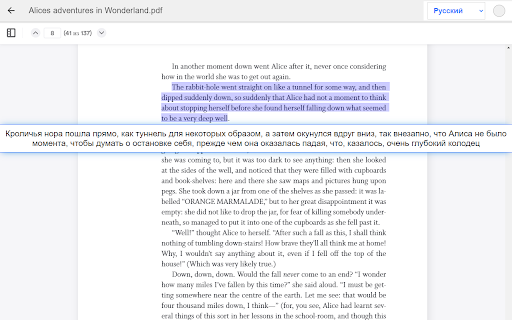
Easy way to translation of your book in PDF format into another language.

PDF Translator - Translate PDF online
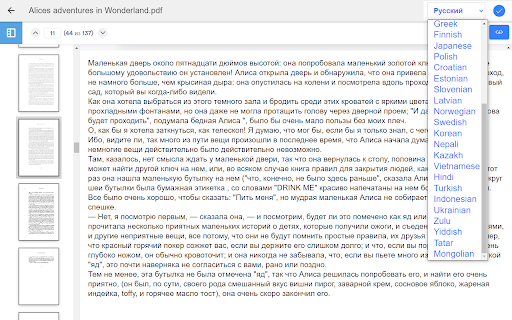
Translate PDF, Excel, Word, PowerPoint, and other documents with just one click. It is suitable for a variety of documents in office and educational scenarios, such as essays, contracts, industry reports, product documentation, books, files, presentations, etc., and provides high-precision document layout recovery capability. - Support uploading files for translation, and saving to the Google Drive or downloading to the local. - Support Word/PPT/Excel/PDF/PowerPoint and other formats. - Inter-translation between 200+ languages, English, Spanish, French, German, Arabic, Russian and many more. Accurate translation and fast operation. - The service will preserve the original formatting and layout of said documents. Instant results. Currently, it translated through Google Translate, Batch mode will support in the future. The "Video Translator" and "Image Translator" in the extension interface are just other extensions we developed and are not included in PDF Translator. Privacy Policy By design, your data stays at all times on your Google account, never saved in our database. Your data aren’t shared with anyone, including the add-on owner. We complies with privacy laws (especially GDPR & California Privacy Act) to protect your data.

Online Translator - Web Page|PDF| Bilingual Subtitles
Google Translate Assistant - Word Selection Translation | Full Page Translation Google Translate Assistant is a free and easy-to-use translation plugin that offers comprehensive translation features including web pages, subtitles, PDFs, documents, Google, online, pronunciation, dictionary definitions, and Chinese-English comparison. It helps you quickly access a vast amount of foreign language information, achieving barrier-free retrieval, browsing, and reading of foreign documents/foreign websites/overseas news, immersing you in the global language landscape and exploring the world of global information. All the following features are provided for free: Perfectly solves the issue of Google Translate not being usable in China, restoring Google Translate with one click, supporting Chrome core browsers such as Google Chrome/360 Browser/QQ Browser/2345 Browser. ★ Word Selection Translation When encountering unfamiliar foreign words while browsing, select with the mouse for one-click translation, with results appearing near the mouse. If the "Quick Word Translation" button is enabled, selected text will be translated instantly. ★ DeepL Translation In-depth analysis, accurate communication, breaking language barriers, and achieving barrier-free communication. Choose DeepL Translation for a professional language conversion experience! ★ PDF Translation PDF files can be easily translated with one click, obtaining the translation without complicated conversion. Efficient and accurate, letting you master the content of your PDF, all within PDF translation! ★ Academic Translation Focused on the academic field, accurately grasping terminology, providing you with the most authentic translation. Academic translation allows academic achievements to spread without barriers! ★ Document Translation Supports multiple formats, easily handling various documents. Efficient translation, accurately conveying the original meaning, letting your documents be rejuvenated! ★ Vocabulary Book When browsing translation results, reading English literature, or any learning materials, just one click can add the new words you encounter to your vocabulary book. Whether it's pronunciation, part of speech, definition, or example sentences, they can all be saved together, and support word categorization for future review. ★ Google Translate Real-time online, accurate and efficient, easily converting global languages. Google Translate allows you to travel the world of language, communicate without barriers, and enjoy the charm of global culture! ★ Image Translation Click "Translate This Image" for quick translation, with direct translation output. Supports copying the image translation and downloading the translated image, essential for cross-border e-commerce product browsing! ★ Dictionary Translation A vast vocabulary and authoritative interpretations help you learn languages easily. Dictionary translation makes your language learning journey smoother! ★ Online Translation Real-time online translation, instant translation. Convenient and efficient. ★ Chinese-English Comparison Provides the translation result format of the original text and the translation, offering Chinese-English comparison, you can even choose your favorite comparison style, customize the translation result style, check the translation results faster, and learn foreign languages more conveniently. ★ Subtitle Translation Compatible with mainstream video websites, achieving real-time subtitle translation. One-click translation breaks the language barrier and collides with cultural ideas from around the world. ★ Screenshot Translation When encountering text that cannot be selected, take a screenshot of the area that needs to be translated, and it can be translated into the language you want. ★ Auto Detection Quickly and automatically detect the original language, automatically remember the target translation language, supporting 100+ language translation, support switching the translation target language, so that you can easily open the browser and browse without barriers anywhere in the world. ★ Always/Never Translate This Website For the foreign websites you use most frequently, you can choose "Always Translate This Website", then you will automatically get the translation results every time you enter the website, greatly reducing time costs and improving work efficiency. If you don't need to translate a certain website, you can also set "Never Translate This Website" to customize your own translation preferences. ★ Simple Mode If you don't need the translation format of the original translation/Chinese-English comparison, you can also choose the simple mode of "Show Translation Only", then you will immediately experience the extreme speed mode of Google Translate. ★ Input Box Translation Input box translation is online! Easily translate the content of the input box, making search/communication smoother! There are also various membership benefits and add-on packs available, enjoy more rights! If you like our plugin, please leave us a five-star review, your encouragement is all the motivation for our continued efforts! If you encounter any problems during use, you are also welcome to leave a message or contact us at any time.

Ddict: AI Translation & Writing Assistant
Translate text and enhance writing with AI for seamless language learning and communication in your browser. Discover Ddict, your friendly AI-powered tool for seamless translation and writing enhancement on any website. Enjoy smooth and uninterrupted reading with real-time text translations and smart writing suggestions. - Instantly translate text to effortlessly understand web content. - Enhance your writing with AI-driven tips for clearer, more engaging communication. - Improve language learning with automatic text-to-speech functionality. - Expand your vocabulary using our comprehensive dictionary with definitions, synonyms, and examples. - Dark mode with other theme options. Perfect for language learners, professionals, and anyone who loves exploring the web, Ddict is your go-to tool for translation and writing assistance. Experience how Ddict can make your online communication more effective and enjoyable today!

Instant Multilingual PDF/HTML/TXT Translator
Translate text on PDF/HTML/TXT in two clicks, even for local docs. Now with ChatGPT support. 📖 Usage: Select text within any document and press Alt+Shift+A for an immediate translation (except for local PDF documents), or right-click on the text and choose 'Translate '. You can also enable the Selection Icon in Options — a floating icon appears when you select text, allowing instant translation with a single click. The translation will appear directly under your selection. With the integration of ChatGPT, Microsoft Translator, and Google API, the extension provides more accurate and context-aware translations, catering to an even broader range of language preferences. 🔍 Interactive Features: Clicking the extension button opens a popup window, allowing you to edit your selection. The extension features intelligent popup window management - when translating PDFs or when inline tooltips cannot be displayed, a smart popup window automatically appears with your translation. This popup remembers your preferred position across sessions and can be reused for multiple translations. Customize your experience by setting shortcuts, enabling the Selection Icon, choosing languages (supported by Google API, Microsoft Translator, and ChatGPT), configuring the popup window, and adding a 'Search the web' link for detailed information. The triple translation providers ensure a robust and versatile translation experience. 🌐 Compatibility: This extension works seamlessly with native PDF formats but is not compatible with protected or scanned documents. To translate local documents (PDF, TXT, HTML, etc.), enable the "Allow access to file URLs" option on the chrome://extensions page. ⚙️ Recent Updates and Improvements: - v4.8.0: Added Selection Icon for instant translation — a floating icon appears when selecting text (enable in Options), increased popup font size for better readability, improved messaging reliability. - v4.7.136: Enhanced popup window with keyboard shortcuts support (Alt+Shift+A works inside popup), automatic size and position memory, and context-aware styling. - v4.6.135: Added Chrome Web Store support hub link in Options, enhanced PDF translation reliability with improved accessibility detection. - v4.5.132: Enhanced PDF translation with intelligent popup window system — automatic fallback for PDF viewers, position memory, and multi-monitor support. - v4.4.129: Added Google API as a new translation provider. - v4.3.115: Integrated ChatGPT for context-aware translations. - Ongoing improvements in response time, API support, and overall functionality.
