
chmhcefppmklgpanddnbefihdigohfan
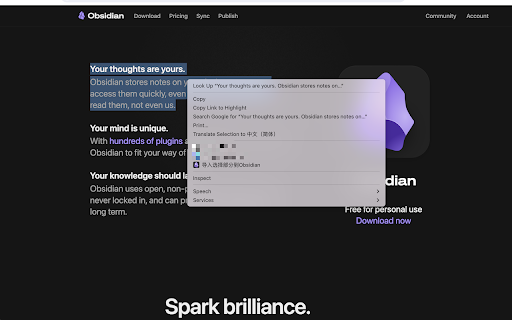
A small tool can import web page content into Obsidian An Obsidian web clipping tool; it imports text and images from web pages into the Obsidian software. After installing the plugin and enabling the feature, two options will be added to the right-click menu: 1. Import entire page, 2. Clip import. Clicking on these options will attempt to launch the Obsidian software. After the user agrees, the web page content will automatically be pasted into Obsidian

obsidian-livesync-webclip
Webclipper for Obsidian LiveSync Clip web pages to markdown, and send them to Obsidian via Obsidian-livesync. You can keep online content as a local notebook, and reallege, collect, and add your comments as markdown. Images are also captured. Therefore, you can view the content while you are off the line. Self-hosted livesync and obsidian-live-sync-webcip are made in OpenSource. If you feel anything worries, check the repo. You can control all your data completely. Note: - Obsidian, and your own server or SaaS account are required. for more information, check the repo. - Your Cloudant or CouchDB instance should allow the CORS request from the URI you have clipped.

Markdown Copier
Copy selected text and page URL in Markdown format Markdown Copier is a Chrome extension designed to help you copy selected text and page URLs in markdown format for use with note-taking and knowledge management apps like Obsidian and Logseq. Key Features Two Modes of Operation: The extension has two modes: Text is selected: Copies the selected text and the page URL in markdown format; No text selected: Copies only the page URL in markdown format. Current Tab Only: The extension works exclusively for the current tab, ensuring that you have control over the content you want to copy. Customisable Output Format: Tailor the output format to your preferences. The default format is "> [selected text] | [src]([current page URL])", but you can modify it to suit your needs. Keyboard Shortcut Support: Assign a custom keyboard shortcut to activate the extension without clicking the icon. To set up a shortcut, visit `chrome://extensions/shortcuts` in your browser and configure a key combination. 'Cmd + M' is a suggested one. Seamless Integration with Obsidian and Logseq: Effortlessly copy and paste markdown-formatted links into Obsidian and Logseq, enhancing your research and note-taking experience. Secure and Lightweight: The extension is developed with security in mind, ensuring no unnecessary permissions or security vulnerabilities are present.

Obsidian Clipper
A small chrome plugin that let's you easily clip things to Obsidian This is an unofficial clipper for Obsidian that allows you to easily clip a selection to a note in Obsidian. Clip a selection in Chrome with or without markdown support to Obsidian.

Obsidian Clipper
Obsidian Web Clipper Chrome Extension to save articles and pages from the web in Obsidian Effortlessly save web articles to your Obsidian vault with just one click. Perfect for researchers, students, and avid readers who want to organize and reference online content. - Uses Readability.js to extract clean, readable content - Captures essential metadata: domain, title, timestamp, excerpt, and word count - Simple one-click saving to your specified Obsidian vault - Customizable settings for organizing your saved articles - Install the extension - Set up your preferred Obsidian vault in the extension settings - Click the extension icon on any web page to save the article Compatibility: Currently tested and optimized for Google Chrome. Get started by configuring your Obsidian vault in the extension settings. Happy clipping!
