
chgkpfgnhlojjpjchjcbpbgmdnmfmmil


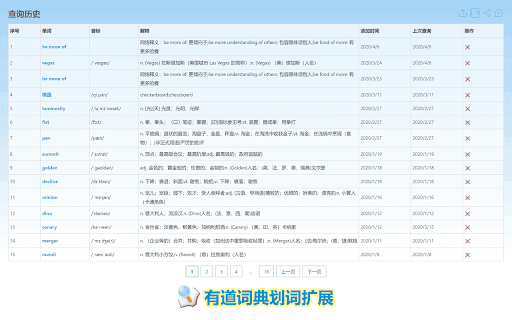
可自动发音,添加单词本,记录、导出查询历史! 功能亮点: 1. 记录、导出查询历史 2. 自动朗读控制(支持在 https 页面中朗读) 3. 去除[官方版本重定向百度首页“后门”](http://wenku.baidu.com/view/e9660493aef8941ea76e05cf "后门报告") 4. 修复官方版本无法保存设置 5. 引用新技术手段避免与浏览页面样式冲突(v3.1.6) 6. 添加到单词本(v3.2.0) --- 重要更新: 2025-7-19 v4.0: 迁移到 MV3 2023-11-17 v3.3.8: `自动朗读`配置应用到 popup 查询;发音类型配置应用到所有朗读位。 2023-11-16 v3.3.7: 修复 popup 不能多次查询问题(感谢@空星隐月) 2020-06-27 v3.3.2.3: 修复翻译功能 2019-07-09 v3.3.0: 增加历史记录单词管理页 2019-05-28 v3.2.8: 指词支持指定触发按键(shift/alt/ctrl/option/command(v3.3.2新增)) 2018-11 v3.2.6.x: 添加英、美发音按钮;兼容 Instagram 网站,修复弹窗定位问题; 2018-03-06 v3.2.4: 使用 ES6,修复无法保存设置问题,用户设置跟随 Chrome 登录的 Google 账号同步; 2017-02-23 v3.2.0: 支持“添加到单词本”; 2015-11-17 v3.1.4:界面重构,替换 flash 朗读为 html5(感谢网友 XGHeaven 热心反馈); 2015-06-30 v3.1.0: 新特性:添加对单词朗读的控制选项(感谢网友 john_shao 热心反馈); --- 隐私策略: https://github.com/g8up/youDaoDict/wiki/privacy

稀土掘金
为程序员、设计师、产品经理每日发现优质内容。 在新标签页展示聚合内容,包含前端、Android、iOS、后端、产品、设计六大频道,每个频道内都有一到多个内容源; 此外提供综合搜索及开发辅助小工具等能力为开发者的工作提效,浏览器激活状态下双击"j"键可快速唤起搜索框; 用户可以根据自己的需求和喜好自定义页面布局、切换日间/深色模式; 此浏览器拓展由稀土掘金技术社区(juejin.cn)提供支持,在线问题反馈请访问 https://juejin.cn/topic/6824710202692993037?sort=newest 。

FeHelper - JSON格式化、编解码、二维码、开发者工具箱
FeHelper is a powerful developer tool designed for front-end developers. It integrates various practical tools to help developers improve work efficiency. However, FeHelper strictly adheres to the principle of single function activation. By default, FeHelper only provides the JSON auto-formatting function, and all other functions are disabled by default. If users need them, they can go to the plugin configuration page to install and enable them. The following are the main functions of FeHelper: ## JSON Tools: - JSON beautifier: Automatically detects and formats JSON data, supports manual formatting, decoding of messy codes, sorting, BigInt processing, editing, downloading, and skin customization, greatly facilitating developers' processing of JSON data. - JSON comparison tool: Supports automatic key-value comparison of two JSON contents, highlights differences, and helps developers quickly identify data changes. ## QR Code Tool: - QR code generator: Supports custom color and icon QR code generation, suitable for a variety of application scenarios. - QR code decoder: Supports multiple modes of QR code decoding, including decoding after pasting a screenshot, which is convenient and fast. ## Encoding tool: - String encoding and decoding: Supports multi-format information encoding and decoding, such as Unicode, UTF-8, URL, Base64, MD5, etc., to meet different encoding requirements. Code beautification tool: Supports code beautification for multiple languages, including Javascript, CSS, HTML, XML, and SQL, helping developers maintain clean and tidy code. Code compression tool: Provides simple code compression functionality, supports HTML, Javascript, and CSS code compression, and optimizes web page loading speed. ## Developer Tools: - AI assistant: A super intelligent dialogue tool powered by AI, supporting code writing, code modification, scheme design, and other tasks to improve development efficiency. - Simple Postman: An interface debugging tool that supports GET/POST/HEAD request methods, automatically formats JSON content, and simplifies the API testing process. - Websocket tool: supports packet capture testing for Websocket interfaces, including connection testing for ws services, message sending testing, result analysis, and more. ## Other tools: - Time (stamp) conversion: mutual conversion between localized time and time stamp, supporting second/millisecond, world time zone switching, clock display in various time zones, etc. - Random password generation: Generate passwords by randomly combining various characters, supporting specified length and character type to ensure password security. - My sticky notes: A sticky notes tool that supports creating directories to categorize and manage notes. Notes can be exported/imported with one click for convenient information management. - Markdown conversion: Markdown editing/preview tool, supports direct conversion of HTML fragments to Markdown, and supports downloading content in PDF format. - Webpage screenshot tool: It can take screenshots of any webpage, supporting both visible area screenshots and full-page scrolling screenshots. The final result can be previewed before being saved. - Page color picker tool: You can directly collect color values for any element on the webpage. Move the cursor to the location where you want to pick the color, and click OK.

Lingocloud - AI Translate Web, PDF & Subtitles
Web bilingual, PDF link, YouTube ; Lingocloud V4 + multi-model with glossary for fluent, accurate translation 1. Personalization: Customize translation styles to better match your linguistic habits. 2. Floating Ball Upgrade: Redesigned floating interactions and menu for a lighter, more intuitive experience. 3. Seamless Experience: Switch models, glossaries, or styles without refreshing the page—translations update dynamically. 4. Glossary Enhancement: No need to set translation directions; multi-language entries can now be used together. 5. Performance Improvements and Bug Fixes. More than just a translator—it's your all-in-one AI reading assistant. Lingocloud integrates a matrix of world-class AI models to provide an intelligent bilingual experience for web pages, documents, videos, and social media. V4 Model: Our proprietary model optimized for nuanced context, delivering natural and fluent translations. AI Aggregation: One-click toggle between DeepSeek V3, GPT, Qwen, GLM4, and more for multi-perspective references. 🧠 AI Bilingual Web Translation: Automatically recognizes web content for side-by-side reading. Supports AI bilingual subtitles on YouTube, Netflix, and more. 📂 AI Document Parsing: Smartly translate PDF, Word, PPT, and arXiv papers while perfectly preserving the original layout. ⚡ Real-time AI Lookup: Select text on Reddit, Discord, or X (Twitter) for instant AI-powered explanations and translations. 🌟 Core Features 1. Bilingual Webpage Translation 🌐 Click the “Lingocloud icon,” and the webpage instantly displays in bilingual parallel view! Source and translation are aligned top-to-bottom for easy comparison. The innovative layout makes reading smoother and more natural. 2. Text Selection Translation 🖱️ Highlight any text to get accurate translations instantly—no page switching needed. Stay immersed in your reading while exploring foreign content effortlessly. 3. Professional Terminology Library 📚 Built-in database of 100,000+ professional terms across multiple fields, with support for custom glossaries. Ensures precise domain-specific translations while meeting personalized expression needs. 4. PDF Translation 📄 Translate PDF documents with one click while perfectly preserving formatting and layout. Supports recognition of complex formulas—ideal for research papers and technical documents. 5. Video Subtitle Translation 🎬 Supports bilingual subtitle translation on YouTube and other major platforms. Learn while watching, enhance your language skills, and easily understand foreign-language videos. 6.Image and Manga Translation Supports one-click translation of images or comics on web pages. 👥 Who It’s For • 🔬 Researchers: Accurate translations of journals and reports • 📖 Novel Lovers: Immersive reading of AO3 and foreign fiction • 📚 Students Abroad: Easily access textbooks, papers, and academic resources • 💻 Programmers: Quick access to technical documentation and developer communities • 🌐 Trade Professionals: Accurate translation of contracts, emails, and business files • 🎓 Language Learners: Improve comprehension with bilingual parallel texts • 🧳 Global Travelers: Real-time multilingual communication and information access ℹ️ Usage Notes • 🔒 Permissions: To enable text selection, auto-translation, and video subtitle features, please allow the extension to read and modify webpage data. Video translation requires access to the current tab’s audio. • 🎁 Free vs. Paid: Register to enjoy free daily usage with a quota limit. The quota refreshes automatically each day. Upgrade to membership for unlimited access. • 💌 Feedback: For questions or suggestions, visit our website at https://fanyi.caiyunapp.com and click “Feedback” to share your thoughts! 🌈 Break down language barriers with Lingocloud and explore a bigger world! 🚀🌟

LuLu Translate
LuLu Translate, the world-leading cross-platform translation software, supports translation by selecting words.
