
chakcgkmpodbaocfkahnjocenlmemjbg


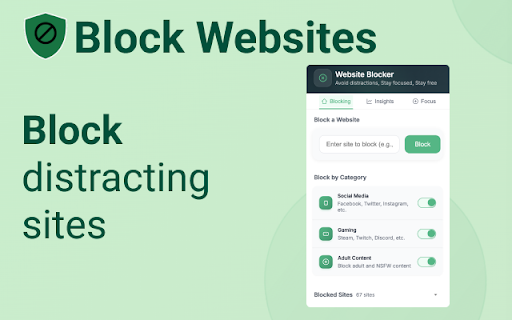
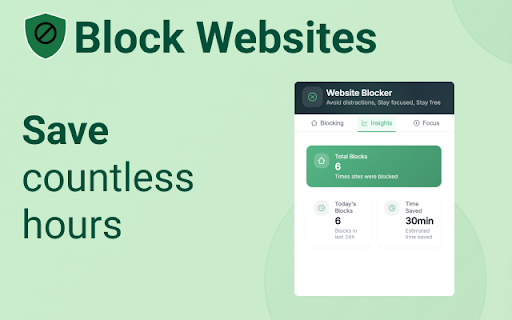

Easy way to block websites and stay focused. Block sites, use focus mode, block by category, and use pomodoro timer. Block websites and make productivity your priority with Website Blocker!! Want to block websites? Stay focused? Be productive? We’ve got you covered with our free site blocker extension. Simply add websites to your block list and we’ll make sure they won’t distract you. Stay More Focused Website Bocker is an app and website blocker that let's you to temporarily block distracting apps and websites so you can be focused, productive, and increase your self control. 🚫 Add Websites to Block List Simply type and add websites to block. Add as many as you'd like to stay focused. Websites will be added to a block list (you can update this at anytime). 💡Unblock Protection Sites can be unblocked and we had a countdown timer to ensure you actually want to unblock the site. This gives you time to reflect vs act on urges. Helps you keep your original intentions in mind. 👨🏼💻Focus Mode Focus mode helps you control your schedule via the Pomodoro technique. Break down your tasks into intervals, traditionally 25 minutes followed by a short break. With ‘Focus Mode’ you can set specific times to block websites and when to browse freely. 🔞Adult Content Ever wanted to block adult, NSFW, porn, content? With the Website Blocker extension you can do so easily. Our adult blocker removes adult sites by default making sure that you don’t see any inappropriate or unwanted content. Plus all our other features like Customized Blocked Page, Insights and more. It is the Website Blocker team here. We know how easy it is to get distracted online—one quick check turns into hours of lost time. That’s why we built this extension: to help you stay in control, block distractions, and focus on what truly matters. Whether you're working, studying, making your computer family safe, or just trying to be more mindful of your screen time, this tool is here to support you. Give it a try and take back your time. If you love it, consider leaving a 5 star review so more people can find it and we can make more features to customize your experience even further. Let’s stay productive together! Click add to chrome to add it to your browser then click the "puzzle" piece to "pin" it. It takes less than 5 seconds to set up. 🚀

AppBlock - Block sites & Stay focused
Block distracting webs and stay focused on your work. Block distracting websites and stay focused on your work. AppBlock is a powerful website blocker that helps you stay focused and on task by blocking distracting websites on your computer. With AppBlock, you can easily block any website with just a few clicks and even block websites based on keywords. Whether you're trying to focus on work, study, or just want a break from social media, AppBlock makes it easy to stay on track and achieve your goals. New Features: - Schedules: Users can now set specific times and days for blocking websites or keywords. - Keyword Blocking: Enhanced blocking based on keyword appearance within URL or website text. - Timer Quick Block: Quick Block feature now supports a timer for temporary blocking. - Pause for Schedules: Users can set a temporary pause on scheduled blocking, giving more flexibility during the workday. - Instant Blocking This version of the AppBlock extension for Google Chrome brings the same functionality to your browser that you know from the mobile app, now enriched with new features. Keep your time and focus in check with easy browser-based website blocking. Use your time more efficiently and increase productivity with AppBlock, which blocks distracting websites. This extension is easy to use and highly customizable, making it the perfect tool for anyone looking to increase their productivity and stay focused while working on their computer. Did you know that up to 20% of all adults procrastinate? For students, it's up to 95%! That's a lot, and you're missing out on precious free time that you could be spending with your family or on self-development. Luckily, there's AppBlock! With AppBlock for Chrome, you can easily set up sites that distract you and start blocking at the touch of a button. While the block is active, you won't be able to visit the sites of your choice, so you can focus on work or studying. Download AppBlock today and get your free time back. AppBlock is also available for iOS and Android devices, where you can block entire apps in addition to websites to streamline your experience by blocking on all your devices.

Site Block Pro - free website blocker
Stay Productive with our free and easy-to-use website blocker Site Block Pro: Block sites so you can focus Regain control of your online time with Site Blocker Pro, a FREE and powerful Chrome extension designed to boost focus and curb digital distractions. ⭐Key Features⭐: - Flexible website blocking: outright or with custom policies - Schedulable restrictions with daily time limits - Password-protected settings - "Stay Still" challenge to resist browsing urges - Insightful usage statistics and charts - Whitelist feature for allowing specific URLs or paths ***Update: ver 1.05: Added one click Block All ver 1.04: Added different languages ver 1.03: Added whitelist functionality ver 1.02: added toggle to easy pausing extension ver 1.01: added welcome page New Whitelist Feature: Our new whitelist feature allows you to specify exact URLs or paths that should always be allowed, even if the main domain is blocked. This is perfect for scenarios like: For example, you can block "youtube.com" generally, but whitelist "youtube.com/watch?v=specific_video_id" to allow a particular background music video. This granular control helps you maintain focus while still accessing necessary or beneficial content.

BlockSite Pomodoro: Block Sites & Focus
Stay focused & Boost productivity with a custom blocklist & pomodoro-based site blocking. The BlockSite Pomodoro extension is the perfect extension/site blocker for staying productive and avoiding distractions while using the internet. With this site blocker, you can easily choose sites to block, and based on the Pomodoro work technique, they'll be blocked and unblocked automatically. This extension can help anyone stay focused, from high schoolers to office workers to freelance entrepreneurs. Eliminate procrastination and block sites with BlockSite Pomodoro! 🚫 Block Websites by URL You can choose to block any website and any number of websites in the settings. Add the websites you want to block and we'll take care of the rest! (You can remove blocked websites at any time). 🏳️ Whitelist Websites You have the option to block every other website except the ones added to your whitelist for even more powerful blocking! 🟢 Except Websites If you have subpages on websites you want to block that you still need to access (like a specific YouTube video), you can add them to the exceptions list and they'll never be blocked! 🍅 Pomodoro Block Timing Using the acclaimed Pomodoro technique, this extension will automatically block websites until a break interval is reached, during which you can freely use your blocked websites! ✋ Strict Blocking Block websites even while outside the timer if you want to stay focused on your work for more time! BlockSite Pomodoro is the site blocker for maintaining focus without completely giving up distracting websites. Download this extension to stay focused, boost productivity, and achieve your goals!

Web Site blocker
Easy way to block distracting websites to prevent access while you work The Web Site Blocker Chrome extension empowers users to permanently deny access to websites or implement scheduled restrictions. Safeguard yourself from distracting or harmful content or shield your children from inappropriate material. - URL Blocking: Block distracting and harmful websites, including subdomains. - White List: Activate this option to block all websites except those included in the whitelist. - Password Protection: Secure the options page with a password to prevent easy removal of blocked sites. - Custom Rules Keyword based control. Allow or block access to a specific site only if the URL contains specific keyword - White & Black Time Configuration: Customize your daily schedule with the Scheduling feature, allowing you to set specific days and times for accessing certain sites. Stay focused and maintain daily routines effortlessly.
