
cgjlhokjempgkhjjoeohfcefhcgknfic


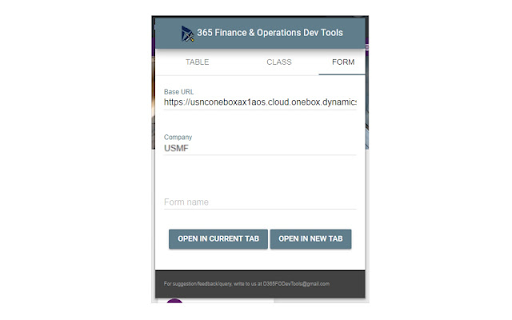
**Introducing the Dynamics 365 Finance & Operations Dev Tools Extension: Elevate Your Development Workflow** Are you a developer working with Dynamics 365 Finance & Operations and tired of the manual URL manipulation that often comes with the territory? Say goodbye to those cumbersome tasks and welcome a powerful solution into your development arsenal. The Dynamics 365 Finance & Operations Dev Tools extension is here to revolutionize your development experience, making it more efficient and productive than ever before. **Key Features:** - **Table Browser:** Access a user-friendly table browser with ease, allowing you to explore and interact with your tables effortlessly. - **Class Runner:** Execute your classes effortlessly with the simple input of class names, streamlining your development process. - **Form Opener:** Quickly open forms by specifying the form name, reducing time spent searching and navigating through menus. Whenever you open the extension's popup, you will find the Base URL field pre-populated with the current tab's URL, sparing you from the tedious task of manual URL manipulation. Moreover, the extension intelligently captures the legal entity from the current tab's URL (if available), further enhancing your workflow efficiency. We are proud to offer this extension as an open-source project. You can explore and contribute to its development on our GitHub repository at https://github.com/huzaima/D365FODevTools. Your feedback and collaboration are welcome as we work together to continually enhance and refine this essential tool for Dynamics 365 Finance & Operations developers. Experience a seamless and productive development journey like never before. Download the Dynamics 365 Finance & Operations Dev Tools extension and embrace a new era of development efficiency today.

D365: Dynamics 365 & Power Platform updates
Stay updated with Microsoft Dynamics 365 and Power Platform D365 extension keeps you updated with the latest of - Microsoft Dynamics 365 - Power Platform - Microsoft 365 & - Azure D365Hub aggregates related content from hundreds of Blogs, YouTube channels and Podcasts to keep you updated with the latest happenings. D365Hub doesn't fetch the complete story from the blogs, it just presents you with the image, title and a link back to the original post. If you find any helpful blog missing from D365Hub then please submit it at https://d365hub.com D365Hub extension UI has been designed to provide you with intuitive navigation and a clutter-free experience Hope you will like it!

Dynamics 365 FSCM WarmUp
The Microsoft Dynamics FSCM Warm-Up Extension is designed to boost your productivity by speed up the initial startup process for Microsoft Dynamics 365 Finance and Supply Chain Management (FSCM) background processes. With this extension, you can predefine a set of tabs that are essential for your workflow and open them all at once, reducing the time spent navigating through the system. Customizable Tabs: Easily configure which tabs to open upon startup to suit your specific needs. One-Click Warm-Up: Open all predefined tabs with a single click to get your system ready for work. User-Friendly Interface: Simple and intuitive interface for setting up and managing your tabs. Enhanced Productivity: Save time and improve efficiency by quickly accessing necessary parts of Microsoft Dynamics FSCM. Seamless Integration: Works seamlessly within the Chrome browser, providing a smooth user experience.

DevTools for D365F&O
Chrome extension for D365 F&O: colors the nav bar, shows DB field names, and more An Extension that is compatible with Google Chrome and Microsoft Edge, allowing users to change the color of the navigation bar to show the database names of forms, fields, and more. Now you don’t have to be confused ever again! Personalize navigation bar colors, this extension works with Dynamics 365 Finance and Operations (not affiliated with or endorsed by Microsoft) : • According to URL • By legal entity names • Database form names You can also add screenshot capturing to the task recorder. It can be installed in Microsoft Edge and is fully compatible with the browser. Applications This Extension allows the user to change the color of the D365FO (not affiliated with or endorsed by Microsoft) navigation bar according to the environment. The latest version of the tool can instantly show database form names. For more information, please visit this link: https://devanalytic365.com/blog/f/how-change-d365-fo-navigation-bar-color-in-chrome Features • Instantly show database form names • Allows users to distinguish environments by legal entity names • Adds screenshot capture feature to task recorder (Screenshot capturing chrome extension) • Adds task recorder screenshot (task recorder with screenshot) Update V 7.0 • Added a checkbox to show an environment banner at the bottom right of the screen • Revamped the Chrome extension with a brand-new design, improving usability and aesthetics. Update V 5.1.1 • Enhanced Database form name function The tool now displays more fields in the Database form names function, including some missing headers in previous versions. Disclaimer The product is not provided with any warranty by the developer and comes “as it is.” Note We do not collect any usage, analytics, or personal data in any capacity for any purpose.

c! Dynamics 365 Helper
Small and usefull js-functions to manipulate Dynamics 365 [Dyn365] (online). Small and usefull js-functions to manipulate Dynamics 365. You can get information about your user, the environment, the activity-storage-capacity and more. Even the oldschool advanced find is there ;). Also you will get the possibility to manipulate some data, but be aware: Use at your own risk. We do not collect any of your data. Contents of the extension: Area: 'CRM: View': Enabled in Views in Dynamics 365 - '->REST': Open the view-results in REST-Endpoint. Area: 'CRM: Record': Enabled for Records in Dynamics 365 - 'Godmode': Show all fields | No field is required | No field is disabled. - 'SchemaNames': Show all Schemanames of the visible fields on the form. - '->REST': Open in the record REST-Endpoint. - 'Properties': Show the basic properties of a record: CreatedBy and CreatedOn. - 'DirtyFields': Highlight changed fields on the form. - 'Reopen': Reopen a closed activity. - 'All Fields': Show all fields of this record and some metadata of them. - 'Test-Data': Populate all required fields with random data - Good for testing and debugging scenarios. Area: 'Info': Open some usefull links or data. Always enabled. - 'Send Link': Open an email with 2 links directing to the current opened record: One for this app and one teammember-friendly link without an appid. - 'Show my User': Open my User-record in Dynamics 365. - 'adv.Find': Open oldschool Advanced Find. - 'User-Data': Show security-relevant information for your systemuser. - 'open JsAPI': Open external link: Official JS API-Documentation - 'EntityTypeCodes': Show a table of all EntityTypeCodes and -Names (etc, etn) of this organisation - 'Component-Types': Show a table of all Componenttypes. Useful for getting rid of Dependency-errors. Area: 'Admin': Tools to Administrate Dynamics 365. Always enabled. - 'Edit': Pretty oldschool. Open the formeditor of this record in Make.Powerapps. Default Solution. - 'Table' - 'Open': Open the table in Make.Powerapps.com - 'Edit': Edit the table data in Make.Powerapps.com - 'EntityTypeCodes': Show all tables and their ETC. - '#Activities': Count all activities and show them as a table, grouped by year and activitytype. - 'RecordCount': Counts all records from one table. - 'RolesByTable': Get SecurityRoles by table. Filter by user/team. - 'ID': Opens a record with the id only. - 'Copy Roles': Copy BU, Teams, SecurityRoles of one user to another.
