
klpaihnmefppdfjmodipinghakkemlkg


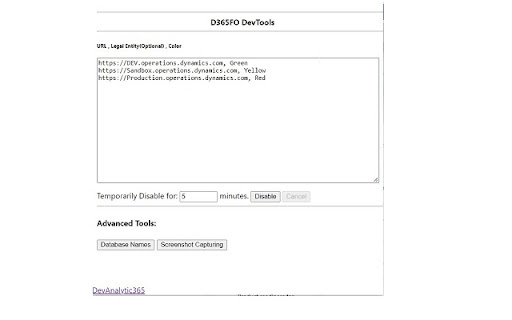

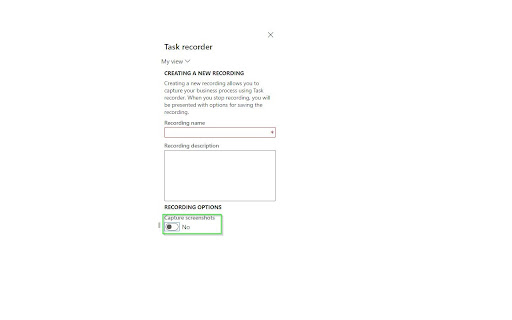
Chrome extension for D365 F&O: colors the nav bar, shows DB field names, and more An Extension that is compatible with Google Chrome and Microsoft Edge, allowing users to change the color of the navigation bar to show the database names of forms, fields, and more. Now you don’t have to be confused ever again! Personalize navigation bar colors, this extension works with Dynamics 365 Finance and Operations (not affiliated with or endorsed by Microsoft) : • According to URL • By legal entity names • Database form names You can also add screenshot capturing to the task recorder. It can be installed in Microsoft Edge and is fully compatible with the browser. Applications This Extension allows the user to change the color of the D365FO (not affiliated with or endorsed by Microsoft) navigation bar according to the environment. The latest version of the tool can instantly show database form names. For more information, please visit this link: https://devanalytic365.com/blog/f/how-change-d365-fo-navigation-bar-color-in-chrome Features • Instantly show database form names • Allows users to distinguish environments by legal entity names • Adds screenshot capture feature to task recorder (Screenshot capturing chrome extension) • Adds task recorder screenshot (task recorder with screenshot) Update V 7.0 • Added a checkbox to show an environment banner at the bottom right of the screen • Revamped the Chrome extension with a brand-new design, improving usability and aesthetics. Update V 5.1.1 • Enhanced Database form name function The tool now displays more fields in the Database form names function, including some missing headers in previous versions. Disclaimer The product is not provided with any warranty by the developer and comes “as it is.” Note We do not collect any usage, analytics, or personal data in any capacity for any purpose.

D365FO OData Link Builder
Build D365FO OData URLs with filters, field selection, history, and favorites. D365FO OData Link Builder helps you quickly create, organize, and reuse OData URLs for Microsoft Dynamics 365 Finance & Operations. Use the URL Builder under Advanced settings page to build URLs with filters and field selection, then copy or open them in a new tab. Save multiple environment URLs, keep a history of what you’ve generated, and mark frequently used links as favorites. Use the popup for fast access to favorites while you’re working. Build OData URLs with filters and field selection Save multiple D365FO environment URLs History and favorites for quick reuse Popup for quick access + full Options page for advanced building Privacy: Settings are stored locally in your browser profile The extension only connects to the D365FO environment URLs you configure No data is sent to third-party services

D365 Tools
Opens Menus, Reports and tables with a click, simplifying navigation for developers in Dynamics 365. This Chrome extension streamlines by generating direct links to menus, classes, and reports in the table browser within Microsoft Dynamics 365 F&O. No more manual menu item creation or typing in address bar– simply click and explore! This can be very handy during an implementation when you are working on multiple projects. You can set up your browser to automatically launch the extension when you press a keyboard shortcut. Save time by eliminating the need to add menu items. Keep checking back for additional improvements!

Level up for Dynamics 365/Power Apps
The extension helps Dynamics 365/Power Apps users to perform advanced actions, that normally require bookmarklets. Source code and help for this extension can be found in https://github.com/rajyraman/Levelup-for-Dynamics-CRM

D365: Dynamics 365 & Power Platform updates
Stay updated with Microsoft Dynamics 365 and Power Platform D365 extension keeps you updated with the latest of - Microsoft Dynamics 365 - Power Platform - Microsoft 365 & - Azure D365Hub aggregates related content from hundreds of Blogs, YouTube channels and Podcasts to keep you updated with the latest happenings. D365Hub doesn't fetch the complete story from the blogs, it just presents you with the image, title and a link back to the original post. If you find any helpful blog missing from D365Hub then please submit it at https://d365hub.com D365Hub extension UI has been designed to provide you with intuitive navigation and a clutter-free experience Hope you will like it!
