
cgibknllccemdnfhfpmjhffpjfeidjga
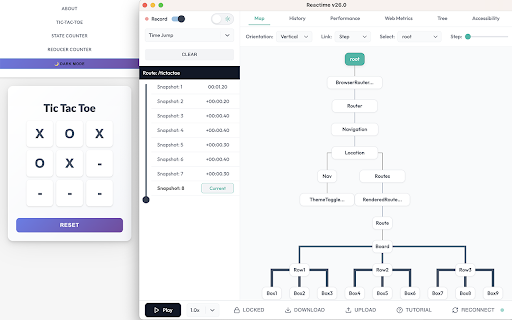


A Chrome extension for time travel debugging and performance monitoring in React applications. Reactime was nominated for the Productivity Booster award at React Open Source Awards 2020. Reactime is an open source Chrome developer tool for time travel debugging and performance monitoring in React applications. Reactime enables developers to record snapshots of application state, jump between and inspect state snapshots, and monitor performance metrics such as component render time and render frequency. - Record Snapshots of Application State and Accessibility Tree - Provider/Consumer Panel for useContext Hook - Import and Export Snapshots of State - Time-Travel Debugging - Snapshot Series Comparison - Component Tree Visualization - React Router Compatibility - Component Render Time & Frequency - Support for Gatsby, Next.js and Remix - TypeScript Support - Ability to Reconnect - Web Performance Metrics - Tutorial Walkthrough - Prop Visualization - Intuitive Layout and Modern Design - Dark Mode Reactime 26.0 introduces transformative updates that redefine React debugging. The groundbreaking Providers/Consumers Panel now captures and visualizes state changes from useContext hooks, offering a real-time view of provider-consumer relationships and live context state values. A revamped time travel slider delivers enhanced control over debugging with intuitive navigation and playthrough options. The extension also boasts a modernized UI with dark mode for better usability, improved reliability through critical bug fixes, and the restoration of the accessibility tree tab for addressing potential accessibility issues. With these innovations, Reactime v26 empowers developers to streamline workflows and optimize complex state flows like never before. ❓ Why is Reactime not recording new state changes? Reactime lost its connection to the tab you're monitoring, simply click the "reconnect" button to resume your work. ❓ Why isn’t Reactime finding my hooks? Reactime detects and monitors hooks by traversing your application’s unminified React code in development mode. If your build process is minifying or uglifying your code—even for development builds—Reactime may not be able to properly locate and track your hooks. To fix this: Ensure a true development build: Double-check your bundler or build tool configuration (e.g., Webpack, Babel, Vite, etc.) to make sure that your application is not minimized or uglified in development mode. For example, with Webpack, make sure you’re running in mode: 'development', which should disable default minification. In a Create React App project, simply running npm start or yarn start will automatically configure a non-minified development build. Check for overrides: Ensure there are no custom Babel or Webpack plugins that minify your code, especially if you’re using frameworks like Next.js or Gatsby. Sometimes additional plugins or scripts might be running under the hood. Restart & rebuild: After changing any build configuration, rebuild or restart your development server to ensure the new configuration is applied. Then refresh your browser tab so Reactime can detect your unminified hooks. After changing any build configuration, rebuild or restart your development server to ensure the new configuration is applied. Then refresh your browser tab so Reactime can detect your unminified hooks. ❓ Why is Reactime telling me that no React application is found? Reactime initially runs using the dev tools global hook from the Chrome API. It takes time for Chrome to load this. Try refreshing your application a couple of times until you see Reactime running. ❓ Why do I need to have React Dev Tools enabled? Reactime works in tandem with the React Developer Tools to access a React application's Fiber tree; under the hood, Reactime traverses the Fiber tree through the React Developer Tool's global hook, pulling all relevant information needed to display to the developer ❓ I found a bug in Reactime Reactime is an open-source project, and we'd love to hear from you about improving the user experience. Please read the 👩💻 Developer README, and create a pull request (or issue) to propose and collaborate on changes to Reactime.

Auto Refresh
Enhance efficiency with Auto Refresh Chrome Extension. Automate page reloads and updates for seamless browsing experience. 🚀 Auto Refresh Chrome Extension! 🔄 Say goodbye to manual page refreshing and welcome a new era of seamless browsing. ⏲️ With our cutting-edge features like auto refresh page and auto reload tab, your browsing experience will never be the same. 📈 Stay up-to-date with automatic page updates and never miss a beat with our auto refresh web page feature. 💻 Tired of constantly hitting the refresh button? Let our auto page reloader do the work for you, saving you time and effort. 🔁 Experience the convenience of our page auto reload function, ensuring your tabs are always current and ready for action. ❓ Why Choose Our Extension? ➤ Efficiency at Its Best: Say goodbye to the constant click of the refresh button. With our auto page reloader and auto tab reloader, information retrieval is faster and more efficient. ➤ Tailored to Your Needs: The customization options ensure that the auto reloader for Chrome works exactly how you want it to, fitting perfectly into your workflow. ➤ User-Friendly Design: We prioritize ease of use, making our tool accessible to everyone, regardless of their technical skills. ➤ Time Saver: Automating the refresh process with our auto webpage refresh feature saves you a significant amount of time, especially when monitoring fast-changing data. ➤ Reliability: Built with robust technology, our extension guarantees reliable performance, ensuring that the tab auto refresh function is always smooth and consistent. 📋 Here's why our Auto Refresh Chrome Extension stands out from the rest: • Tracking stock market fluctuations without needing to manually refresh for the latest updates. • Keeping up with live sports scores or news events in real-time. • Monitoring social media feeds for the most current posts. • Ensuring auction and bidding sites are refreshed to catch the latest bids. • For developers, keeping documentation or development tools updated with the latest changes. 🌟 Upgrade your browsing experience with the power of auto reloader for Chrome! 🔗 Keep your tabs fresh with the page auto refresher feature, ensuring your content is always up to date and relevant. 💪 Forget about manual updates - our auto webpage refresh function keeps your browsing experience smooth and effortless. 🌐 Enhance your productivity with our tab auto refresh capability, allowing you to focus on your tasks without interruptions. 📊 Don't let outdated content slow you down - our extension guarantees that your web pages are continuously refreshed and ready for action. 🚦 Take control of your browsing with our auto tab reloader feature, making it easy to manage and update your tabs efficiently. 📌 Upgrade your browsing game with the auto reload page feature, keeping your content fresh and engaging with minimal effort. 🌐 Unleash the full potential of your browsing experience with the Auto Refresh Chrome Extension - your key to effortless and efficient browsing! 🎯 Say goodbye to manual refreshing and hello to a smoother browsing experience with our auto reload page feature. ✨ Experience the difference our extension can make in your daily browsing routine - try it out now and discover a new way to browse the web! 🌟 Enhance your browsing experience with the simplicity and efficiency of our Auto Refresh Chrome Extension. 🛡️ Safety and Privacy: ▸ Your safety and privacy are our top priorities. Our extension is designed with state-of-the-art security measures, ensuring that your browsing data remains private. Unlike other extensions, we do not track your browsing activity or collect personal information. ▸ In conclusion, our Chrome extension revolutionizes the way you interact with the web. By automating the refresh process, it enhances productivity, saves time, and ensures you're always up-to-date with the latest information. Embrace the future of browsing with our auto refresh page, auto reload page, and auto refresh web page capabilities. ✅ Try it today and experience a seamless, more efficient way to surf the web.

Take a Break
Take a Break is a Chrome extension that monitors and reminds you to take breaks periodically. Take a Break is your personal wellness companion for a healthier digital life. In today's fast-paced world, we often forget to prioritize our well-being while working on our computers. Take a break helps you make small yet significant changes in your routine. 👁️ Rest Your Eyes: Give your eyes the care they deserve. Regularly looking away from the screen helps reduce eye strain and keeps your vision sharp. 🚰 Stay Hydrated: Get timely reminders to drink water throughout the day. Proper hydration is crucial for maintaining focus and energy levels. 💆♀️ Stretch and Relax: Avoid the stiffness and discomfort of prolonged sitting. Reminders are broadcasted to take short breaks for gentle stretches and brief walks to keep your body and mind in harmony. With customizable intervals and friendly notifications, Take a Break ensures you maintain a healthy balance between screen time and self-care. Start taking mindful breaks, stay hydrated, and nurture your well-being effortlessly. Install now and experience the difference in your daily routine! What's new (v1.3.1) ✨ Do Not Disturb (DND) Mode Introducing Do Not Disturb mode — a new way to pause break reminders whenever you need uninterrupted focus. Whether you're in a meeting, presenting, or working on something important, you can now turn on DND to stop reminders temporarily. Once you’re ready, simply disable DND to resume your regular break reminders. ⏱️ “Next Break In” Timer Stay on top of your schedule with the new "Next Break In" display, showing exactly how much time is left until your next break. This new feature shows a live countdown to your upcoming break, so you always know how much time is left before your next reminder. It’s a simple way to stay aware of your routine without losing track of time. Update history v1.2.1 Introducing Advanced settings to that enables customizing break times and audio alerts. 1. You can now customize break times as per your comfort. Click on "Advanced settings" in the popup to expand the timings pane and adjust the duration for each type of break by dragging the slider towards left or right. 2. Enable audio alert to notify when the break ends. Lost track of time when you were relaxing during a break? No worries. You can now simply enable the "Break end notification sound" option in the "Advanced settings" and an alarm rings just before the break ends. Disabled by default. Toggle the switch to opt-in to the break end audio alert option. Make sure to click on the "Submit" button to save your changes.

Exploratory Testing Extension
Chrome extension for exploratory testing A Chrome extension designed for making web exploratory testing easier Features: - 🐛 Quickly create and track bugs, notes, ideas and questions - 📸 Capture full page or custom cropped screenshots - 🔗 Automatically track URLs for each annotation created - 🔍 Advanced filtering of annotations by type in reports - 📊 Visualize testing data through interactive charts - 👁️ View screenshot previews instantly on hover - 💾 Export testing sessions to JSON, CSV or HTML formats - 🤝 Share and collaborate by importing/exporting sessions

Time Keeper
A simple time logger for work. Track tasks, boost productivity, and stay organized with this Chrome extension. 💪 Time Keeper is your all-in-one solution for tracking work hours, managing tasks, and boosting productivity! Whether you're working remotely, freelancing, or managing a busy schedule, Time Keeper helps you keep everything on track. With our intuitive work hour tracker and progress timer, staying on top of your projects has never been easier. 🤔 Why Choose Time Keeper? 🕒 Time Keeper is more than just an activity timer; it's a complete time logger for work that empowers you to: 📝 Stay organized with a task list with time estimate free feature. ⏱️ Track your productivity with a work hour tracker. 📈 Monitor your progress effortlessly using the progress timer. ⚖️ Balance your workload and maximize efficiency with a workload tracker. 🌱 With Time Keeper, you can say goodbye to missed deadlines and chaotic schedules, and hello to a more organized workday. ❤️ Features You'll Love 1. Task List with Time Estimate Free - Create a detailed task list with date estimates for each activity. - Easily organize tasks by priority and manage them at your own pace. - Get a clear overview of your workload and ensure nothing falls through the cracks. 2. Activity Timer and Progress Tracker - Start the activity date for any task and see how much effort you've spent on it. - Track your progress with a visual progress timer that keeps you motivated. 3. Comprehensive Work Hour Tracker - Log work hours seamlessly and understand how much hours you're dedicating to different projects. - Use the work hour tracker to stay compliant with your working schedules and achieve your schedule management goals. 4. Detailed Analytics and Insights - Gain insight into your productivity trends with time logger for work statistics. - View detailed charts showing how your moment is distributed across different activities. 🌍 Stay Productive Anytime, Anywhere 🏡 Whether you're at home or on the go, Time Keeper is your perfect companion for effective activity management. Keep track of your tasks, manage your workload, and make each workday count with features like: ⌛ Customizable Activity Timer 🔄 Automatic Logging and Syncing 🗂️ Detailed Task List with Time Estimate Free 👥 User-Friendly Workload Tracker 🎁 Benefits of Using Time Keeper 📊 Better Schedule Management: Use our activity timer and work hour tracker to better allocate activity to important tasks. ⚙️ Effortless Planning: Create a task list with date estimate free to plan your day, week, or month in minutes. 🛠 Optimize Productivity:The workload tracker helps you analyze and manage how much attention you're spending on each project, so you can optimize your efforts and stay focused on the right activities. 📝 How Does Time Keeper Work? 1. Add Your Tasks: Start by adding all the tasks you need to work on. The task list with time estimate free feature will help you visualize your workload. 2. Set the Timer: Use the activity timer to begin tracking the work you spend on each task. It's simple and precise! 3. Track Your Hours: The work hour tracker automatically logs all the activity you put into work, giving you accurate data for review. 4. Analyze and Adjust: Use the workload tracker and progress timer to understand where your work is going and make adjustments to boost efficiency. 🗝️ Key Advantages of Time Keeper 🔍 Precision Tracking: Whether you're using the activity timer or the work hour tracker, you’ll get precise activity logs to analyze how your workday is spent. 💸 Boost Productivity: By utilizing the progress timer, you can visualize your achievements and set clear targets to accomplish your tasks. 🌐 User-Friendly Interface: Navigate easily between features like time logger for work, workload tracker, and task list with time estimate free. 🤖 Automation and Notifications: Get notified when it's moment to switch tasks or when you're nearing your effort limit for an activity, thanks to Time Keeper’s smart reminders. 🌟 Get the Most Out of Time Keeper 🎯 Stay Focused: Avoid distractions by setting goals and estimate limits for each task using the activity timer. ⚡ Measure Efficiency: Use the work hour tracker and see which tasks are eating up most of your effort, allowing you to adapt and become more efficient. 📅 Plan Your Workday: With the task list with time estimate free feature, plan and estimate the required effort for each task to help distribute your workload effectively. 🤔 Who Can Benefit from Time Keeper? 1️⃣ Freelancers: Keep track of billable hours with the logger for work and maintain client transparency. 2️⃣ Remote Workers: Use the work hour tracker to ensure you're hitting your targets and maintaining productivity. 3️⃣ Project Managers: Monitor your team’s progress using the progress timer and ensure everything stays on schedule. 4️⃣ Students: Track study hours and manage your academic workload with ease. ⏳ Seamless Time Management 🏆 The key to productivity is effective schedule management. Time Keeper brings you everything you need, from a task list with time estimate free to an activity timer that keeps you accountable. You'll enjoy: ✉️ Email Reports: Receive detailed weekly summaries of your work. 🌟 Goal Achievement: Set milestones and celebrate when your progress timer reaches 100%. 🧠 Smart Scheduling: Let Time Keeper automatically suggest date blocks based on your work patterns. 🎨 Intuitive Design and Flexible Functionality 🖥️ With Time Keeper, you don’t need to be a tech expert to manage your work hours effectively. Simply start the activity timer, input tasks into your task list with time estimate free, and watch as Time Keeper does the rest. ⚡ Boost Your Efficiency with Time Keeper 📏 Ready to boost your productivity and track every minute effectively? Time Keeper is here to help you manage your time, whether for personal projects or work-related activities. Use the work hour tracker to log time effortlessly, and get a clear picture of your daily progress. ⌛ Time Keeper is the ultimate date logger for work. Manage your workload, optimize your tasks, and keep track of every moment that matters. 🚀 Install Time Keeper today and transform the way you work!
