
cgffilbpcibhmcfbgggfhfolhkfbhmik


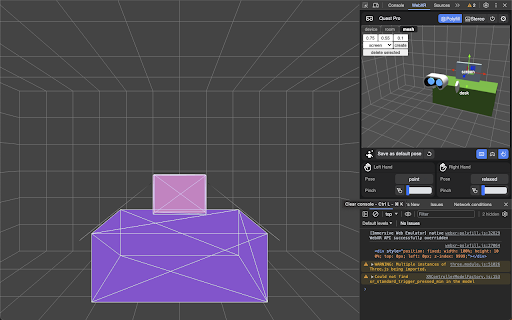
WebXR Emulator for Meta Quest devices Develop WebXR experiences efficiently and effectively on Meta Quest with Immersive Web Emulator. This browser extension provides a user-friendly interface and is capable of simulating all Meta Quest headsets, enabling developers to easily test and iterate their WebXR experiences without a physical XR device. Key Features - Interactive 3D viewport to easily transform manipulation of the VR headset and the controllers - Simulate controller input, binary input (buttons), and analog input (trigger, grip, joysticks) - Simulate hand input, including built-in hand poses and pinch gesture control - Keyboard action mapping for added efficiency - Keyboard input relay The extension is built on top of the WebExtensions API, and implements the newly introduced Chrome Extension Manifest V3, which means that it will operate with enhanced security and performance on most Chromium-based desktop browsers. - Download the extension from this page. - Navigate to a WebXR app, such as this Three.js example: https://threejs.org/examples/webxr_xr_dragging The app will detect WebXR support as if you are visiting from the specified Meta Quest device, and let you enter immersive (AR/VR) mode. - Launch the desktop browser’s developer tool panel, and navigate to the “WebXR” tab to control the emulated device.

WebXR-OpenXR Bridge
Enables WebXR applications to communicate with Leia OpenXR runtime settings WebXR-OpenXR Bridge enables immersive WebXR applications to communicate with the Leia OpenXR runtime. This extension works alongside the Leia OpenXR installation to provide advanced viewing controls for WebXR content. Key features: • Connects WebXR applications to the native Leia OpenXR runtime • Provides real-time adjustment of IPD, Parallax, Zoom, FOV. • Supports multiple projection methods for optimal viewing • Seamless integration with compatible WebXR content Requirements: This extension requires the LeiaOpenXR runtime to be installed on your system. Visit our website for installation instructions and compatible hardware information.

VRPlayer - Play Web Videos in VR / 360 Mode
Detect 360° / SBS videos on webpages and switch them to VR mode with one click. VRPlayer is an extension for playing web videos in VR. It can detect 360° / SBS videos on webpages and switch them to VR mode with one click, making it easier to open immersive video content directly from the web. It is suitable for watching 360° videos, SBS videos, and other video content that is better experienced in VR mode. Main features: Detect playable videos on webpages Switch to VR mode with one click Support 360° / SBS video playback Quickly enter an immersive viewing experience How to use: Open a webpage that contains a video When the page detects a playable video, click the extension entry Then switch to VR mode for playback

WebGPU Inspector
DevTools debugger and profiler for WebGPU — inspect objects, capture frames, edit shaders live, and analyze GPU performance. WebGPU Inspector is the extension for debugging and profiling WebGPU applications — RenderDoc-style graphics debugging, right inside Chrome DevTools. 🔍 Inspect • Browse every live WebGPU object with full details and the stack trace showing exactly where it was created. • Plot frame times and GPU object counts over time to track performance. • Texture viewer, look at individual pixel values. • Edit shaders live on the page to test and fix changes without reloading. 🖼️ Capture • Capture one or more frames with all of their commands, buffers, textures, and render pass results. • Auto-inject render and compute pass timestamp queries to measure performance and identify bottlenecks. • Debug shaders (experimental, compute only for now). Step through shader execution, watching variable values. • Save and reload captures, open in multiple tabs or windows, useful for A | B analysis. 🔵 Record • Record the commands and data for a set of frames and export a standalone HTML or binary file that reproduces the render anywhere — perfect for bug reports and regression tests. • Play back the recorded frame, with the ability to step through the commands to render up to that point. • Edit and disable commands in the recording to help investigate rendering issues.

EVRTHN Meta Quest Companion
Share any page directly to your Meta Quest browser with a single click! Share any page directly to your Meta Quest browser with a single click! With the EVRTHN Chrome plugin, you can send any page directly to your Meta Quest, Quest 2 or Quest Pro with a single click - just click "Open on Meta Quest" and a new tab will be open, which allows you to pick your device and send content to your device's browser. About us: EVRTHN.com is the search engine of XR - we index content across all the major XR platforms, bringing you all the games, events, news, worlds and content across top apps such as VRChat, RecRoom, Horizon Worlds and many more. To learn more, go to evrthn.com
