
cgeoeehlcbijkefhlmcnoahlelccfndj


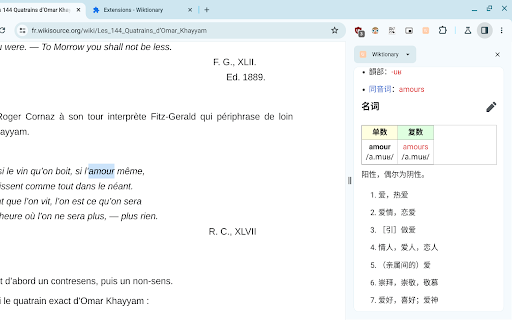
Find the definition of any word on a web page. Uses the side panel. - search on highlight - popup mode (English only) - available in 162 languages - free and open source - Open the side panel by clicking the extension icon. Note: You need to enable the Side Panel feature in Chrome. - Once the side panel is open, search Dictionary by highlighting a word. - To change the language of Dictionary, right-click the extension icon and select "Options". - Popup Mode: Highlight a word by double-clicking or dragging to see its definition(s) in a popup. Popup Mode is only available in English. Alt + P is the shortcut to enable/disable popup mode. You can change this shortcut in chrome://extensions/shortcuts Note: In PDF files, the methods above do not work. Instead, while the side panel is open, highlight a word, right-click it and select "Search on Wiktionary.org".

News Storyline
Know Thy History and Be Notified About Future A Chrome sidebar extension and companion newsletter that gives you an unbiased, context-rich timeline of any news story and quietly watches for what happens next—so you never miss a beat (or waste time scrolling). 📖 On-Demand Timelines in Your Sidebar • One-click access while you’re reading any article: hit the extension icon to slide open a concise, chronological view of past reports on that story. • Facts, not opinions: we aggregate across dozens of reputable outlets, stripping out commentary bias so you see the unvarnished sequence of events. • Top highlights only: instead of drowning you in every mention, we surface a handful of the most relevant milestones—headlines, timestamps, and sources—so you instantly understand “what led here.” 🤖 Background Story Scanning & Positive Alerts • Hands-free monitoring: once you’ve opened a timeline, our service continues scanning in the background for new developments on that very story. • Positive-only notifications: you decide what matters—receive alerts only when something significant (and positive) happens, so your inbox isn’t full of noise. • Peace of mind: no more endless manual refreshes or fear of overlooking a breaking update. 📰 Daily Newsletter & “New Developments” Bulletin • Daily digest delivered each morning: a simple roll-up of every event we tracked across your subscribed stories in the past 24 hours—no grouping, no spin. • On-demand “New Developments” email: when fresh updates arrive mid-day (for critical beats), we’ll ping you separately so you stay in the loop around the clock. 🔔 Story Subscriptions & Future Tracking • Subscribe in one click: any timeline can be turned into a “watched” story. From that moment on, we’ll keep you posted on each follow-up report. • Tailored alerts: choose your stories—finance, politics, tech, climate—and we do the rest, surfacing only the most impactful next chapters. 🔧 Platform & Integration • Chrome-based browsers supported (Chrome, Edge, Brave, Opera). • Privacy-first: minimal permissions, no tracking beyond the stories you opt in to follow. • Lightweight: sits quietly in your toolbar, loading only when you ask. Who It’s For • Journalists & analysts who need quick, neutral context before filing next headlines. • Researchers & students chasing down backstory and evolution of key events. • Curious readers who want more than a single outlet’s perspective—and zero surprises when the story moves on. Why Know Thy History? • Context at your fingertips—instantly see what happened before. • Stop missing updates—positive alerts mean you’ll always catch the next big development. • Save time & mental bandwidth—no more endless feeds or biased roundups. Install now and start each story with the past in view—and the future on your radar.

Dictionary Anytime
AI powered Dictionary Anytime is a versatile and user-friendly Chrome extension designed to help you instantly access definitions, synonyms, antonyms, and pronunciations for any word while browsing the web. No need to navigate away from the page or open a new tab—Dictionary Anytime is always there to enrich your reading and writing experience. 🔵 Instant definitions: Simply enable the Dictionary Anytime checkbox to activate the feature, and then select a word to see its definition in a tooltip. 🔵 Verbose meanings: Enable the verbose checkbox to access detailed definitions, synonyms, antonyms, and pronunciations for the selected word. 🔵 Pronunciation support: Improve your spoken language skills by learning the correct pronunciation of words alongside their definitions. 🔵 Recent tab: Keep track of the words you've looked up with a handy list of brief meanings, organized from most recent to oldest. 🔵 Easy toggling: Quickly turn on or off dictionary features to suit your browsing needs, right from the extension popup. Dictionary Anytime is perfect for students, professionals, and anyone who wants to improve their vocabulary and language skills while browsing the web. Install Dictionary Anytime today and enjoy the convenience of having a dictionary at your fingertips, anytime and anywhere.

Instant Word Definition
Click on a word to get its definition instantly, now with audio pronunciation and Google Search. Instant Word Definition & Pronunciation Unlock the power of words with our advanced Chrome extension! Instantly get definitions, phonetic spellings, and audio pronunciations for any word you highlight. Enhance your learning experience with features designed to make understanding and pronunciation easier than ever. Instant Definitions: Highlight any word on the web to get its definition instantly. Powered by reliable dictionary APIs for accurate information. Phonetic Spelling: See simplified phonetic representations of words, breaking them down into syllables with visual cues for easy learning. Audio Pronunciations: Listen to both normal and slow pronunciations of any word. Hear it in a clear, professional audio format. Interactive Pronunciation: Click to play audio and follow along with highlighted syllables to master pronunciation. Synonyms & Examples: Discover synonyms and examples to deepen your understanding of each word. Google Search Integration: Easily find more information with a “More” button linking directly to Google search results. User-Friendly Design: Clean, intuitive interface designed for quick access and easy navigation. Why Choose Us? Our extension offers a seamless way to enhance your vocabulary and pronunciation skills directly from your browser. Whether you're a student, professional, or language enthusiast, our tool provides the resources you need to improve your understanding and use of English. Highlight any word on a webpage. Click the extension icon to view the definition, phonetic spelling, and audio pronunciation. Interact with the features to listen to pronunciations and explore synonyms and examples. Perfect for: Students looking to expand their vocabulary Professionals needing quick access to word meanings and pronunciation Anyone interested in improving their language skills Download now to transform the way you interact with text online!

Double Click Dictionary
Checking the lexical item on any websites using double click A dictionary that works on any website. Simply double click to fetch the meaning, pronunciation. It currently supports 5 in 1 dictionaries including English - Vietnamese, English - English, Collocation Dictionary, Basic Dictionary and Thesaurus.
