
mhodfiapdkckpndblmmajncefllgpcjm

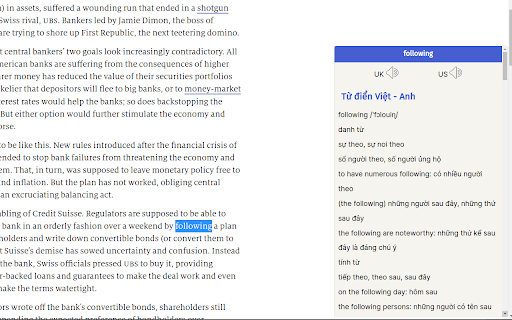
Checking the lexical item on any websites using double click A dictionary that works on any website. Simply double click to fetch the meaning, pronunciation. It currently supports 5 in 1 dictionaries including English - Vietnamese, English - English, Collocation Dictionary, Basic Dictionary and Thesaurus.

Instant Multilingual PDF/HTML/TXT Dictionary
Define word(s) on PDF/HTML/TXT pages in just two clicks, even on local docs. Now with ChatGPT support. 🔍 Enhance your reading experience with our extension. Easily obtain definitions by selecting a word or phrase. Click the floating icon, use the Alt+Shift+Z shortcut, or right-click to choose 'Define [your selected word(s)]'. 🆕 Now with robust PDF support: If tooltips cannot be shown in PDFs, the extension automatically opens a popup window for definitions, ensuring a seamless experience even in Chrome's built-in PDF viewer. 🔑 Key Options: - 🎛️ Customize Shortcuts: Tailor a shortcut that complements your workflow. - 📚 Definition Providers: Choose your primary definition provider. We now feature the versatile ChatGPT, supporting languages including Arabic, Brazilian Portuguese, Bulgarian, Chinese (Simplified), Chinese (Traditional), Czech, Danish, Dutch, English (UK/US), Finnish, French, German, Greek, Hebrew, Hindi, Hungarian, Indonesian, Italian, Japanese, Korean, Norwegian, Polish, Portuguese, Romanian, Russian, Slovak, Spanish, Swedish, Thai, Turkish, Ukrainian, and Vietnamese. - 🖼️ Popup Window Configuration: Personalize the popup window's appearance and functionality. - 🔗 Web Search Link: Easily access extended information with a 'Search the web' link. - 💡 ChatGPT Backup: Utilize ChatGPT as an additional source for definitions (register at chatgpt.com if required). 🌟 Special Feature: Enable word pronunciation on Content Security Policy (CSP) protected pages like github.com with our 'CSP Page Pronunciation' option. This feature is initially disabled 🔒 and can be activated based on site policies. ⚠️ Note: Our extension is compatible with native PDF formats (including Chrome's built-in PDF viewer) and now automatically falls back to a popup window if tooltips cannot be displayed. Protected or scanned documents are not supported. For local document access, enable the 'Allow access to file URLs' option on the chrome://extensions page. 📃 Changelog Highlights: -- 📜 Version 2.4.0: Added Search History functionality to easily view and retrieve your past definitions. -- 🎯 Version 2.3.0: Added Selection Icon for instant translation, increased popup font size for better readability, and improved overall reliability. -- 🪟 Version 2.2.146: Enhanced popup window system with keyboard shortcut support for recursive lookups within definitions, resizable fallback windows with position memory across sessions, and improved reliability with context menu duplicate error fix. -- 🔧 Version 2.1.142: Enhanced code quality and user support experience. Fixed tooltip reuse logic to prevent stale "thinking..." text, improved tooltip visibility on complex pages, added direct support hub link in Options for faster issue resolution, and modernized keyboard event handling. -- 🚀 Version 2.0.140: Major update! PDF support is now robust—when tooltips cannot be rendered (e.g., in Chrome's PDF viewer), the extension automatically opens a popup window for definitions. Popup window creation and positioning have been overhauled for reliability and user experience.

Instant Word Definition
Click on a word to get its definition instantly, now with audio pronunciation and Google Search. Instant Word Definition & Pronunciation Unlock the power of words with our advanced Chrome extension! Instantly get definitions, phonetic spellings, and audio pronunciations for any word you highlight. Enhance your learning experience with features designed to make understanding and pronunciation easier than ever. Instant Definitions: Highlight any word on the web to get its definition instantly. Powered by reliable dictionary APIs for accurate information. Phonetic Spelling: See simplified phonetic representations of words, breaking them down into syllables with visual cues for easy learning. Audio Pronunciations: Listen to both normal and slow pronunciations of any word. Hear it in a clear, professional audio format. Interactive Pronunciation: Click to play audio and follow along with highlighted syllables to master pronunciation. Synonyms & Examples: Discover synonyms and examples to deepen your understanding of each word. Google Search Integration: Easily find more information with a “More” button linking directly to Google search results. User-Friendly Design: Clean, intuitive interface designed for quick access and easy navigation. Why Choose Us? Our extension offers a seamless way to enhance your vocabulary and pronunciation skills directly from your browser. Whether you're a student, professional, or language enthusiast, our tool provides the resources you need to improve your understanding and use of English. Highlight any word on a webpage. Click the extension icon to view the definition, phonetic spelling, and audio pronunciation. Interact with the features to listen to pronunciations and explore synonyms and examples. Perfect for: Students looking to expand their vocabulary Professionals needing quick access to word meanings and pronunciation Anyone interested in improving their language skills Download now to transform the way you interact with text online!

Double Click Translate - Instant Translation, Dictionary & PDF Support
Improve speed in reading foreign language with over 100+ languages. Just double-click. Dictionary, PDF translate and more Easy translate website content with just double click! 🚀 Features ❤️ Double click to translate ❤️ Transform PDF file to translatable when open local PDF file by Chrome ⭐️ Transtate for subtitle YouTube™, Edx Course ⭐️ Text to Speech ⭐️ Switch to 4 themes ⭐️ Support almost popular language (100+) in the world ⭐️ Compatible for almost news website: Reddit, Yahoo News, MSN, CNN,... Made with ❤️ by Franky Giap

Dictionary
Select a word on the webpage and open popup to instantly look up in the dictionary It is unconventional to always open a new tab to lookup for a word's meaning while you are reading your favorite blog or when you are simply browsing and you come across a word you want to know about. This extension is here to rescue. Select a word you want to look at and click on the extension button at the top and a beautiful popup will appear with the word definition and example. Isn't this cool and conventional? Install this extension and find word definitions on the go. [Open Source]
