
cfppnjkmonaidnemfamopfflbcnecfco

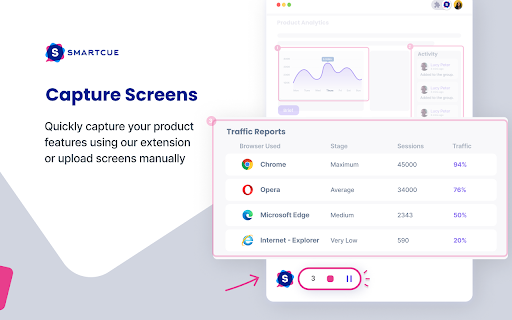

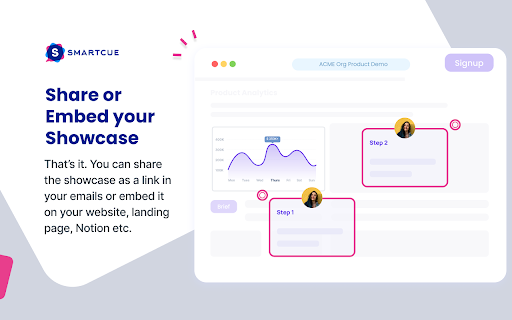

Interactive, no-code demo builder & powerful analytics for high-performance GTM teams SmartCue helps go-to-market teams create & distribute interactive showcase of their products that can help them improve the quality of their MQLs. We help marketers improve the quality of their leads by eliminating the friction for their buyers to experience their products right at the beginning of the buyer’s journey thereby shortening the sales motion and ultimately, increasing revenue. Revenue & GTM teams use SmartCue for the following: - Embed interactive demos on websites, landing pages and marketing collateral - Replace pdfs and videos as ‘leave-behinds’ with self-serve, interactive product showcase - Increase product adoption & usage by creating interactive showcases of newly launched features and modules Customer Success, L&D and Onboarding teams also use SmartCue to rapidly train and onboard both internal & external stakeholders. With SmartCue’s interactive, self-serve product showcases, qualify leads better and faster, resulting in a shortened sales motion and increase in revenue.

Inksprout - AI Social Media Writer
Compose a clear, trustworthy caption in social media link sharing with Inksprout's AI writing assistant. We'll seed your "create post" with the article summarization. You are free to edit the summarized text. Add a personal message. You will increase engagement with a clear description in your linked post. Provide value and gain more followers. Sharing your blog post has never been easier. Never miss the last opportunity to bring traffic to your site. Support schedulers such as Hootsuite, SocialBee, and Publer as well as native platforms like LinkedIn.

Stepsy: create step-by-step guide with screenshots
Struggle to describe your every step with screenshots in the browser manually? Welcome to Stepsy, your free AI-powered go-to solution for generating powerful, yet easy-to-understand step-by-step guides, SOPs, process tasks, or manuals, and sharing them with your colleagues and customers. Our software features have been proven to deliver exceptional results. With our intuitive interface and robust functionality, you can streamline your processes and achieve greater efficiency. Stepsy is free to use, along with Personal and Team plans to fit any team's needs. BENEFITS OF USING STEPSY: 📈 Increase data processing efficiency 📊 Improve workflow documentation accuracy ⚙️Ensure consistency across instructions ⏳ Save time of tedious work for each guide 🎯 Simplify the training and onboarding process STEPSY’S FEATURES: 📸Record your steps with screenshots on clicks: Just do your work, and we will automatically capture the screenshots with auto-generated descriptions. ✨Customize your screenshots: No need for other tools, we have a built-in image editor. ⚙️AI-tuned step descriptions and document summaries: Eliminate the need for manual repetitive text input, let us care about it. 📥Export and share via GDrive: Your guide quickly becomes shareable online via your own GDrive. 🔐Keep your screenshots safe: Your screenshots never leave YOUR space. Everything happens in YOUR browser and then gets exported directly to YOUR GDrive or YOUR local workstation. HOW TO USE STEPSY: Step 1. Get started Begin by downloading our extension for free. Step 2. Capture the process Navigate to the website you want to document. Then, open the Stepsy icon in your Chrome toolbar and click the “Record a Guide” icon to initiate the process. Once you've captured your process, you can edit and customize it with a built-in toolset. Step 3. Publish your results Simply click the “Finish and share” button and publish it as a Google Docs document directly to your Google Drive. WHO'S STEPSY FOR WHAT YOU CAN CREATE WITH STEPSY ✔️ Any documentation you need! What used to take hours, now takes seconds with our free step-by-step guide creator — empowering you and your team's productivity as well as allowing you all to focus on what truly matters: innovation and growth.

Stacks - Web Clipper and AI Assistant
The fastest way to save links, notes, and files with AI-powered recall. Instead of dumping content into endless folders or tabs, Stacks lets you save with context. It connects the dots across your browsing - helping you remember why you saved something, surface it at the right time, and organize without effort. ✨ Key features: - One-click save for links, text, notes, screenshots & more - AI-powered recall to find what you forgot - Smart suggestions as you browse - Collections to organize your thinking - Private by default, built for creators and curious minds Whether you're researching, planning, learning, or building - Stacks is your second brain in the browser. Here's everything Stacks can do for you: ✨ One-Click Saving - Save any webpage, article, video, or document instantly - Support for YouTube, LinkedIn, Twitter, and more - Quick keyboard shortcut (Ctrl/Cmd + K) 🔍 Smart Search & Discovery - Get personalized recommendations in Google search results - Find your saved content when you need it most - Search across all your bookmarks instantly 🤖 AI-Powered Organization - Automatic categorization of saved content - Smart collections based on topics and themes - Custom folders and tags for personal organization 💼 Professional Features - Create shareable collections - Collaborate with team members - Build a searchable knowledge base - Access from any device or browser Perfect for: - Researchers & Students - Professionals & Teams - Content Creators - Digital Collectors ⚡️ Install Stacks now and transform how you save and find online content.

UtilEngine: Launcher for your browser
UtilEngine is your shortcut for everthing browser related with a collection of productivity tools. UtilEngine gives you all the tools you need to help boost productivity around work. It never uploads your data, streamlines your workflow, and makes you more productive than ever. It’s designed by developers, for developers. ⚒️ Tools- Random String Lorem Ipsum Generator JSON Parser ChatGPT Interface Backslash Escape/Unescape ...much more You can find all the tools here- https://utilengine.com/tools If you haven't bought this extension, you can buy it here - https://utilengine.com. 💡 Bug Report and Suggestions To report a bug or for a feature request, you can send an e-mail to hello@utilengine.com.
