
cfnpidifppmenkapgihekkeednfoenal
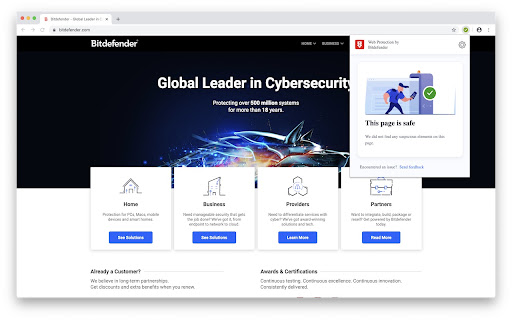


Bitdefender TrafficLight adds a strong and non-intrusive layer of security to your browsing experience. TrafficLight is taking the security-while-browsing concept where it belongs: in the browser. This extension will add a strong layer of security over your browsing experience without inducing speed penalties or system resource consumption. Part of the processing is done in the cloud with some intelligent small engines that make various checks on pages you're visiting enabling you to have top notch antiphishing and antimalware protection. Real Time: TrafficLight scans the pages you visit for malware and phishing attempts, malvertising and other on-line threats each and every time you access them to avoid the threat of legitimate but recently compromised websites. Precise: TrafficLight won't block an entire website if just some pages within are malicious. Only the potentially harmful elements are blocked, leaving you free to view the rest of the site if you so choose. Unintrusive: TrafficLight does not add a toolbar to your already-cluttered browser interface. Its interface remains invisible until your input is needed or it's called up with a simple mouse gesture. Search Results: TrafficLight flags malware and fraudulent websites in search results. Subscription Agreement: https://www.bitdefender.com/en-us/site/view/subscription-agreement-and-terms-of-services-for-home-user-solutions

Bitdefender SecurePass
Vault-like protection for passwords and sensitive data across all your devices. Stay safe online with Bitdefender SecurePass, the top-tier password manager built for those who take security seriously. Powered by advanced end-to-end encryption technology, SecurePass protects your passwords, credit card details, and sensitive information across all your devices. Whether you manage hundreds of accounts or just a few, SecurePass takes the hassle out of remembering passwords and gives you vault-like security. 🔐Complete Protection : Secure your passwords and sensitive data with end-to-end encryption, keeping your online accounts and personal information completely private. 🛡️Password Generator & Strength Advisor: Create strong, complex passwords with just one click. Use the built-in advisor to check if any of your existing passwords are weak or require attention. 📲Multi-platform Synchronization: Save and sync your passwords across multiple platforms, including , iOS, Windows, macOS, and all major browsers like Chrome, Firefox, Safari, and Edge. Access your password manager vault anytime, anywhere. 🔑Master Password Convenience: Manage all your accounts with just one Master Password. SecurePass eliminates the need to remember dozens of login details by centralizing everything in one secure password manager. 💳Secure Credit Card Management: Protect your payment details for online shopping. Autofill your credit card information on websites safely, knowing that your sensitive data is encrypted and stored locally on your device. 🖥️Easy Import/Export: Transitioning from another password manager? SecurePass makes it easy to import your data from 1Password, Dashlane, LastPass, Chrome, Firefox, and more. Supported file formats include JSON, CSV, and XML. 👥Share Passwords Safely: Need to share passwords with family or colleagues? Use SecurePass to share credentials securely, thanks to encrypted password sharing. 🔔Password Leak Alerts: SecurePass constantly monitors data breaches to alert you if any of your credentials are exposed, giving you a chance to update your passwords before it’s too late. • Two-Factor Authentication: Add an extra layer of security to your password vault. • Secure Notes: Store sensitive information like documents, personal notes, or PIN codes with color-coded organization. • Identities Management: Manage multiple online identities with ease, autofilling your details for fast form completion. • Auto-Lock & Secure Me Feature: Automatically log out or lock your vault after inactivity or on shared devices. • Face & Fingerprint Unlock: Quickly access your vault with biometric authentication on supported devices. Why Choose Bitdefender SecurePass? Bitdefender SecurePass is designed for users who value privacy and need top-tier protection for their online identities. As a powerful and intuitive password manager, SecurePass offers a seamless way to manage your digital life without compromising on security. Whether you’re shopping online, managing work accounts, or simply keeping track of personal passwords, SecurePass has your back!

Sophos Chrome Security
This is the Sophos Mobile client for Chrome devices. NOTE: Use of this extension is subject to the Sophos End User License Agreement (License Agreement) accessible at https://www.sophos.com/en-us/legal/sophos-end-user-license-agreement.aspx. By installing or using this extension, you agree to the terms and conditions of the License Agreement. You also acknowledge that Sophos processes personal data in accordance with the Sophos Privacy Policy accessible at https://www.sophos.com/en-us/legal/sophos-group-privacy-policy.aspx. Sophos Mobile is a Unified Endpoint Management (UEM) solution that allows companies to easily manage, control and secure Android, iOS, macOS, Windows 10 and Chrome devices (like Chromebooks) from a single web console. The Sophos Chrome Security extension allows you to enroll your Chrome device with Sophos Mobile. FEATURES Your organization can do the following: • Use Web Filtering to block web pages with malicious, undesirable or illegal content. • Find the device. • Send a message to the device. Web Filtering uses up-to-the-minute intelligence from SophosLabs. Your device is secured even when you’re not connected to your organization’s network. Sophos Chrome Security requires a Mobile Advanced or an Intercept X for Mobile license. For more information, visit https://www.sophos.com/mobile MANUAL ENROLLMENT 1. Sign in to Chrome with your corporate Google account. 2. Open Sophos Chrome Security in the Chrome Web Store and add it to Chrome. 3. Select the Sophos button in the Chrome toolbar. 4. Select “Enroll” and then enter the enrollment token. AUTO-ENROLLMENT If your organization uses G Suite, they can configure Sophos Chrome Security to automatically enroll with Sophos Mobile.

Extensity
Tired of having too many extensions in your toolbar? Try Extensity, the ultimate tool for lightning fast enabling and disabling all your extensions for Google Chrome. Just enable the extension when you want to use it, and disable when you want to get rid of it for a little while. You can also launch Chrome Apps right from the list. * Keep your browser lean and fast - disable extensions that you won't use right away. * Keep your toolbar clean. * Turn all extensions off (and back on) with a single click. * Quick switch between several extensions groups using the Profiles feature. * Allow your most important extensions to be always enabled. * Keep computers in sync with Chrome Cloud Storage support. * Ideal companion for extensions collectors.

IP Domain Country Flag
Shows country flag and other IP / domain information in the location bar. This extension shows a country flag for the current website's server. The tooltip shows city, region and country name. The popup shows more information about the domain. Details are Provider, Alexa and Domain ranking. The design of the popup is simple and clean. To protect your privacy, we only send the domain name to our database. IP Domain Country Flag - Shows country flag and other IP and Domain information in the location bar.
