
cfidkbgamfhdgmedldkagjopnbobdmdn


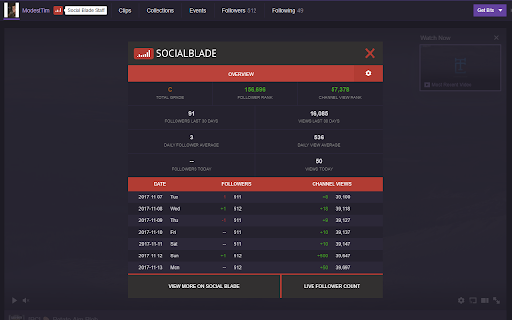
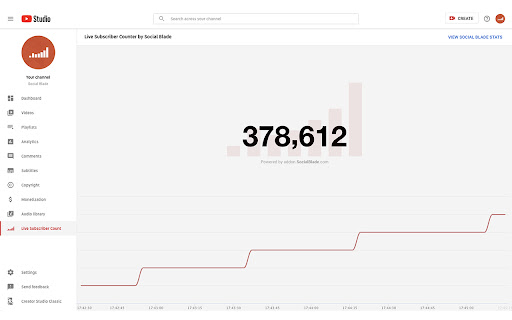
See the best of Social Blade Stats right on YouTube, TwitchTV *** July 2025 UPDATE *** We wanted to provide an update to everyone waiting for this to work again. Rest assured the Chrome extension is on the top of our priority list, but does require a number of things to be completed behind the scenes before we can relaunch this. Not only did a number of things in Chrome change (V2 manifest going away for example) but with the launch of our new website our backend is different now as well. Our goal is to have a completely new from the ground up browser extension by the end of the year. We thank everyone for bearing with us and know we want this back up as much as you do. *** *** AUGUST 2024 UPDATE *** As of Chrome version 127, the YouTube functionality of this extension is no longer operational due to Google removing a core feature it relied upon. In the coming months, the Social Blade team will be completely redesigning this extension to be compatible with the new features in Chrome 127 and future versions. By keeping this extension installed, you will receive an automatic update once the new version is available. We apologize for the inconvenience and appreciate your patience as we work to restore functionality soon! *** Adds a box to the right of the video you're watching on YouTube (and other platforms) showing the most important statistics from Social Blade about the channel. YouTube Statistics Include: ► Channel Grade (quickly judge if the channel is average or top of the class) ► Subscriber & View Rank ► Estimated Monthly Earnings for the channel ► Subscribers & Views in the past 30 days (includes % growth) ► Average daily subs & views ► Subs & views gained today ► Tags video uses Also provides an easy link to view the channel on Social Blade as well as a way to view the Live Sub Count on Social Blade

TimeTags for YouTube
Create YouTube time tags with simple keyboard shortcuts TimeTags for Youtube is a tool designed to simplify the task of tagging specific moments in YouTube videos. Say goodbye to manually writing timestamps in a separate text editor. With yt-timetag, you can conveniently add and adjust tags within the YouTube interface using your keyboard. The extension provides precise and accurate timestamps, enhancing your experience when tagging longer videos. Browse to any YouTube video, click the icon of the extension in browser bar to activate it. - [delete, backspace] remove tag (affects active tag) - [left] backward 5 seconds (affects active tag) - [alt+left] backward 1 second (affects active tag) - [right] forward 5 seconds (affects active tag) - [alt+right] forward 1 second (affects active tag) - [space] play/pause - [a] add a tag at current time - [d] edit the description of active tag - [esc] cancel active tag Shortcuts won't work when YouTube's bulit-in shortcuts is active (which means your focus is currently on the video element). - Fix: Icons color for YouTube dark mode - Fix: mouse wheel behavior in tag/comment list - Add "Trash" tab for temporarily holding removed tags - Add options page - Explorer - Custom shortcuts - Data import/export - Standalone Explorer is also available at https://cloud.pymaster.tw/yt-timetag-explorer/ - Remove unnecessary site `permissions` specified for Firefox support in Chrome build - Add `chrome.storage.local` as primary storage option - "Sync" feature of Chrome - Now syncs recently updated 100 videos only - Compress `chrome.storage.sync` data to better utilize the quota (100kB max) - Store video id, video title information for upcoming features - Export in Markdown format - CommentList UI: add time tags in comments to your collection ## 1.2.0 - Remove "tabs" permission - Default to sync storage of Chrome - Add shortcut for "remove" - Update for new YouTube design component change ## 1.1.0 - Support new YouTube design - Tag list will become scrollable when it feels overwhemled - Add keyboard shortcut `d` for editing active tag description, due to `/` is already used by the new YouTube

VISO for Chrome
VISO for Chrome gives you automated and intelligent optimization tips while you edit & upload on YouTube Improve your YouTube video titles, descriptions, and tags on the fly with VISO as your co-pilot. Accompanying this is a state of the art Image Editor; choose backgrounds, add text and position graphics to customize to your heart's content. VISO gives you everything you need to grow your audience! Note: You must be partnered with BBTV or an associated network to use this extension.

Nexlev YouTube Research & Analytics
An extension that turns your YouTube into a tool for creators. Its packed with features that can speed up your content creation process significantly. As well as help you come up with better video ideas, and manage your channels better. + Find similar channels in a niche & see their statistics + See shorts channel analytics in the shorts feed + Combine multiple channels' analytics into one overview & dashboard + View advanced metrics like average views, subscriber counts, outliers, views per hour, & more + Preview thumbnails + Take beautiful screenshots of videos to share online + Advanced filter tools for search, home page, and subscription feed (e.g., filter search by dates, view counts, channel subscriber counts & more) + Take screenshots of frames inside videos + Download thumbnails + Easily copy and paste transcriptions + Analyze comment section sentiments with a single click + Calculate your net profit inside your channel's dashboard + See channel's average views & audience demographic data + Check monetization status for channels + & many more! Note: Monetization status checks and audience saturation scores are estimations and, although very accurate, are not 100% precise. There are some cases and channels where they might not function as expected. If you think it gives wrong results for particular channels, please reach contact@nexlev.io for feedback. We are happy to improve accuracy for particular cases!

YouTube Monetization & RPM Checker by TubeLab
Adds an icon to YouTube's UI informing if the channel, video or short is monetized. Adds RPM estimations for channels & videos. Adds Revenue estimations for videos. How does the monetization checker work? - It checks that the channel or video has traces of a monetized content such as: videos with custom ads, enough subscribers and sponsored content, and more. How does the RPM & Revenue prediction work? The extension matches the video title with a source of 100+ RPM Estimations. Then the the RPM is calculated based on that niche RPM, the video duration and audience. The revenue is the RPM*Views / 1000. This is by far the most accurate YouTube revenue prediction available! Notes: - This does NOT check monetization with 100% accuracy. - Revenue estimation is NOT 100% accurate. - Shorts only channels are less accurate but should work. - Sometimes it will require a page refresh due to YouTube's UI layout shifts. - Best results for english based content & with YouTube english UI. If you see any issues please contact@tubelab.net. 1.5.0 Updates: - New Features Onboarding page for initial setup and local model warmup with visible progress - Bug Fixes Improved sponsor detection for monetization analysis Monetization badge now shows “Sponsored” when appropriate - Improvements Better progress feedback and graceful handling on unsupported devices Adjusted badge spacing and dark-mode styling 1.4.8 Updates: - Fixed multi-language support for Deutch, French, Italian & Others.
